0. 作品介紹
1. AI 提示詞
把這段指令貼給 AI,讓它幫你生成程式碼。
我有一個Google試算表
欄位是:A(年)、B(班)、C(座號)、D(姓名)、E(性別)
我想要建立多個系統
首先建立 【輪盤抽籤系統】
操作步驟與需求說明
【
1.下拉式選單選取年級、班級。
3.輪盤方式把全班顯示出來(每一個切割範圍要彩色顯示)。
4.點選開始抽籤,輪盤開始旋轉,要有加速、減速的效果,停止後把抽到的學生資料,以卡片的方式顯示在畫面上的一個區塊(中簽區)。
5.被抽到的學生,就從輪盤中移除。
6.重複步驟三,就表示連續抽籤。
7.在中簽區中設置一個按鈕(清除中簽結果),點選後,清除中簽區,恢復全班的輪盤。
8.我希望的風格是校園、活潑、青春。
】
要把它變成程式碼我要發佈
請完整敘述操作步驟 越詳細越好
作業環境
Google試算表
Google Apps Script
我看不懂程式碼,請給我後端gs完整程式碼、前端index完整程式碼
欄位是:A(年)、B(班)、C(座號)、D(姓名)、E(性別)
我想要建立多個系統
首先建立 【輪盤抽籤系統】
操作步驟與需求說明
【
1.下拉式選單選取年級、班級。
3.輪盤方式把全班顯示出來(每一個切割範圍要彩色顯示)。
4.點選開始抽籤,輪盤開始旋轉,要有加速、減速的效果,停止後把抽到的學生資料,以卡片的方式顯示在畫面上的一個區塊(中簽區)。
5.被抽到的學生,就從輪盤中移除。
6.重複步驟三,就表示連續抽籤。
7.在中簽區中設置一個按鈕(清除中簽結果),點選後,清除中簽區,恢復全班的輪盤。
8.我希望的風格是校園、活潑、青春。
】
要把它變成程式碼我要發佈
請完整敘述操作步驟 越詳細越好
作業環境
Google試算表
Google Apps Script
我看不懂程式碼,請給我後端gs完整程式碼、前端index完整程式碼
2. 資料表規則
請照下面規則建立分頁與欄位。
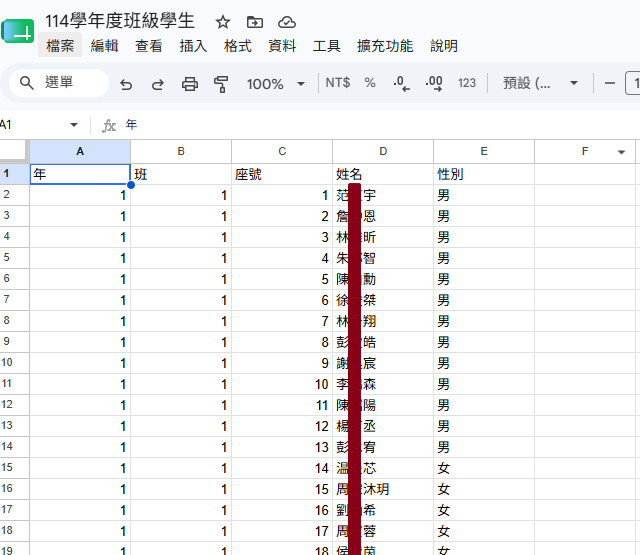
第1分頁: 工作表1
A 欄: 年
B 欄: 班
C 欄: 座號
D 欄: 姓名
E 欄: 性別
📄 解析結果(自動表格)
分頁:工作表1
| A 欄 | B 欄 | C 欄 | D 欄 | E 欄 |
|---|---|---|---|---|
| 年 | 班 | 座號 | 姓名 | 性別 |
3. 開啟 Apps Script
從試算表開 Apps Script,才能直接用 SpreadsheetApp 讀寫資料。
- 試算表上方選單:擴充功能 → Apps Script
- 刪掉預設的程式碼(或全部選取覆蓋)
-
保留/建立檔案:
- Code.gs
- index.html
4. 貼上後端(Code.gs)
把後端程式貼到 Apps Script 的 Code.gs。
function doGet() {
  return HtmlService.createHtmlOutputFromFile('index')
      .setTitle('✨ 青春校園輪盤抽籤系統 ✨')
      .addMetaTag('viewport', 'width=device-width, initial-scale=1')
      .setXFrameOptionsMode(HtmlService.XFrameOptionsMode.ALLOWALL);
}

// 取得年級與班級清單供下拉選單使用
function getDropdownData() {
  const sheet = SpreadsheetApp.getActiveSpreadsheet().getActiveSheet();
  const data = sheet.getDataRange().getValues();
  const years = new Set();
  const classesByYear = {};

  // 從索引 1 開始,跳過第一列的標題
  for (let i = 1; i < data.length; i++) {
    const year = data[i][0];
    const cls = data[i][1];
    if (year && cls) {
      years.add(year);
      if (!classesByYear[year]) {
        classesByYear[year] = new Set();
      }
      classesByYear[year].add(cls);
    }
  }

  const result = {
    years: Array.from(years).sort(),
    classesByYear: {}
  };
  for (let y in classesByYear) {
    result.classesByYear[y] = Array.from(classesByYear[y]).sort();
  }
  return result;
}

// 根據選取的年級與班級,取得該班所有學生
function getStudents(year, cls) {
  const sheet = SpreadsheetApp.getActiveSpreadsheet().getActiveSheet();
  const data = sheet.getDataRange().getValues();
  const students = [];

  for (let i = 1; i < data.length; i++) {
    if (data[i][0] == year && data[i][1] == cls) {
      students.push({
        seat: data[i][2],
        name: data[i][3],
        gender: data[i][4]
      });
    }
  }
  return students;
}
貼到 Apps Script 的 Code.gs 檔案
5. 貼上前端(index.html)
把前端程式貼到 Apps Script 的 index.html。
<!DOCTYPE html>
<html>
<head>
  <base target="_top">
  <link href="https://fonts.googleapis.com/css2?family=Noto+Sans+TC:wght@400;700&family=Nunito:wght@700&display=swap" rel="stylesheet">
  <style>
    :root {
      --primary: #FF8BA7;
      --secondary: #FFC6C7;
      --bg: #FAEEE7;
      --text: #33272A;
      --card-bg: #FFFFFF;
    }
    body {
      font-family: 'Nunito', 'Noto Sans TC', sans-serif;
      background-color: var(--bg);
      background-image: radial-gradient(#FFC6C7 1px, transparent 1px);
      background-size: 20px 20px;
      color: var(--text);
      margin: 0;
      padding: 20px;
      display: flex;
      flex-direction: column;
      align-items: center;
    }
    h1 {
      color: var(--primary);
      text-shadow: 2px 2px 0px #FFF;
      font-size: 2.5em;
      margin-bottom: 20px;
    }
    .control-panel {
      background: var(--card-bg);
      padding: 15px 30px;
      border-radius: 30px;
      box-shadow: 0 8px 15px rgba(255,139,167,0.2);
      margin-bottom: 30px;
      display: flex;
      gap: 15px;
      align-items: center;
    }
    select {
      padding: 10px 15px;
      border: 2px solid var(--secondary);
      border-radius: 15px;
      font-size: 1em;
      font-family: inherit;
      outline: none;
      cursor: pointer;
    }
    select:focus {
      border-color: var(--primary);
    }
    .main-container {
      display: flex;
      gap: 40px;
      width: 100%;
      max-width: 1000px;
      justify-content: center;
      flex-wrap: wrap;
    }
    .wheel-section {
      display: flex;
      flex-direction: column;
      align-items: center;
      position: relative;
    }
    canvas {
      filter: drop-shadow(0 10px 15px rgba(0,0,0,0.1));
    }
    .btn {
      margin-top: 20px;
      padding: 15px 40px;
      font-size: 1.2em;
      font-weight: bold;
      color: white;
      background: linear-gradient(45deg, #FF8BA7, #FF99AA);
      border: none;
      border-radius: 25px;
      cursor: pointer;
      box-shadow: 0 5px 15px rgba(255,139,167,0.4);
      transition: transform 0.1s, box-shadow 0.1s;
    }
    .btn:active {
      transform: translateY(3px);
      box-shadow: 0 2px 5px rgba(255,139,167,0.4);
    }
    .btn:disabled {
      background: #ccc;
      cursor: not-allowed;
      box-shadow: none;
    }
    .result-section {
      background: var(--card-bg);
      padding: 20px;
      border-radius: 20px;
      box-shadow: 0 10px 25px rgba(0,0,0,0.05);
      min-width: 300px;
      display: flex;
      flex-direction: column;
    }
    .result-header {
      display: flex;
      justify-content: space-between;
      align-items: center;
      border-bottom: 2px dashed var(--secondary);
      padding-bottom: 10px;
      margin-bottom: 15px;
    }
    .result-header h2 {
      margin: 0;
      color: var(--primary);
    }
    .btn-clear {
      background: #A0C4FF;
      padding: 8px 15px;
      border: none;
      border-radius: 15px;
      color: white;
      cursor: pointer;
      font-weight: bold;
    }
    .cards-container {
      display: flex;
      flex-direction: column;
      gap: 10px;
      max-height: 400px;
      overflow-y: auto;
      padding-right: 5px;
    }
    .student-card {
      display: flex;
      align-items: center;
      background: #FDFFB6;
      padding: 15px;
      border-radius: 15px;
      box-shadow: 0 4px 6px rgba(0,0,0,0.05);
      animation: popIn 0.3s cubic-bezier(0.175, 0.885, 0.32, 1.275);
    }
    .student-card.boy { background: #E4F1EE; border-left: 5px solid #9BF6FF; }
    .student-card.girl { background: #FFF0F3; border-left: 5px solid #FFADAD; }
    .seat-no {
      font-size: 1.5em;
      font-weight: bold;
      color: var(--primary);
      margin-right: 15px;
      min-width: 40px;
    }
    .student-info {
      flex-grow: 1;
    }
    .student-name {
      font-size: 1.2em;
      font-weight: bold;
    }

    @keyframes popIn {
      0% { transform: scale(0.8); opacity: 0; }
      100% { transform: scale(1); opacity: 1; }
    }
  </style>
</head>
<body>

  <h1>🎒 青春校園抽籤系統 🎒</h1>

  <div class="control-panel">
    <select id="yearSelect" onchange="updateClasses()">
      <option value="">請選擇年級</option>
    </select>
    <select id="classSelect" onchange="loadStudents()">
      <option value="">請選擇班級</option>
    </select>
  </div>

  <div class="main-container">
    <div class="wheel-section">
      <canvas id="wheelCanvas" width="500" height="500"></canvas>
      <button class="btn" id="spinBtn" onclick="spin()">🎉 開始抽籤 🎉</button>
    </div>

    <div class="result-section">
      <div class="result-header">
        <h2>中籤區 🏆</h2>
        <button class="btn-clear" onclick="resetSystem()">重新來過</button>
      </div>
      <div class="cards-container" id="drawnArea">
        </div>
    </div>
  </div>

  <script>
    let appData = {};
    let originalStudents = [];
    let currentStudents = [];

    // 青春活潑的色彩盤
    const colors = ['#FFADAD', '#FFD6A5', '#FDFFB6', '#CAFFBF', '#9BF6FF', '#A0C4FF', '#BDB2FF', '#FFC6FF', '#FFFFFC'];

    let canvas, ctx;
    let currentAngle = 0;
    let isSpinning = false;
    let isWaiting = false; // 控制等待三秒的狀態
    let spinVelocity = 0;
    let lastWinnerIndex = -1; // 用來判斷是否經過新的扇形

    // 音效處理核心 (Web Audio API)
    let audioCtx;

    // 播放「噠噠噠」的指針聲
    function playTickSound() {
      if (!audioCtx) return;
      const osc = audioCtx.createOscillator();
      const gainNode = audioCtx.createGain();
      osc.connect(gainNode);
      gainNode.connect(audioCtx.destination);
      osc.type = 'triangle';
      osc.frequency.setValueAtTime(600, audioCtx.currentTime);
      gainNode.gain.setValueAtTime(0.1, audioCtx.currentTime);
      gainNode.gain.exponentialRampToValueAtTime(0.001, audioCtx.currentTime + 0.05);
      osc.start(audioCtx.currentTime);
      osc.stop(audioCtx.currentTime + 0.05);
    }

    // 播放「登登登登」的中籤音效
    function playWinSound() {
      if (!audioCtx) return;
      const notes = [440, 554.37, 659.25, 880]; // A4, C#5, E5, A5 大調和弦
      let startTime = audioCtx.currentTime;
      notes.forEach((freq, i) => {
        const osc = audioCtx.createOscillator();
        const gainNode = audioCtx.createGain();
        osc.connect(gainNode);
        gainNode.connect(audioCtx.destination);
        osc.type = 'sine';
        osc.frequency.value = freq;
        gainNode.gain.setValueAtTime(0, startTime + i * 0.1);
        gainNode.gain.linearRampToValueAtTime(0.3, startTime + i * 0.1 + 0.05);
        gainNode.gain.linearRampToValueAtTime(0, startTime + i * 0.1 + 0.3);
        osc.start(startTime + i * 0.1);
        osc.stop(startTime + i * 0.1 + 0.3);
      });
    }

    window.onload = function() {
      canvas = document.getElementById('wheelCanvas');
      ctx = canvas.getContext('2d');
      drawEmptyWheel();

      google.script.run.withSuccessHandler(function(data) {
        appData = data;
        const yearSelect = document.getElementById('yearSelect');
        data.years.forEach(year => {
          let opt = document.createElement('option');
          opt.value = year;
          opt.innerText = year + ' 年級';
          yearSelect.appendChild(opt);
        });
      }).getDropdownData();
    };

    function updateClasses() {
      if (isSpinning || isWaiting) return;
      const year = document.getElementById('yearSelect').value;
      const classSelect = document.getElementById('classSelect');
      classSelect.innerHTML = '<option value="">請選擇班級</option>';

      if(year && appData.classesByYear[year]) {
        appData.classesByYear[year].forEach(cls => {
          let opt = document.createElement('option');
          opt.value = cls;
          opt.innerText = cls + ' 班';
          classSelect.appendChild(opt);
        });
      }
      clearAll();
    }

    function loadStudents() {
      if (isSpinning || isWaiting) return;
      const year = document.getElementById('yearSelect').value;
      const cls = document.getElementById('classSelect').value;
      if(year && cls) {
        google.script.run.withSuccessHandler(function(data) {
          originalStudents = [...data];
          currentStudents = [...data];
          currentAngle = 0;
          document.getElementById('drawnArea').innerHTML = '';
          document.getElementById('spinBtn').disabled = false;
          drawWheel();
        }).getStudents(year, cls);
      } else {
        clearAll();
      }
    }

    function clearAll() {
      originalStudents = [];
      currentStudents = [];
      document.getElementById('drawnArea').innerHTML = '';
      drawEmptyWheel();
    }

    function resetSystem() {
      if (isSpinning || isWaiting || originalStudents.length === 0) return;
      currentStudents = [...originalStudents];
      currentAngle = 0;
      document.getElementById('drawnArea').innerHTML = '';
      document.getElementById('spinBtn').disabled = false;
      drawWheel();
    }

    function drawEmptyWheel() {
      ctx.clearRect(0, 0, canvas.width, canvas.height);
      ctx.beginPath();
      ctx.arc(250, 250, 220, 0, 2 * Math.PI);
      ctx.fillStyle = '#E2E2E2';
      ctx.fill();
      ctx.fillStyle = '#888';
      ctx.font = 'bold 20px Noto Sans TC';
      ctx.textAlign = 'center';
      ctx.textBaseline = 'middle';
      ctx.fillText('請先選擇班級', 250, 250);
    }

    function drawWheel() {
      ctx.clearRect(0, 0, canvas.width, canvas.height);
      let numSlices = currentStudents.length;

      if (numSlices === 0) {
        drawEmptyWheel();
        ctx.fillStyle = '#888';
        ctx.fillText('已全數抽出!', 250, 280);
        document.getElementById('spinBtn').disabled = true;
        return;
      }

      let sliceAngle = 2 * Math.PI / numSlices;

      for (let i = 0; i < numSlices; i++) {
        let startAngle = currentAngle + i * sliceAngle;
        let endAngle = startAngle + sliceAngle;

        ctx.beginPath();
        ctx.moveTo(250, 250);
        ctx.arc(250, 250, 220, startAngle, endAngle);
        ctx.closePath();
        ctx.fillStyle = colors[i % colors.length];
        ctx.fill();
        ctx.lineWidth = 2;
        ctx.strokeStyle = '#FFF';
        ctx.stroke();

        ctx.save();
        ctx.translate(250, 250);
        ctx.rotate(startAngle + sliceAngle / 2);
        ctx.textAlign = 'right';
        ctx.textBaseline = 'middle';
        ctx.fillStyle = '#33272A';
        ctx.font = 'bold 16px Noto Sans TC';
        let displayName = currentStudents[i].name;
        if(displayName.length > 4) displayName = displayName.substring(0,4) + '..';
        ctx.fillText(displayName, 200, 0);
        ctx.restore();
      }

      // 指標
      ctx.beginPath();
      ctx.moveTo(480, 250);
      ctx.lineTo(500, 235);
      ctx.lineTo(500, 265);
      ctx.closePath();
      ctx.fillStyle = '#FF5252';
      ctx.fill();
      ctx.strokeStyle = '#FFF';
      ctx.lineWidth = 2;
      ctx.stroke();

      // 中心點
      ctx.beginPath();
      ctx.arc(250, 250, 15, 0, 2 * Math.PI);
      ctx.fillStyle = '#FFF';
      ctx.fill();
    }

    function spin() {
      if (isSpinning || isWaiting || currentStudents.length === 0) return;

      // 初始化並喚醒音效引擎 (瀏覽器規定必須由使用者點擊後才能啟用音效)
      if (!audioCtx) {
        audioCtx = new (window.AudioContext || window.webkitAudioContext)();
      }
      if (audioCtx.state === 'suspended') {
        audioCtx.resume();
      }

      isSpinning = true;
      document.getElementById('spinBtn').disabled = true;
      spinVelocity = Math.random() * 0.15 + 0.35;
      lastWinnerIndex = -1;

      animateSpin();
    }

    function animateSpin() {
      if (spinVelocity > 0.001) {
        currentAngle += spinVelocity;
        spinVelocity *= 0.985;

        let numSlices = currentStudents.length;
        let sliceAngle = 2 * Math.PI / numSlices;
        let normalizedAngle = currentAngle % (2 * Math.PI);
        // 計算目前指針位在哪個扇形區域
        let currentWinnerIndex = Math.floor((2 * Math.PI - normalizedAngle) / sliceAngle) % numSlices;

        // 當指針切換到新的扇形時,發出噠噠聲
        if (currentWinnerIndex !== lastWinnerIndex) {
          if (lastWinnerIndex !== -1) playTickSound();
          lastWinnerIndex = currentWinnerIndex;
        }

        drawWheel();
        requestAnimationFrame(animateSpin);
      } else {
        // 輪盤停止轉動
        isSpinning = false;
        isWaiting = true; // 進入等待三秒模式,此時按鈕依舊被鎖住
        spinVelocity = 0;

        // 播放中籤音效
        playWinSound();

        // 暫停3秒後,才把學生移到中籤區
        setTimeout(() => {
          determineWinner();
          isWaiting = false;
          // 如果還有學生,才恢復按鈕可以點擊
          if(currentStudents.length > 0) {
             document.getElementById('spinBtn').disabled = false;
          }
        }, 3000);
      }
    }

    function determineWinner() {
      let numSlices = currentStudents.length;
      let sliceAngle = 2 * Math.PI / numSlices;
      let normalizedAngle = currentAngle % (2 * Math.PI);
      let winnerIndex = Math.floor((2 * Math.PI - normalizedAngle) / sliceAngle) % numSlices;

      let winner = currentStudents[winnerIndex];
      addWinnerCard(winner);

      currentStudents.splice(winnerIndex, 1);
      drawWheel();
    }

    function addWinnerCard(student) {
      const container = document.getElementById('drawnArea');
      const card = document.createElement('div');

      let genderClass = '';
      if(student.gender === '男') genderClass = 'boy';
      else if(student.gender === '女') genderClass = 'girl';

      card.className = `student-card ${genderClass}`;
      card.innerHTML = `
        <div class="seat-no">${student.seat}</div>
        <div class="student-info">
          <div class="student-name">${student.name}</div>
        </div>
      `;
      container.insertBefore(card, container.firstChild);
    }
  </script>
</body>
</html>
貼到 Apps Script 的 index.html 檔案
6. 部署
部署成 Web App 後,就會拿到可分享網址。
- Apps Script 右上:部署 → 新部署
- 類型選:Web app
- 執行身分:你
- 存取權限:任何人
- 完成後複製網址
💬 評論區
老師們的交流與提問
登入 後即可發表評論