0. 作品介紹
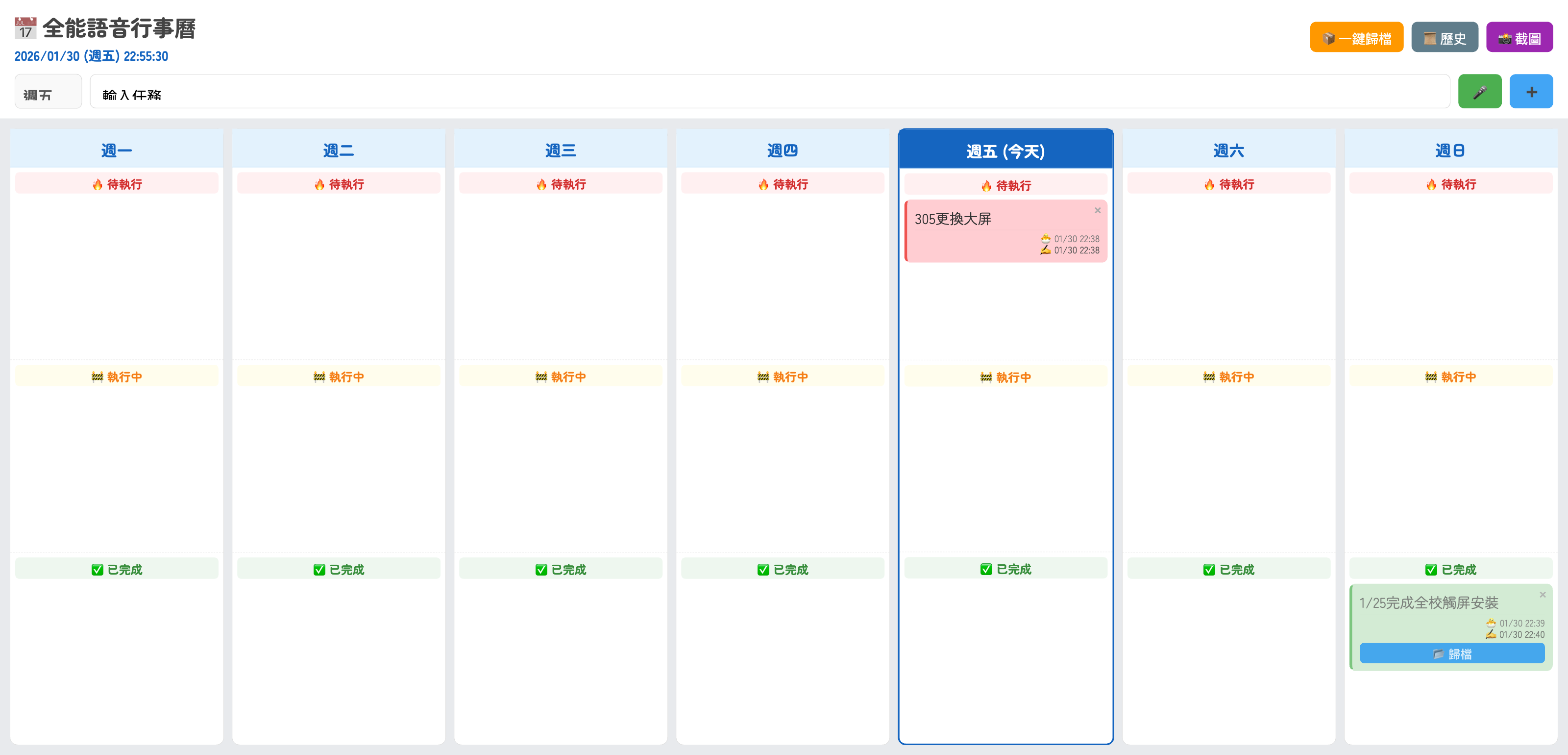 封面
封面
1. AI 提示詞
把這段指令貼給 AI,讓它幫你生成程式碼。
這是一個**濃縮成 10 句話、完全不含程式語法**的精華版提示詞。
請直接複製以下內容發送給 AI:
---
請擔任全端工程師,用 Google Apps Script 開發一個連結試算表的單頁式語音週計畫網頁應用程式。
介面必須是全螢幕矩陣佈局,橫向排列週一到週日,縱向將每一天分為待執行、執行中與已完成三個區塊。
請實作拖放功能,讓使用者能自由將任務卡片在不同日期與狀態間移動並自動存檔。
輸入區需包含日期選單與支援瀏覽器原生語音辨識的按鈕,可將語音轉為文字建立任務。
任務卡片需顯示內容與時間,並提供刪除功能,且僅在已完成狀態下顯示歸檔按鈕。
頂部功能列需包含即時時鐘、將看板畫面截圖下載成圖片的按鈕,以及一鍵歸檔所有完成任務的功能。
請製作歷史紀錄功能,允許使用者查看已歸檔的任務清單並進行永久刪除。
請在右上角加入說明按鈕,點擊後跳出包含操作教學與介面介紹的彈出視窗。
設計風格請採用圓潤字體與柔和配色,並在讀取或儲存資料時顯示載入中的提示。
請直接提供完整的後端腳本與前端頁面程式碼,確保複製後即可直接運作。
請直接複製以下內容發送給 AI:
---
請擔任全端工程師,用 Google Apps Script 開發一個連結試算表的單頁式語音週計畫網頁應用程式。
介面必須是全螢幕矩陣佈局,橫向排列週一到週日,縱向將每一天分為待執行、執行中與已完成三個區塊。
請實作拖放功能,讓使用者能自由將任務卡片在不同日期與狀態間移動並自動存檔。
輸入區需包含日期選單與支援瀏覽器原生語音辨識的按鈕,可將語音轉為文字建立任務。
任務卡片需顯示內容與時間,並提供刪除功能,且僅在已完成狀態下顯示歸檔按鈕。
頂部功能列需包含即時時鐘、將看板畫面截圖下載成圖片的按鈕,以及一鍵歸檔所有完成任務的功能。
請製作歷史紀錄功能,允許使用者查看已歸檔的任務清單並進行永久刪除。
請在右上角加入說明按鈕,點擊後跳出包含操作教學與介面介紹的彈出視窗。
設計風格請採用圓潤字體與柔和配色,並在讀取或儲存資料時顯示載入中的提示。
請直接提供完整的後端腳本與前端頁面程式碼,確保複製後即可直接運作。
2. 資料表規則
請照下面規則建立分頁與欄位。
第1分頁: Tasks
A 欄: ID
B 欄: Content
C 欄: Status
D 欄: Timestamp
E 欄: Day
📄 解析結果(自動表格)
分頁:Tasks
| A 欄 | B 欄 | C 欄 | D 欄 | E 欄 |
|---|---|---|---|---|
| ID | Content | Status | Timestamp | Day |
3. 開啟 Apps Script
從試算表開 Apps Script,才能直接用 SpreadsheetApp 讀寫資料。
- 試算表上方選單:擴充功能 → Apps Script
- 刪掉預設的程式碼(或全部選取覆蓋)
-
保留/建立檔案:
- Code.gs
- index.html
4. 貼上後端(Code.gs)
把後端程式貼到 Apps Script 的 Code.gs。
const SPREADSHEET_ID = SpreadsheetApp.getActiveSpreadsheet().getId();
const SHEET_NAME = "Tasks";

function doGet() {
  return HtmlService.createTemplateFromFile('Index')
      .evaluate()
      .setTitle('全能語音行事曆 (時間完整版)')
      .setXFrameOptionsMode(HtmlService.XFrameOptionsMode.ALLOWALL)
      .addMetaTag('viewport', 'width=device-width, initial-scale=1.0, user-scalable=yes');
}

// --- 核心防呆工具 ---
function safeDate(val) {
  try {
    if (!val) return new Date().toISOString();
    const d = new Date(val);
    if (isNaN(d.getTime())) return new Date().toISOString();
    return d.toISOString();
  } catch (e) {
    return new Date().toISOString();
  }
}

function formatTaskData(row) {
  return {
    id: row[0],
    content: row[1],
    status: row[2],
    createdTime: safeDate(row[3]), // 第4欄:建立時間
    updatedTime: safeDate(row[4]), // 第5欄:更新/歸檔時間
    day: row[5] || 'Mon'
  };
}

// --- 資料庫操作 ---

function getTasks() {
  const sheet = SpreadsheetApp.openById(SPREADSHEET_ID).getSheetByName(SHEET_NAME);
  const data = sheet.getDataRange().getValues();
  if (data.length <= 1) return [];
  data.shift();
  return data
    .filter(row => row[2] !== 'archived')
    .map(row => formatTaskData(row));
}

function getHistory() {
  try {
    const sheet = SpreadsheetApp.openById(SPREADSHEET_ID).getSheetByName(SHEET_NAME);
    const data = sheet.getDataRange().getValues();
    if (data.length <= 1) return [];
    data.shift();

    // 這裡會抓取所有的時間欄位
    return data
      .filter(row => row[2] === 'archived')
      .reverse()
      .map(row => formatTaskData(row));
  } catch (e) {
    Logger.log("讀取歷史錯誤: " + e.toString());
    return [];
  }
}

function addTask(content, day) {
  const sheet = SpreadsheetApp.openById(SPREADSHEET_ID).getSheetByName(SHEET_NAME);
  const id = Utilities.getUuid();
  const status = "pending";
  const now = new Date();

  sheet.appendRow([id, content, status, now, now, day]);

  return formatTaskData([id, content, status, now, now, day]);
}

function updateTaskPosition(id, newStatus, newDay) {
  const sheet = SpreadsheetApp.openById(SPREADSHEET_ID).getSheetByName(SHEET_NAME);
  const data = sheet.getDataRange().getValues();
  const now = new Date();

  for (let i = 1; i < data.length; i++) {
    if (data[i][0] == id) {
      sheet.getRange(i + 1, 3).setValue(newStatus);
      sheet.getRange(i + 1, 5).setValue(now);
      sheet.getRange(i + 1, 6).setValue(newDay);
      return true;
    }
  }
  return false;
}

function archiveTask(id) {
  const sheet = SpreadsheetApp.openById(SPREADSHEET_ID).getSheetByName(SHEET_NAME);
  const data = sheet.getDataRange().getValues();
  const now = new Date();

  for (let i = 1; i < data.length; i++) {
    if (data[i][0] == id) {
      sheet.getRange(i + 1, 3).setValue('archived');
      sheet.getRange(i + 1, 5).setValue(now); // 更新歸檔時間,但不碰第4欄(建立時間)
      return true;
    }
  }
  return false;
}

function archiveAllDoneTasks() {
  const sheet = SpreadsheetApp.openById(SPREADSHEET_ID).getSheetByName(SHEET_NAME);
  const data = sheet.getDataRange().getValues();
  const now = new Date();
  let count = 0;

  for (let i = 1; i < data.length; i++) {
    if (data[i][2] === 'done') {
      sheet.getRange(i + 1, 3).setValue('archived');
      sheet.getRange(i + 1, 5).setValue(now); // 更新歸檔時間
      count++;
    }
  }
  return count;
}

function deleteTask(id) {
  const sheet = SpreadsheetApp.openById(SPREADSHEET_ID).getSheetByName(SHEET_NAME);
  const data = sheet.getDataRange().getValues();
  for (let i = data.length - 1; i >= 1; i--) {
    if (data[i][0] == id) {
      sheet.deleteRow(i + 1);
      return true;
    }
  }
  return false;
}
貼到 Apps Script 的 Code.gs 檔案
5. 貼上前端(index.html)
把前端程式貼到 Apps Script 的 index.html。
<!DOCTYPE html>
<html>
<head>
<base target="_top">
<link href="https://fonts.googleapis.com/css2?family=Zen+Maru+Gothic:wght@400;700&display=swap" rel="stylesheet">
<script src="https://html2canvas.hertzen.com/dist/html2canvas.min.js"></script>
<style>
:root {
--bg-color: #e8eaed;
--pending-color: #ffcdd2;
--progress-color: #fff9c4;
--done-color: #c8e6c9;
--text-color: #333;
--day-header-bg: #e3f2fd;
--today-header-bg: #1565c0;
--today-header-text: #ffffff;
--column-header-bg: rgba(0,0,0,0.04);
}
* { box-sizing: border-box; }
body {
font-family: 'Zen Maru Gothic', sans-serif;
background-color: var(--bg-color);
margin: 0;
padding: 0;
color: var(--text-color);
height: 100vh;
display: flex;
flex-direction: column;
overflow: hidden;
}
/* 頂部控制區 */
.top-container {
padding: 10px 15px;
background: white;
box-shadow: 0 2px 10px rgba(0,0,0,0.05);
z-index: 100;
flex-shrink: 0;
}
.header-row {
display: flex;
justify-content: space-between;
align-items: center;
margin-bottom: 10px;
}
.title-group { display: flex; flex-direction: column; }
h1 { margin: 0; font-size: 1.4rem; color: #444; }
.live-clock { font-size: 0.85rem; color: #1565c0; font-weight: bold; margin-top: 2px; }
.top-buttons { display: flex; gap: 8px; }
.top-btn {
color: white;
border: none;
border-radius: 6px;
padding: 6px 12px;
cursor: pointer;
font-size: 0.85rem;
box-shadow: 0 1px 3px rgba(0,0,0,0.2);
display: flex;
align-items: center;
gap: 4px;
transition: opacity 0.2s;
font-family: 'Zen Maru Gothic', sans-serif;
font-weight: bold;
}
.top-btn:hover { opacity: 0.9; }
.history-btn { background-color: #607d8b; }
.archive-all-btn { background-color: #ff9800; }
.screenshot-btn { background-color: #9c27b0; }
/* 新增:說明按鈕樣式 */
.help-btn { background-color: #009688; }
/* Input Area */
.input-area {
display: flex;
gap: 8px;
align-items: center;
}
select {
padding: 8px;
border-radius: 6px;
border: 1px solid #ddd;
font-size: 0.95rem;
background: #f9f9f9;
font-weight: bold;
color: #555;
}
input[type="text"] {
flex: 1;
padding: 8px 12px;
border: 1px solid #ddd;
border-radius: 6px;
font-size: 0.95rem;
outline: none;
}
.action-btn {
border: none;
border-radius: 6px;
padding: 8px 15px;
font-size: 0.9rem;
cursor: pointer;
font-weight: bold;
color: white;
}
#mic-btn { background-color: #4caf50; }
#mic-btn.listening { background-color: #f44336; animation: pulse 1s infinite; }
#add-btn { background-color: #42a5f5; }
@keyframes pulse {
0% { transform: scale(1); }
50% { transform: scale(1.05); }
100% { transform: scale(1); }
}
/* Board */
#weekly-board {
flex: 1;
display: flex;
flex-direction: row;
gap: 8px;
padding: 10px;
overflow-x: auto;
overflow-y: hidden;
}
.day-section {
flex: 1;
min-width: 200px;
background: white;
border-radius: 8px;
display: flex;
flex-direction: column;
border: 1px solid #e0e0e0;
box-shadow: 0 2px 4px rgba(0,0,0,0.05);
height: 100%;
}
.day-section.is-today {
border: 2px solid #1565c0;
box-shadow: 0 0 10px rgba(21, 101, 192, 0.2);
min-width: 220px;
position: relative;
z-index: 10;
}
.day-header {
text-align: center;
background-color: var(--day-header-bg);
color: #1565c0;
padding: 8px 0;
font-size: 1rem;
font-weight: bold;
border-bottom: 1px solid #bbdefb;
flex-shrink: 0;
}
.day-section.is-today .day-header {
background-color: var(--today-header-bg);
color: var(--today-header-text);
}
.status-container {
flex: 1;
display: flex;
flex-direction: column;
overflow: hidden;
}
.column {
flex: 1;
padding: 5px;
border-bottom: 1px dashed #eee;
display: flex;
flex-direction: column;
overflow-y: auto;
min-height: 0;
position: relative;
}
.column:last-child { border-bottom: none; }
.column h3 {
font-size: 0.75rem;
text-align: center;
margin: 0 0 5px 0;
padding: 2px 0;
border-radius: 4px;
color: #666;
background: var(--column-header-bg);
position: sticky;
top: 0;
z-index: 5;
backdrop-filter: blur(2px);
}
.column[data-col-status="pending"] h3 { color: #d32f2f; background: rgba(255, 205, 210, 0.3); }
.column[data-col-status="progress"] h3 { color: #f57f17; background: rgba(255, 249, 196, 0.3); }
.column[data-col-status="done"] h3 { color: #388e3c; background: rgba(200, 230, 201, 0.3); }
.column::-webkit-scrollbar { width: 6px; }
.column::-webkit-scrollbar-track { background: transparent; }
.column::-webkit-scrollbar-thumb { background: #ccc; border-radius: 3px; }
.column::-webkit-scrollbar-thumb:hover { background: #bbb; }
.note {
padding: 8px;
margin-bottom: 6px;
border-radius: 6px;
font-size: 0.9rem;
position: relative;
box-shadow: 0 1px 2px rgba(0,0,0,0.1);
cursor: grab;
background: white;
word-wrap: break-word;
transition: transform 0.1s;
flex-shrink: 0;
}
.note:active { cursor: grabbing; transform: scale(1.02); }
.note[data-status="pending"] { background-color: var(--pending-color); border-left: 3px solid #ef5350; }
.note[data-status="progress"] { background-color: var(--progress-color); border-left: 3px solid #fbc02d; }
.note[data-status="done"] { background-color: var(--done-color); border-left: 3px solid #66bb6a; text-decoration: line-through; color: #666; opacity: 0.8; }
.note[data-status="done"] .time-info { text-decoration: none; }
.note-content { margin-bottom: 4px; line-height: 1.3; }
.delete-btn {
position: absolute; top: 2px; right: 2px; background: transparent; color: #aaa; border: none; font-size: 14px; cursor: pointer; padding: 0 4px;
}
.delete-btn:hover { color: red; }
.archive-btn {
display: none; width: 100%; margin-top: 4px; background-color: #2196f3; color: white; border: none; border-radius: 4px; padding: 2px; font-size: 0.75rem; cursor: pointer;
}
.note[data-status="done"] .archive-btn { display: block; }
.time-info {
display: block; margin-top: 4px; text-align: right; border-top: 1px solid rgba(0,0,0,0.03); padding-top: 2px;
}
.time-line { display: block; font-size: 0.6rem; color: #777; line-height: 1.2; white-space: nowrap; overflow: hidden; text-overflow: ellipsis; }
.time-updated { color: #555; }
#loader { position: fixed; top: 0; left: 0; width: 100%; height: 4px; background: linear-gradient(90deg, #ef5350, #fff176, #66bb6a); display: none; z-index: 9999; }
/* Modals */
.modal-overlay {
position: fixed; top: 0; left: 0; width: 100%; height: 100%; background: rgba(0,0,0,0.5); display: none; justify-content: center; align-items: center; z-index: 200;
}
.modal-content {
background: white; width: 90%; max-width: 500px; max-height: 85vh; border-radius: 10px; padding: 20px; display: flex; flex-direction: column; box-shadow: 0 4px 15px rgba(0,0,0,0.3);
}
.modal-header { display: flex; justify-content: space-between; align-items: center; margin-bottom: 10px; border-bottom: 1px solid #eee; padding-bottom: 5px; }
.history-list { flex: 1; overflow-y: auto; padding-right: 5px; }
.history-item { background: #f9f9f9; border-bottom: 1px solid #eee; padding: 8px; display: flex; justify-content: space-between; align-items: center; margin-bottom: 4px; border-radius: 4px; }
.history-text { font-size: 0.9rem; font-weight: bold; color: #333; }
.history-time { font-size: 0.7rem; color: #777; }
/* Help Content Style */
.help-text { overflow-y: auto; font-size: 0.95rem; color: #444; line-height: 1.6; }
.help-text h3 { color: #1565c0; margin-top: 15px; margin-bottom: 8px; border-bottom: 2px solid #e3f2fd; display: inline-block; }
.help-text ul, .help-text ol { padding-left: 20px; margin: 5px 0; }
.help-text li { margin-bottom: 5px; }
.tag { display: inline-block; padding: 2px 6px; border-radius: 4px; font-size: 0.8rem; font-weight: bold; color: white; margin: 0 2px;}
</style>
</head>
<body>
<div id="loader"></div>
<div class="top-container">
<div class="header-row">
<div class="title-group">
<h1>📅 全能語音行事曆</h1>
<div id="live-clock" class="live-clock">--/--/-- (--) --:--:--</div>
</div>
<div class="top-buttons">
<button class="top-btn archive-all-btn" onclick="archiveAllDone()">📦 一鍵歸檔</button>
<button class="top-btn history-btn" onclick="openHistory()">📜 歷史</button>
<button class="top-btn screenshot-btn" onclick="captureBoard()">📸 截圖</button>
<button class="top-btn help-btn" onclick="openHelp()">❓ 說明</button>
</div>
</div>
<div class="input-area">
<select id="day-select"></select>
<input type="text" id="task-input" placeholder="輸入任務...">
<button id="mic-btn" class="action-btn" onclick="startDictation()">🎤</button>
<button id="add-btn" class="action-btn" onclick="triggerAddTask()">➕</button>
</div>
</div>
<div id="weekly-board"></div>
<div id="history-modal" class="modal-overlay">
<div class="modal-content">
<div class="modal-header">
<h2 style="margin:0; font-size:1.2rem;">📜 歸檔歷史</h2>
<button onclick="closeHistory()" style="border:none;background:none;font-size:1.5rem;cursor:pointer;">×</button>
</div>
<div class="history-list" id="history-container">
<div style="text-align:center; color:#999; margin-top:20px;">載入中...</div>
</div>
</div>
</div>
<div id="help-modal" class="modal-overlay">
<div class="modal-content">
<div class="modal-header">
<h2 style="margin:0; font-size:1.2rem;">❓ 使用說明</h2>
<button onclick="closeHelp()" style="border:none;background:none;font-size:1.5rem;cursor:pointer;">×</button>
</div>
<div class="help-text">
<p>歡迎使用「全能語音週行事曆」!這是一個結合矩陣視圖與語音輸入的極簡任務工具。</p>
<h3>👁️ 核心介面 (Matrix View)</h3>
<ul>
<li><b>橫向 (時間):</b>週一至週日,一眼看清整週行程。</li>
<li><b>縱向 (狀態):</b>分為三個階段:
<ul>
<li><span class="tag" style="background:#ef5350;">🔥 待執行</span>:還沒開始的任務。</li>
<li><span class="tag" style="background:#fbc02d; color:#444;">🚧 執行中</span>:正在處理的任務。</li>
<li><span class="tag" style="background:#66bb6a;">✅ 已完成</span>:搞定!準備歸檔。</li>
</ul>
</li>
</ul>
<h3>⚡ 快速上手</h3>
<ol>
<li><b>新增:</b>點擊麥克風 🎤 說話,或打字按下 ➕。</li>
<li><b>拖拉:</b>按住卡片,可自由拖曳到不同日期或狀態。</li>
<li><b>截圖:</b>按下 📸 按鈕,下載圖片回報進度。</li>
<li><b>清理:</b>按下 📦 按鈕,將所有完成任務移入歷史區。</li>
</ol>
<h3>💡 小技巧</h3>
<ul>
<li>輸入框左側可選擇預設加入的日期。</li>
<li>每張卡片右上角的 <span style="color:red">×</span> 可直接永久刪除。</li>
<li>完成的卡片會出現「📂 歸檔」按鈕,可單獨收納。</li>
</ul>
</div>
</div>
</div>
<script>
const DAYS = [
{ key: 'Mon', label: '週一' },
{ key: 'Tue', label: '週二' },
{ key: 'Wed', label: '週三' },
{ key: 'Thu', label: '週四' },
{ key: 'Fri', label: '週五' },
{ key: 'Sat', label: '週六' },
{ key: 'Sun', label: '週日' }
];
window.onload = function() {
updateClock();
setInterval(updateClock, 1000);
initBoard();
initDaySelect();
document.getElementById('loader').style.display = 'block';
google.script.run.withSuccessHandler(renderTasks).getTasks();
};
function captureBoard() {
document.getElementById('loader').style.display = 'block';
const board = document.getElementById('weekly-board');
const originalOverflow = board.style.overflowX;
board.style.overflowX = 'visible';
html2canvas(document.body, {
scale: 2,
windowWidth: document.body.scrollWidth,
height: window.innerHeight,
ignoreElements: (element) => {
return element.id === 'history-modal' || element.id === 'loader' || element.id === 'help-modal';
}
}).then(canvas => {
const link = document.createElement('a');
const dateStr = new Date().toISOString().slice(0,10);
link.download = `Weekly_Matrix_${dateStr}.png`;
link.href = canvas.toDataURL("image/png");
link.click();
board.style.overflowX = originalOverflow;
document.getElementById('loader').style.display = 'none';
}).catch(err => {
console.error(err);
board.style.overflowX = originalOverflow;
document.getElementById('loader').style.display = 'none';
alert("截圖失敗");
});
}
function updateClock() {
const now = new Date();
const year = now.getFullYear();
const month = (now.getMonth() + 1).toString().padStart(2, '0');
const day = now.getDate().toString().padStart(2, '0');
const dayNames = ['週日', '週一', '週二', '週三', '週四', '週五', '週六'];
const week = dayNames[now.getDay()];
const h = now.getHours().toString().padStart(2, '0');
const m = now.getMinutes().toString().padStart(2, '0');
const s = now.getSeconds().toString().padStart(2, '0');
document.getElementById('live-clock').innerText = `${year}/${month}/${day} (${week}) ${h}:${m}:${s}`;
}
function initBoard() {
const board = document.getElementById('weekly-board');
let html = '';
const todayKey = getTodayKey();
DAYS.forEach(day => {
const isTodayClass = (day.key === todayKey) ? 'is-today' : '';
const labelSuffix = (day.key === todayKey) ? ' (今天)' : '';
html += `
<div class="day-section ${isTodayClass}" id="day-${day.key}">
<div class="day-header">${day.label}${labelSuffix}</div>
<div class="status-container">
<div class="column" data-day="${day.key}" data-col-status="pending"
ondrop="drop(event)" ondragover="allowDrop(event)">
<h3>🔥 待執行</h3>
<div id="list-${day.key}-pending"></div>
</div>
<div class="column" data-day="${day.key}" data-col-status="progress"
ondrop="drop(event)" ondragover="allowDrop(event)">
<h3>🚧 執行中</h3>
<div id="list-${day.key}-progress"></div>
</div>
<div class="column" data-day="${day.key}" data-col-status="done"
ondrop="drop(event)" ondragover="allowDrop(event)">
<h3>✅ 已完成</h3>
<div id="list-${day.key}-done"></div>
</div>
</div>
</div>
`;
});
board.innerHTML = html;
setTimeout(() => {
const todayEl = document.querySelector('.day-section.is-today');
if(todayEl) todayEl.scrollIntoView({behavior: "smooth", inline: "center"});
}, 500);
}
function getTodayKey() { return ['Sun', 'Mon', 'Tue', 'Wed', 'Thu', 'Fri', 'Sat'][new Date().getDay()]; }
function initDaySelect() {
const select = document.getElementById('day-select');
select.innerHTML = '';
DAYS.forEach(day => {
const option = document.createElement('option');
option.value = day.key; option.text = day.label; select.appendChild(option);
});
select.value = getTodayKey();
}
function formatFullTime(isoString) {
if (!isoString) return '--';
try {
const d = new Date(isoString);
if (isNaN(d.getTime())) return '--';
const month = (d.getMonth() + 1).toString().padStart(2, '0');
const day = d.getDate().toString().padStart(2, '0');
const h = d.getHours().toString().padStart(2, '0');
const m = d.getMinutes().toString().padStart(2, '0');
return `${month}/${day} ${h}:${m}`;
} catch (e) { return '--'; }
}
function renderTasks(tasks) {
document.getElementById('loader').style.display = 'none';
DAYS.forEach(day => {
document.getElementById(`list-${day.key}-pending`).innerHTML = '';
document.getElementById(`list-${day.key}-progress`).innerHTML = '';
document.getElementById(`list-${day.key}-done`).innerHTML = '';
});
tasks.forEach(createNoteElement);
}
function createNoteElement(task) {
const dayKey = task.day || 'Mon';
const targetListId = `list-${dayKey}-${task.status}`;
const container = document.getElementById(targetListId);
if (!container) return;
const note = document.createElement('div');
note.className = 'note';
note.draggable = true;
note.id = task.id;
note.dataset.status = task.status;
note.dataset.day = dayKey;
const createdStr = formatFullTime(task.createdTime);
const updatedStr = formatFullTime(task.updatedTime);
note.innerHTML = `
<button class="delete-btn" onclick="deleteNote(event, '${task.id}')">×</button>
<div class="note-content">${task.content}</div>
<div class="time-info">
<span class="time-line">🐣 ${createdStr}</span>
<span class="time-line time-updated">✍️ ${updatedStr}</span>
</div>
<button class="archive-btn" onclick="archiveNote(event, '${task.id}')">📂 歸檔</button>
`;
note.ondragstart = drag;
note.addEventListener('touchstart', handleTouchStart, {passive: false});
note.addEventListener('touchmove', handleTouchMove, {passive: false});
note.addEventListener('touchend', handleTouchEnd);
container.appendChild(note);
}
function triggerAddTask() {
const input = document.getElementById('task-input');
const daySelect = document.getElementById('day-select');
const text = input.value.trim();
const selectedDay = daySelect.value;
if (!text) { alert("請輸入內容"); return; }
document.getElementById('loader').style.display = 'block';
input.value = '';
google.script.run.withSuccessHandler((newTask) => {
createNoteElement(newTask);
document.getElementById('loader').style.display = 'none';
}).addTask(text, selectedDay);
}
function deleteNote(event, id) {
event.stopPropagation();
if (!confirm("確定要刪除嗎?")) return;
const note = document.getElementById(id);
if (note) note.remove();
google.script.run.deleteTask(id);
}
function archiveNote(event, id) {
event.stopPropagation();
if (!confirm("歸檔此任務?")) return;
const note = document.getElementById(id);
if (note) {
note.style.transform = "scale(0)";
setTimeout(() => note.remove(), 200);
}
google.script.run.archiveTask(id);
}
function archiveAllDone() {
if (!confirm("歸檔所有已完成任務?")) return;
const doneNotes = document.querySelectorAll('.note[data-status="done"]');
if (doneNotes.length === 0) { alert("無已完成任務"); return; }
doneNotes.forEach(note => {
note.style.transform = "scale(0)";
setTimeout(() => note.remove(), 200);
});
document.getElementById('loader').style.display = 'block';
google.script.run.withSuccessHandler((count) => {
document.getElementById('loader').style.display = 'none';
alert(`已歸檔 ${count} 筆。`);
}).archiveAllDoneTasks();
}
function openHistory() {
document.getElementById('history-modal').style.display = 'flex';
document.getElementById('history-container').innerHTML = '<div style="text-align:center; color:#999; margin-top:20px;">載入中...</div>';
google.script.run.withSuccessHandler(renderHistory).getHistory();
}
function closeHistory() { document.getElementById('history-modal').style.display = 'none'; }
// Help Modal Functions
function openHelp() { document.getElementById('help-modal').style.display = 'flex'; }
function closeHelp() { document.getElementById('help-modal').style.display = 'none'; }
function renderHistory(tasks) {
const container = document.getElementById('history-container');
container.innerHTML = '';
if (!tasks || tasks.length === 0) {
container.innerHTML = '<div style="text-align:center; color:#999; margin-top:20px;">無歸檔紀錄</div>';
return;
}
tasks.forEach(task => {
const item = document.createElement('div');
item.className = 'history-item';
const createdStr = formatFullTime(task.createdTime);
const archivedStr = formatFullTime(task.updatedTime);
item.innerHTML = `
<div style="flex:1;">
<div class="history-text">${task.content}</div>
<div class="history-time">🐣${createdStr} | 📂${archivedStr} | ${task.day}</div>
</div>
<button onclick="deleteHistoryNote('${task.id}', this)" style="background:#ffcdd2;color:#c62828;border:none;border-radius:4px;padding:4px 8px;cursor:pointer;">刪</button>
`;
container.appendChild(item);
});
}
function deleteHistoryNote(id, btnElement) {
if (!confirm("永久刪除?")) return;
const item = btnElement.closest('.history-item');
if (item) item.remove();
google.script.run.deleteTask(id);
}
function startDictation() {
const SpeechRecognition = window.SpeechRecognition || window.webkitSpeechRecognition;
if (!SpeechRecognition) { alert("瀏覽器不支援語音"); return; }
const recognition = new SpeechRecognition();
const micBtn = document.getElementById('mic-btn');
const input = document.getElementById('task-input');
recognition.lang = "zh-TW";
recognition.start();
micBtn.classList.add('listening');
recognition.onresult = (e) => { input.value = e.results[0][0].transcript; };
recognition.onspeechend = () => {
recognition.stop();
micBtn.classList.remove('listening');
document.getElementById('add-btn').focus();
};
recognition.onerror = () => { micBtn.classList.remove('listening'); };
}
function allowDrop(ev) { ev.preventDefault(); }
function drag(ev) { ev.dataTransfer.setData("text", ev.target.id); }
function drop(ev) {
ev.preventDefault();
const id = ev.dataTransfer.getData("text");
const targetColumn = ev.target.closest('.column');
if (targetColumn) {
const newStatus = targetColumn.dataset.colStatus;
const newDay = targetColumn.dataset.day;
finalizeDrop(id, newStatus, newDay);
}
}
let draggedItem = null;
let touchStartX = 0, touchStartY = 0;
function handleTouchStart(e) { draggedItem = this; touchStartX = e.touches[0].clientX; touchStartY = e.touches[0].clientY; this.style.opacity = "0.5"; }
function handleTouchMove(e) {
if (!draggedItem) return;
e.preventDefault();
const touch = e.touches[0];
draggedItem.style.transform = `translate(${touch.clientX - touchStartX}px, ${touch.clientY - touchStartY}px)`;
}
function handleTouchEnd(e) {
if (!draggedItem) return;
draggedItem.style.opacity = "1"; draggedItem.style.transform = "none"; draggedItem.style.display = 'none';
const touch = e.changedTouches[0];
const elem = document.elementFromPoint(touch.clientX, touch.clientY);
draggedItem.style.display = 'block';
if (elem) {
const targetColumn = elem.closest('.column');
if (targetColumn) {
const newStatus = targetColumn.dataset.colStatus;
const newDay = targetColumn.dataset.day;
if (draggedItem.dataset.status !== newStatus || draggedItem.dataset.day !== newDay) {
finalizeDrop(draggedItem.id, newStatus, newDay);
}
}
}
draggedItem = null;
}
function finalizeDrop(id, newStatus, newDay) {
const note = document.getElementById(id);
if (!note) return;
const targetListId = `list-${newDay}-${newStatus}`;
const container = document.getElementById(targetListId);
if (container) container.appendChild(note);
note.dataset.status = newStatus;
note.dataset.day = newDay;
const updatedStr = formatFullTime(new Date().toISOString());
const updatedElem = note.querySelector('.time-updated');
if (updatedElem) { updatedElem.innerText = `✍️ ${updatedStr}`; }
google.script.run.updateTaskPosition(id, newStatus, newDay);
}
document.getElementById("task-input").addEventListener("keypress", function(event) {
if (event.key === "Enter") triggerAddTask();
});
</script>
</body>
</html>貼到 Apps Script 的 index.html 檔案
6. 部署
部署成 Web App 後,就會拿到可分享網址。
- Apps Script 右上:部署 → 新部署
- 類型選:Web app
- 執行身分:你
- 存取權限:任何人
- 完成後複製網址
💬 評論區
老師們的交流與提問
登入 後即可發表評論