0. 作品介紹
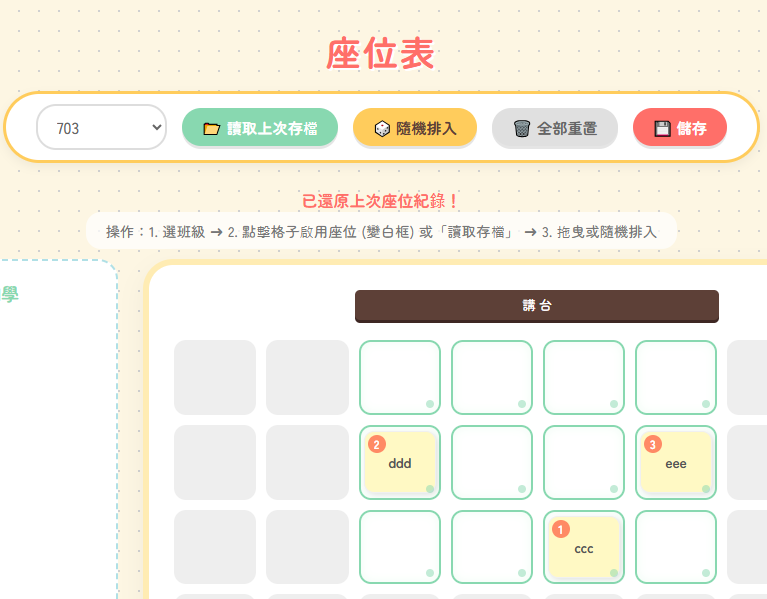 封面
封面
1. AI 提示詞
把這段指令貼給 AI,讓它幫你生成程式碼。
我想要建立一個 【學生座位分配表】
幫我用Google 試算表建立
我希望有些資料我可以直接在試算表更改首頁可以直接呈現
需求說明 【老師可選擇班級、8×8 座位欄位、有一區呈現全部同學方框、可拖曳同學進入固定座位、其餘隨機排入、學生拖曳方框需有該學生座號、點選要啟用座位後再開始排入學生,可選擇排入座位數同學生人數】
要把它變成程式碼我要發佈
請完整敘述操作步驟 越詳細越好
作業環境
Google試算表
Google Apps Script
請給我後端gs完整程式碼、前端index完整程式碼
網頁風格為可愛,網頁感覺如圖(可附圖給AI)
幫我用Google 試算表建立
我希望有些資料我可以直接在試算表更改首頁可以直接呈現
需求說明 【老師可選擇班級、8×8 座位欄位、有一區呈現全部同學方框、可拖曳同學進入固定座位、其餘隨機排入、學生拖曳方框需有該學生座號、點選要啟用座位後再開始排入學生,可選擇排入座位數同學生人數】
要把它變成程式碼我要發佈
請完整敘述操作步驟 越詳細越好
作業環境
Google試算表
Google Apps Script
請給我後端gs完整程式碼、前端index完整程式碼
網頁風格為可愛,網頁感覺如圖(可附圖給AI)
2. 資料表規則
請照下面規則建立分頁與欄位。
第1分頁: 學生名單
A 欄: 班級
B 欄: 座號
C 欄: 姓名
第2分頁: 儲存的座位表
A 欄: 欄位A
📄 解析結果(自動表格)
分頁:學生名單
| A 欄 | B 欄 | C 欄 |
|---|---|---|
| 班級 | 座號 | 姓名 |
分頁:儲存的座位表
| A 欄 |
|---|
| 欄位A |
3. 開啟 Apps Script
從試算表開 Apps Script,才能直接用 SpreadsheetApp 讀寫資料。
- 試算表上方選單:擴充功能 → Apps Script
- 刪掉預設的程式碼(或全部選取覆蓋)
-
保留/建立檔案:
- Code.gs
- index.html
4. 貼上後端(Code.gs)
把後端程式貼到 Apps Script 的 Code.gs。
// Code.gs

function doGet() {
  return HtmlService.createTemplateFromFile('index')
      .evaluate()
      .setTitle('座位表')
      .setXFrameOptionsMode(HtmlService.XFrameOptionsMode.ALLOWALL)
      .addMetaTag('viewport', 'width=device-width, initial-scale=1');
}

/**
 * 取得所有班級清單
 */
function getClassList() {
  var sheet = SpreadsheetApp.getActiveSpreadsheet().getSheetByName('學生名單');
  // 防呆:如果沒有工作表
  if (!sheet) return [];

  var data = sheet.getRange(2, 1, sheet.getLastRow() - 1, 1).getValues();
  var classes = [...new Set(data.flat())].filter(String);
  return classes;
}

/**
 * 根據班級取得學生資料
 */
function getStudentsByClass(className) {
  var sheet = SpreadsheetApp.getActiveSpreadsheet().getSheetByName('學生名單');
  if (!sheet) return [];

  var data = sheet.getDataRange().getValues();
  var students = [];

  for (var i = 1; i < data.length; i++) {
    if (data[i][0] == className) {
      students.push({
        class: data[i][0],
        num: data[i][1],
        name: data[i][2]
      });
    }
  }
  // 依照座號排序
  students.sort(function(a, b) { return a.num - b.num; });
  return students;
}

/**
 * 儲存座位表
 */
function saveSeatLayoutToSheet(layoutData, className) {
  var ss = SpreadsheetApp.getActiveSpreadsheet();
  var sheet = ss.getSheetByName('儲存的座位表');
  if (!sheet) {
    sheet = ss.insertSheet('儲存的座位表');
    sheet.appendRow(['時間', '班級', '座位配置(JSON)']);
  }

  var time = new Date();
  var jsonString = JSON.stringify(layoutData);
  sheet.appendRow([time, className, jsonString]);
  return "✨ 儲存成功!";
}

/**
 * 讀取該班級「最後一次」的存檔
 */
function loadLastLayout(className) {
  var ss = SpreadsheetApp.getActiveSpreadsheet();
  var sheet = ss.getSheetByName('儲存的座位表');
  if (!sheet) return null; // 沒存過檔

  var data = sheet.getDataRange().getValues();
  // 從最後一行開始往回找
  for (var i = data.length - 1; i >= 1; i--) {
    // data[i][1] 是班級欄位
    if (data[i][1] == className) {
      return data[i][2]; // 回傳 JSON 字串
    }
  }
  return null; // 找不到該班級的紀錄
}
貼到 Apps Script 的 Code.gs 檔案
5. 貼上前端(index.html)
把前端程式貼到 Apps Script 的 index.html。
<!DOCTYPE html>
<html>
<head>
  <base target="_top">
  <link href="https://fonts.googleapis.com/css2?family=Zen+Maru+Gothic:wght@500;700&display=swap" rel="stylesheet">
  <style>
    :root {
      --bg-color: #fdf6e3;     /* 溫暖米色背景 */
      --panel-bg: #fff;        /* 純白面板 */
      --accent-color: #88d8b0; /* 薄荷綠 */
      --btn-color: #ffcc5c;    /* 奶油黃 */
      --btn-text: #5d4037;     /* 咖啡色文字 */
      --seat-inactive: #eee;   /* 未啟用座位 */
      --seat-active: #fff;     /* 啟用座位 */
      --text-color: #555;
    }

    body {
      font-family: 'Zen Maru Gothic', sans-serif;
      background-color: var(--bg-color);
      /* 點點背景 */
      background-image: radial-gradient(#d0d0d0 1px, transparent 1px);
      background-size: 20px 20px;
      color: var(--text-color);
      padding: 20px;
      margin: 0;
      display: flex;
      flex-direction: column;
      align-items: center;
    }

    h1 {
      color: #ff6f69;
      font-size: 2.2em;
      margin-bottom: 15px;
      letter-spacing: 2px;
      text-shadow: 2px 2px 0px #fff;
    }

    /* 控制列樣式 */
    .control-panel {
      background: var(--panel-bg);
      border-radius: 50px; /* 膠囊狀 */
      padding: 10px 30px;
      box-shadow: 0 4px 10px rgba(0,0,0,0.05);
      margin-bottom: 25px;
      display: flex;
      gap: 15px;
      align-items: center;
      flex-wrap: wrap;
      border: 3px solid #ffcc5c;
    }

    select {
      font-family: inherit;
      padding: 8px 15px;
      border-radius: 20px;
      border: 2px solid #ddd;
      outline: none;
      font-size: 1em;
      color: #666;
    }

    button {
      font-family: inherit;
      font-weight: bold;
      padding: 8px 20px;
      border-radius: 25px;
      border: none;
      cursor: pointer;
      transition: all 0.2s;
      color: var(--btn-text);
      box-shadow: 0 3px 0 rgba(0,0,0,0.1);
      font-size: 0.95em;
    }

    button:active { transform: translateY(3px); box-shadow: none; }

    .btn-reset { background: #e0e0e0; color: #666; }
    .btn-load { background: #88d8b0; color: #fff; }
    .btn-random { background: #ffcc5c; }
    .btn-save { background: #ff6f69; color: #fff; }

    /* 說明文字 */
    .instruction {
      background: rgba(255, 255, 255, 0.7);
      padding: 8px 20px;
      border-radius: 15px;
      margin-bottom: 10px;
      font-size: 0.9em;
      color: #777;
    }

    /* 主區域佈局 */
    .main-container {
      display: flex;
      flex-wrap: wrap;
      gap: 25px;
      justify-content: center;
      width: 100%;
      max-width: 1100px;
    }

    /* 學生名單區 */
    .student-pool-container {
      flex: 1;
      min-width: 200px;
      background: #fff;
      border-radius: 20px;
      padding: 20px;
      border: 2px dashed #b0e0e6; /* 淡藍色虛線 */
      min-height: 200px;
    }

    .section-title {
      text-align: center;
      margin-bottom: 15px;
      font-weight: bold;
      color: #88d8b0;
      font-size: 1.1em;
    }

    #studentPool {
      display: flex;
      flex-wrap: wrap;
      gap: 10px;
      align-content: flex-start;
    }

    /* 座位區 */
    .seating-area {
      flex: 3;
      min-width: 500px;
      background: #fff;
      border-radius: 30px;
      padding: 25px;
      box-shadow: 0 10px 25px rgba(0,0,0,0.05);
      border: 6px solid #ffecb3; /* 鵝黃色邊框 */
    }

    .blackboard {
      width: 50%;
      height: 30px;
      background: #5d4037;
      border-radius: 5px;
      margin: 0 auto 20px auto;
      display: flex;
      align-items: center;
      justify-content: center;
      color: white;
      font-size: 0.8em;
      box-shadow: 0 3px 0 #3e2723;
    }

    /* 座位網格 8x8 */
    .seat-grid {
      display: grid;
      grid-template-columns: repeat(8, 1fr);
      gap: 10px;
    }

    .seat {
      aspect-ratio: 1.1 / 1;
      background: var(--seat-inactive);
      border-radius: 12px;
      position: relative;
      cursor: pointer;
      transition: all 0.2s;
      display: flex;
      align-items: center;
      justify-content: center;
    }

    /* 啟用的座位 */
    .seat.active {
      background: var(--seat-active);
      border: 2px solid #88d8b0;
      box-shadow: inset 0 0 10px #f0fdf4;
    }

    .seat.active::after {
      content: ''; /* 把 OK 文字拿掉,改用顏色區分比較乾淨 */
      position: absolute;
      width: 8px;
      height: 8px;
      background: #88d8b0;
      border-radius: 50%;
      bottom: 5px;
      right: 5px;
      opacity: 0.5;
    }

    /* 學生卡片 */
    .student-card {
      width: 90%;
      height: 85%;
      background: #fff9c4; /* 淺黃便利貼 */
      border-radius: 10px;
      display: flex;
      flex-direction: column;
      align-items: center;
      justify-content: center;
      font-size: 0.85em;
      font-weight: bold;
      color: #555;
      cursor: grab;
      box-shadow: 2px 2px 5px rgba(0,0,0,0.1);
      user-select: none;
      border: 1px solid #f0f0f0;
      position: relative;
    }

    .student-card:active {
      cursor: grabbing;
      transform: scale(0.95);
    }

    .student-num {
      position: absolute;
      top: 3px;
      left: 3px;
      background: #ff8a65;
      color: white;
      font-size: 0.7em;
      width: 18px;
      height: 18px;
      border-radius: 50%;
      display: flex;
      align-items: center;
      justify-content: center;
    }

    /* 拖曳效果 */
    .seat.drag-over {
      background: #fff3e0;
      border: 2px dashed #ffb74d;
    }

    #statusMsg {
      color: #ff6f69;
      font-weight: bold;
      min-height: 20px;
    }

    #loading {
      color: #888;
      font-size: 0.9em;
      display: none;
    }

  </style>
</head>
<body>

  <h1>座位表</h1>

  <div class="control-panel">
    <select id="classSelect" onchange="handleClassChange()">
      <option value="">選擇班級...</option>
    </select>

    <button class="btn-load" onclick="loadSavedData()">📂 讀取上次存檔</button>
    <button class="btn-random" onclick="randomFill()">🎲 隨機排入</button>
    <button class="btn-reset" onclick="resetAll()">🗑️ 全部重置</button>
    <button class="btn-save" onclick="saveLayout()">💾 儲存</button>
  </div>

  <div id="loading">資料讀取中...</div>
  <div id="statusMsg"></div>
  <div class="instruction">
    操作:1. 選班級 ➜ 2. 點擊格子啟用座位 (變白框) 或「讀取存檔」 ➜ 3. 拖曳或隨機排入
  </div>

  <div class="main-container">

    <div class="student-pool-container">
      <div class="section-title">未分配同學</div>
      <div id="studentPool"></div>
    </div>

    <div class="seating-area">
      <div class="blackboard">講 台</div>
      <div class="seat-grid" id="seatGrid">
        </div>
    </div>

  </div>

  <script>
    var allStudents = [];
    var draggedStudent = null;

    window.onload = function() {
      createGrid();
      google.script.run.withSuccessHandler(populateClassSelect).getClassList();
    };

    function populateClassSelect(classes) {
      var select = document.getElementById('classSelect');
      classes.forEach(function(c) {
        var opt = document.createElement('option');
        opt.value = c;
        opt.innerText = c;
        select.appendChild(opt);
      });
    }

    function createGrid() {
      var grid = document.getElementById('seatGrid');
      grid.innerHTML = '';
      for (var i = 0; i < 64; i++) {
        var seat = document.createElement('div');
        seat.className = 'seat';
        seat.dataset.index = i;

        // 點擊切換座位啟用狀態
        seat.onclick = function() {
          if (this.children.length > 0) return; // 有人時不能關閉
          this.classList.toggle('active');
        };

        // 拖放事件
        seat.ondragover = function(e) {
          e.preventDefault();
          if (this.classList.contains('active')) {
            this.classList.add('drag-over');
            e.dataTransfer.dropEffect = 'move';
          }
        };
        seat.ondragleave = function() {
          this.classList.remove('drag-over');
        };
        seat.ondrop = handleDrop;

        grid.appendChild(seat);
      }
    }

    function handleClassChange() {
      var className = document.getElementById('classSelect').value;
      if (!className) return;

      showLoading(true);
      resetAll(true); // 切換班級時,保留格子狀態嗎?預設全部重置比較保險

      google.script.run.withSuccessHandler(function(students) {
        allStudents = students;
        renderStudentPool(students);
        showLoading(false);
        updateStatus(`已載入 ${students.length} 位同學`);
      }).getStudentsByClass(className);
    }

    // 讀取上次存檔
    function loadSavedData() {
      var className = document.getElementById('classSelect').value;
      if (!className) {
        alert("請先選擇班級!");
        return;
      }

      showLoading(true);

      google.script.run.withSuccessHandler(function(jsonString) {
        showLoading(false);
        if (!jsonString) {
          alert("這個班級還沒有存檔紀錄喔!");
          return;
        }

        var layoutData = JSON.parse(jsonString);
        applyLayout(layoutData);

      }).loadLastLayout(className);
    }

    // 將存檔應用到畫面上
    function applyLayout(layoutData) {
      // 1. 先把所有學生趕回池子 (確保狀態正確)
      var pool = document.getElementById('studentPool');
      var seats = document.querySelectorAll('.seat');

      seats.forEach(s => {
        if(s.firstChild) pool.appendChild(s.firstChild);
        s.classList.remove('active'); // 先全部關閉
      });

      // 2. 依照存檔配置
      layoutData.forEach(item => {
        var seat = seats[item.seatIndex];
        if (seat) {
          // 啟用座位
          seat.classList.add('active');

          // 找對應的學生卡片
          // 我們用 studentNum 來找 (假設座號唯一)
          // 這裡需要遍歷池子裡的卡片
          var cards = Array.from(pool.children);
          var targetCard = cards.find(card => card.dataset.num == item.studentNum);

          if (targetCard) {
            seat.appendChild(targetCard);
          }
        }
      });

      updateStatus("已還原上次座位紀錄!");
      sortPool(); // 剩下的同學整理一下順序
    }

    function renderStudentPool(students) {
      var pool = document.getElementById('studentPool');
      pool.innerHTML = '';
      students.forEach(function(s) {
        var card = createStudentCard(s);
        pool.appendChild(card);
      });
    }

    function createStudentCard(student) {
      var div = document.createElement('div');
      div.className = 'student-card';
      div.draggable = true;
      div.id = 'stu-' + student.num;
      div.dataset.num = student.num;
      div.dataset.name = student.name;

      div.innerHTML = `<span class="student-num">${student.num}</span><span>${student.name}</span>`;

      div.ondragstart = function(e) {
        draggedStudent = this;
        this.style.opacity = '0.5';
      };
      div.ondragend = function() {
        this.style.opacity = '1';
        draggedStudent = null;
      };

      return div;
    }

    function handleDrop(e) {
      e.stopPropagation();
      this.classList.remove('drag-over');

      if (!this.classList.contains('active')) {
        updateStatus("⚠️ 請先點擊格子啟用座位!");
        return;
      }

      // 交換功能:如果座位上有人,把他送回來源地 (或池子)
      if (this.children.length > 0) {
        var existing = this.children[0];
        document.getElementById('studentPool').appendChild(existing);
      }

      if (draggedStudent) {
        this.appendChild(draggedStudent);
      }
      sortPool();
    }

    function randomFill() {
      var pool = document.getElementById('studentPool');
      var unassigned = Array.from(pool.children);
      var emptySeats = Array.from(document.querySelectorAll('.seat.active')).filter(s => s.children.length === 0);

      if (unassigned.length === 0) {
        updateStatus("同學都坐好囉!");
        return;
      }

      // 洗牌
      unassigned.sort(() => Math.random() - 0.5);
      emptySeats.sort(() => Math.random() - 0.5);

      var count = Math.min(unassigned.length, emptySeats.length);
      for (var i = 0; i < count; i++) {
        emptySeats[i].appendChild(unassigned[i]);
      }
      sortPool();
    }

    function resetAll(forceClearSeats = false) {
      var pool = document.getElementById('studentPool');
      var seats = document.querySelectorAll('.seat');

      seats.forEach(seat => {
        if (seat.firstChild) pool.appendChild(seat.firstChild);
        if (forceClearSeats) seat.classList.remove('active');
      });
      sortPool();
      updateStatus("已重置");
    }

    function sortPool() {
      var pool = document.getElementById('studentPool');
      var cards = Array.from(pool.children);
      cards.sort((a, b) => a.dataset.num - b.dataset.num);
      cards.forEach(c => pool.appendChild(c));
    }

    function saveLayout() {
      var layout = [];
      var seats = document.querySelectorAll('.seat');
      var className = document.getElementById('classSelect').value;

      if (!className) {
        alert("請先選擇班級!");
        return;
      }

      seats.forEach((seat, index) => {
        if (seat.children.length > 0) {
          var card = seat.children[0];
          layout.push({
            seatIndex: index,
            studentNum: card.dataset.num,
            studentName: card.dataset.name
          });
        }
      });

      showLoading(true);
      google.script.run.withSuccessHandler(function(res) {
        showLoading(false);
        alert(res);
      }).saveSeatLayoutToSheet(layout, className);
    }

    function updateStatus(msg) {
      document.getElementById('statusMsg').innerText = msg;
    }

    function showLoading(show) {
      document.getElementById('loading').style.display = show ? 'block' : 'none';
    }
  </script>
</body>
</html>
貼到 Apps Script 的 index.html 檔案
6. 部署
部署成 Web App 後,就會拿到可分享網址。
- Apps Script 右上:部署 → 新部署
- 類型選:Web app
- 執行身分:你
- 存取權限:任何人
- 完成後複製網址
💬 評論區
老師們的交流與提問
登入 後即可發表評論