0. 作品介紹
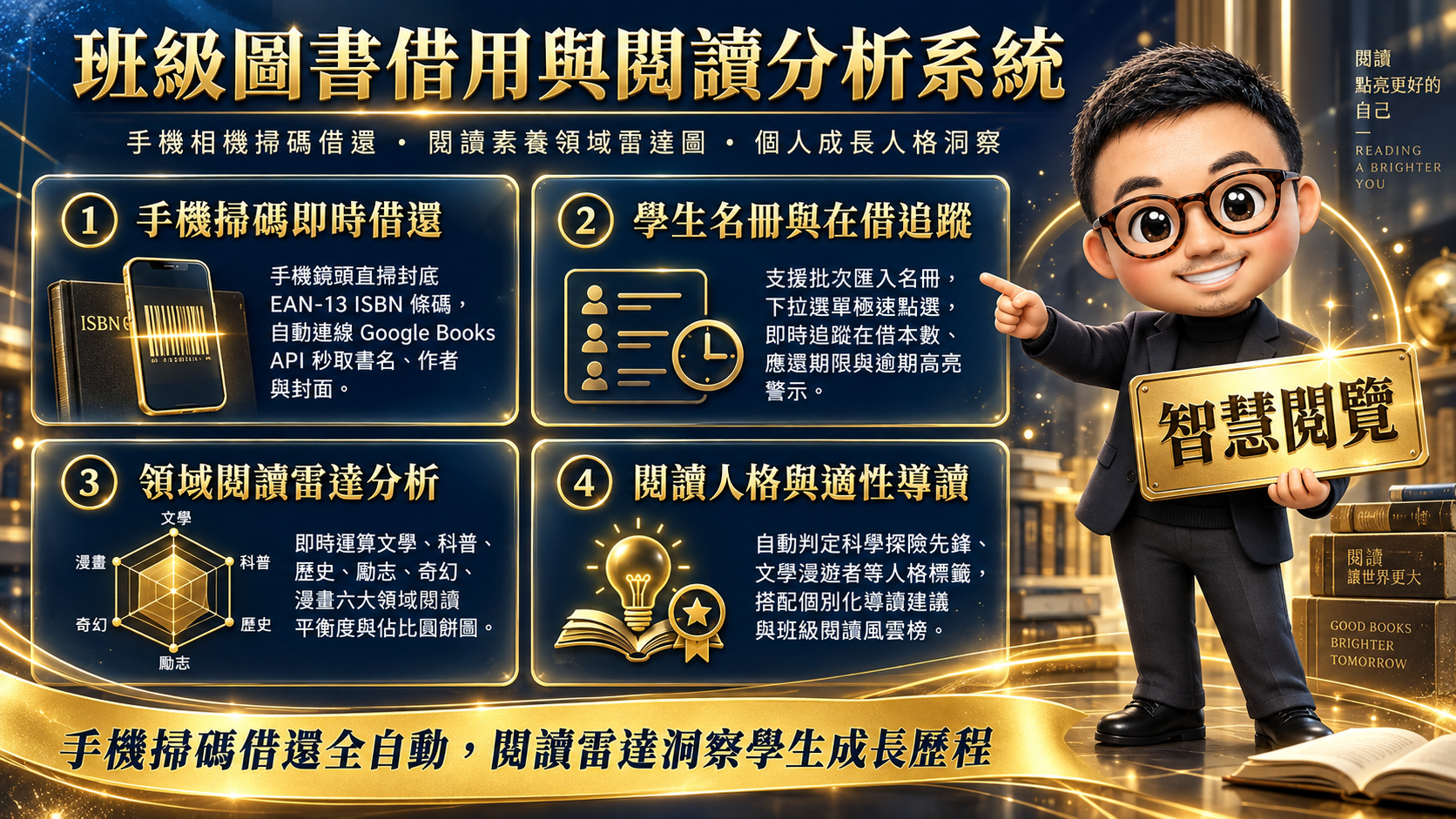 封面
封面
2. 資料表規則
請照下面規則建立分頁與欄位。
第1分頁: 藏書清單
A 欄: ISBN
B 欄: 書名
C 欄: 作者
D 欄: 書籍類別
E 欄: 出版社
F 欄: 封面圖片URL
G 欄: 借閱狀態
H 欄: 目前借閱人
I 欄: 累計借閱次數
第2分頁: 學生名冊
A 欄: 座號
B 欄: 姓名
C 欄: 目前在借數
D 欄: 累計借閱本數
E 欄: 主要閱讀偏向
F 欄: 最後借閱日期
第3分頁: 借還紀錄
A 欄: 紀錄ID
B 欄: 座號
C 欄: 姓名
D 欄: ISBN
E 欄: 書名
F 欄: 書籍類別
G 欄: 借出日期
H 欄: 應還日期
I 欄: 歸還日期
J 欄: 狀態
📄 解析結果(自動表格)
分頁:藏書清單
| A 欄 | B 欄 | C 欄 | D 欄 | E 欄 | F 欄 | G 欄 | H 欄 | I 欄 |
|---|---|---|---|---|---|---|---|---|
| ISBN | 書名 | 作者 | 書籍類別 | 出版社 | 封面圖片URL | 借閱狀態 | 目前借閱人 | 累計借閱次數 |
分頁:學生名冊
| A 欄 | B 欄 | C 欄 | D 欄 | E 欄 | F 欄 |
|---|---|---|---|---|---|
| 座號 | 姓名 | 目前在借數 | 累計借閱本數 | 主要閱讀偏向 | 最後借閱日期 |
分頁:借還紀錄
| A 欄 | B 欄 | C 欄 | D 欄 | E 欄 | F 欄 | G 欄 | H 欄 | I 欄 | J 欄 |
|---|---|---|---|---|---|---|---|---|---|
| 紀錄ID | 座號 | 姓名 | ISBN | 書名 | 書籍類別 | 借出日期 | 應還日期 | 歸還日期 | 狀態 |
3. 開啟 Apps Script
從試算表開 Apps Script,才能直接用 SpreadsheetApp 讀寫資料。
- 試算表上方選單:擴充功能 → Apps Script
- 刪掉預設的程式碼(或全部選取覆蓋)
-
保留/建立檔案:
- Code.gs
- index.html
4. 貼上後端(Code.gs)
把後端程式貼到 Apps Script 的 Code.gs。
/**
 * ==============================================================================
 * 班級圖書借用與閱讀分析系統 (Classroom Library & Reading Analytics System)
 * 後端 Google Apps Script (GAS) + LINE Bot 核心程式
 * ==============================================================================
 *
 * 功能亮點:
 * 1. 班級藏書庫管理 (支援 ISBN 自動向 Google Books API 查詢中文書名、作者、分類、封面)
 * 2. 學生名冊管理 (座號、姓名、借閱總次數、在借數、閱讀偏好)
 * 3. 手機條碼掃描借還書 API 接口 (供 Web App / 手機鏡頭直接調用)
 * 4. LINE Bot 雙向互動查詢 (查詢個人借閱、班級閱讀排行榜、書籍搜尋、逾期提醒)
 * 5. 閱讀領域分析 (文學、科普、歷史、哲學、社會、藝術漫畫之百分比與偏好洞察)
 */

// 系統參數設定 (請在 Google 試算表指令碼屬性或下方填入)
var CONFIG = {
  LINE_CHANNEL_ACCESS_TOKEN: PropertiesService.getScriptProperties().getProperty('LINE_CHANNEL_ACCESS_TOKEN') || 'YOUR_CHANNEL_ACCESS_TOKEN',
  LINE_CHANNEL_SECRET: PropertiesService.getScriptProperties().getProperty('LINE_CHANNEL_SECRET') || 'YOUR_CHANNEL_SECRET',
  DEFAULT_BORROW_DAYS: 14, // 預設借閱天數
  CLASS_NAME: '801班 班級圖書館',
  SHEET_NAMES: {
    BOOKS: '藏書清單',
    STUDENTS: '學生名冊',
    RECORDS: '借還紀錄',
    CONFIG: '系統設定'
  }
};

/**
 * 初始化試算表結構與示範資料
 */
function initializeSpreadsheet() {
  var ss = SpreadsheetApp.getActiveSpreadsheet();

  // 1. 藏書清單
  var sheetBooks = ss.getSheetByName(CONFIG.SHEET_NAMES.BOOKS) || ss.insertSheet(CONFIG.SHEET_NAMES.BOOKS);
  if (sheetBooks.getLastRow() === 0) {
    sheetBooks.appendRow(['ISBN', '書名', '作者', '書籍類別', '出版社', '封面圖片URL', '借閱狀態', '目前借閱人', '累計借閱次數']);
    sheetBooks.getRange(1, 1, 1, 9).setFontWeight('bold').setBackground('#E8F0FE');

    // 預載中學生熱門書籍示範
    var sampleBooks = [
      ['9789865101237', '原子習慣', '詹姆斯·克利爾', '心理勵志', '方智', 'https://covers.openlibrary.org/b/isbn/9789865101237-M.jpg', '可借閱', '', 6],
      ['9789863985020', '被討厭的勇氣', '岸見一郎, 古賀史健', '心理勵志', '究竟', 'https://covers.openlibrary.org/b/isbn/9789863985020-M.jpg', '借閱中', '05 陳品妤', 4],
      ['9789571383798', '人類大歷史', '哈拉瑞', '歷史人文', '時報出版', 'https://covers.openlibrary.org/b/isbn/9789571383798-M.jpg', '可借閱', '', 3],
      ['9789862137680', '解憂雜貨店', '東野圭吾', '文學小說', '皇冠', 'https://covers.openlibrary.org/b/isbn/9789862137680-M.jpg', '借閱中', '12 林宥廷', 8],
      ['9789573289012', '昆蟲記', '法布爾', '科普探索', '遠流', 'https://covers.openlibrary.org/b/isbn/9789573289012-M.jpg', '可借閱', '', 2],
      ['9789864778881', '別鬧了,費曼先生!', '理查·費曼', '科普探索', '天下文化', 'https://covers.openlibrary.org/b/isbn/9789864778881-M.jpg', '可借閱', '', 5],
      ['9789576585142', '三體', '劉慈欣', '科幻奇幻', '字畝文化', 'https://covers.openlibrary.org/b/isbn/9789576585142-M.jpg', '借閱中', '01 王小明', 7],
      ['9789863448129', '如果歷史是一群喵', '肥志', '漫畫圖文', '野人', 'https://covers.openlibrary.org/b/isbn/9789863448129-M.jpg', '借閱中', '18 張雅晴', 12]
    ];
    sampleBooks.forEach(function(row) { sheetBooks.appendRow(row); });
  }

  // 2. 學生名冊
  var sheetStudents = ss.getSheetByName(CONFIG.SHEET_NAMES.STUDENTS) || ss.insertSheet(CONFIG.SHEET_NAMES.STUDENTS);
  if (sheetStudents.getLastRow() === 0) {
    sheetStudents.appendRow(['座號', '姓名', '目前在借數', '累計借閱本數', '主要閱讀偏向', '最後借閱日期']);
    sheetStudents.getRange(1, 1, 1, 6).setFontWeight('bold').setBackground('#E6F4EA');

    var sampleStudents = [
      ['01', '王小明', 1, 7, '科幻奇幻 / 科普', '2026-09-08'],
      ['02', '李美玲', 0, 5, '文學小說', '2026-09-02'],
      ['03', '張家豪', 0, 3, '歷史人文', '2026-08-28'],
      ['04', '林冠宇', 0, 4, '科普探索', '2026-09-05'],
      ['05', '陳品妤', 1, 9, '心理勵志 / 文學', '2026-09-10'],
      ['06', '黃子軒', 0, 2, '漫畫圖文', '2026-08-20'],
      ['07', '楊承恩', 0, 6, '科普探索', '2026-09-07'],
      ['08', '趙若芸', 0, 4, '文學小說', '2026-09-01'],
      ['09', '周柏翰', 0, 3, '歷史人文', '2026-08-30'],
      ['10', '吳佳穎', 0, 5, '心理勵志', '2026-09-03'],
      ['11', '徐浩然', 0, 2, '科普探索', '2026-08-25'],
      ['12', '林宥廷', 1, 11, '文學小說 / 奇幻', '2026-09-09'],
      ['18', '張雅晴', 1, 12, '漫畫圖文 / 歷史', '2026-09-10']
    ];
    sampleStudents.forEach(function(row) { sheetStudents.appendRow(row); });
  }

  // 3. 借還紀錄
  var sheetRecords = ss.getSheetByName(CONFIG.SHEET_NAMES.RECORDS) || ss.insertSheet(CONFIG.SHEET_NAMES.RECORDS);
  if (sheetRecords.getLastRow() === 0) {
    sheetRecords.appendRow(['紀錄ID', '座號', '姓名', 'ISBN', '書名', '書籍類別', '借出日期', '應還日期', '歸還日期', '狀態']);
    sheetRecords.getRange(1, 1, 1, 10).setFontWeight('bold').setBackground('#FEF7E0');

    var sampleRecords = [
      ['REC-20260901-01', '01', '王小明', '9789576585142', '三體', '科幻奇幻', '2026-09-08', '2026-09-22', '', '借閱中'],
      ['REC-20260902-02', '05', '陳品妤', '9789863985020', '被討厭的勇氣', '心理勵志', '2026-09-10', '2026-09-24', '', '借閱中'],
      ['REC-20260903-03', '12', '林宥廷', '9789862137680', '解憂雜貨店', '文學小說', '2026-09-09', '2026-09-23', '', '借閱中'],
      ['REC-20260904-04', '18', '張雅晴', '9789863448129', '如果歷史是一群喵', '漫畫圖文', '2026-09-10', '2026-09-24', '', '借閱中']
    ];
    sampleRecords.forEach(function(row) { sheetRecords.appendRow(row); });
  }
}

/**
 * Web API - 處理 GET 請求 (提供前端網頁讀取與查詢)
 */
function doGet(e) {
  var action = (e && e.parameter && e.parameter.action) ? e.parameter.action : 'ping';
  var responseData = {};

  try {
    switch (action) {
      case 'ping':
        responseData = { status: 'success', message: '班級圖書館 API 正常運作中!', time: new Date().toISOString() };
        break;

      case 'getBooks':
        responseData = { status: 'success', data: getAllBooks() };
        break;

      case 'getStudents':
        responseData = { status: 'success', data: getAllStudents() };
        break;

      case 'getRecords':
        responseData = { status: 'success', data: getAllRecords() };
        break;

      case 'lookupIsbn':
        var isbn = e.parameter.isbn || '';
        responseData = { status: 'success', data: lookupBookByIsbn(isbn) };
        break;

      case 'getStudentStats':
        var studentNo = e.parameter.studentNo || '';
        responseData = { status: 'success', data: calculateStudentAnalytics(studentNo) };
        break;

      case 'getClassStats':
        responseData = { status: 'success', data: calculateClassAnalytics() };
        break;

      default:
        responseData = { status: 'error', message: '未知操作:' + action };
    }
  } catch (err) {
    responseData = { status: 'error', message: err.toString() };
  }

  return ContentService.createTextOutput(JSON.stringify(responseData))
    .setMimeType(ContentService.MimeType.JSON);
}

/**
 * Web API - 處理 POST 請求 (借書、還書、學生名冊匯入、LINE Webhook)
 */
function doPost(e) {
  // 檢查是否為 LINE Webhook 呼叫
  if (e && e.postData && e.postData.type && e.postData.type.indexOf('json') !== -1) {
    var body = JSON.parse(e.postData.contents);
    if (body.events) {
      return handleLineWebhook(body.events);
    }

    // 若為前端 Web App 發送的 JSON
    var action = body.action || '';
    var result = {};
    if (action === 'borrow') {
      result = executeBorrow(body.studentNo, body.isbn);
    } else if (action === 'return') {
      result = executeReturn(body.isbn, body.recordId);
    } else if (action === 'importStudents') {
      result = batchImportStudents(body.students);
    } else if (action === 'registerBook') {
      result = registerNewBook(body.book);
    }
    return ContentService.createTextOutput(JSON.stringify(result)).setMimeType(ContentService.MimeType.JSON);
  }

  return ContentService.createTextOutput(JSON.stringify({ status: 'error', message: '無效的請求資料' }))
    .setMimeType(ContentService.MimeType.JSON);
}

/**
 * 核心業務:執行借書
 */
function executeBorrow(studentNo, isbn) {
  var ss = SpreadsheetApp.getActiveSpreadsheet();
  var sheetBooks = ss.getSheetByName(CONFIG.SHEET_NAMES.BOOKS);
  var sheetStudents = ss.getSheetByName(CONFIG.SHEET_NAMES.STUDENTS);
  var sheetRecords = ss.getSheetByName(CONFIG.SHEET_NAMES.RECORDS);

  // 1. 查尋書籍
  var bookRow = findRowByValue(sheetBooks, 1, isbn);
  if (!bookRow) {
    // 若尚未在藏書庫中,嘗試自動連線查詢並建檔
    var bookInfo = lookupBookByIsbn(isbn);
    sheetBooks.appendRow([isbn, bookInfo.title, bookInfo.authors, bookInfo.category, bookInfo.publisher, bookInfo.cover, '借閱中', studentNo, 1]);
    bookRow = sheetBooks.getLastRow();
  } else {
    var status = sheetBooks.getRange(bookRow, 7).getValue();
    if (status === '借閱中') {
      var currentBorrower = sheetBooks.getRange(bookRow, 8).getValue();
      return { status: 'error', message: '此書已被「' + currentBorrower + '」借閱中,尚未歸還!' };
    }
  }

  // 2. 查詢學生
  var studentRow = findRowByValue(sheetStudents, 1, studentNo);
  var studentName = '未知同學';
  if (studentRow) {
    studentName = sheetStudents.getRange(studentRow, 2).getValue();
  }

  var bookTitle = sheetBooks.getRange(bookRow, 2).getValue();
  var bookCategory = sheetBooks.getRange(bookRow, 4).getValue();

  // 更新書籍狀態
  sheetBooks.getRange(bookRow, 7).setValue('借閱中');
  sheetBooks.getRange(bookRow, 8).setValue(studentNo + ' ' + studentName);
  var borrowCount = Number(sheetBooks.getRange(bookRow, 9).getValue() || 0) + 1;
  sheetBooks.getRange(bookRow, 9).setValue(borrowCount);

  // 計算借出與應還日期
  var today = new Date();
  var todayStr = Utilities.formatDate(today, 'GMT+8', 'yyyy-MM-dd');
  var dueDate = new Date();
  dueDate.setDate(dueDate.getDate() + CONFIG.DEFAULT_BORROW_DAYS);
  var dueDateStr = Utilities.formatDate(dueDate, 'GMT+8', 'yyyy-MM-dd');

  // 新增借閱紀錄
  var recId = 'REC-' + Utilities.formatDate(today, 'GMT+8', 'yyyyMMdd') + '-' + Math.floor(1000 + Math.random() * 9000);
  sheetRecords.appendRow([recId, studentNo, studentName, isbn, bookTitle, bookCategory, todayStr, dueDateStr, '', '借閱中']);

  // 更新學生借閱次數與在借數
  if (studentRow) {
    var currentActive = Number(sheetStudents.getRange(studentRow, 3).getValue() || 0) + 1;
    var totalCount = Number(sheetStudents.getRange(studentRow, 4).getValue() || 0) + 1;
    sheetStudents.getRange(studentRow, 3).setValue(currentActive);
    sheetStudents.getRange(studentRow, 4).setValue(totalCount);
    sheetStudents.getRange(studentRow, 6).setValue(todayStr);
  }

  return {
    status: 'success',
    message: '借書登記成功!',
    data: {
      recordId: recId,
      studentNo: studentNo,
      studentName: studentName,
      isbn: isbn,
      title: bookTitle,
      borrowDate: todayStr,
      dueDate: dueDateStr
    }
  };
}

/**
 * 核心業務:執行還書
 */
function executeReturn(isbn, recordId) {
  var ss = SpreadsheetApp.getActiveSpreadsheet();
  var sheetBooks = ss.getSheetByName(CONFIG.SHEET_NAMES.BOOKS);
  var sheetStudents = ss.getSheetByName(CONFIG.SHEET_NAMES.STUDENTS);
  var sheetRecords = ss.getSheetByName(CONFIG.SHEET_NAMES.RECORDS);

  var targetRecordRow = null;
  var targetIsbn = isbn;
  var studentNo = '';
  var bookTitle = '';

  var recordsData = sheetRecords.getDataRange().getValues();
  for (var i = recordsData.length - 1; i >= 1; i--) {
    var row = recordsData[i];
    var rId = row[0];
    var rIsbn = String(row[3]);
    var rStatus = row[9];

    if (rStatus === '借閱中' && (rId === recordId || rIsbn === targetIsbn)) {
      targetRecordRow = i + 1;
      targetIsbn = rIsbn;
      studentNo = row[1];
      bookTitle = row[4];
      break;
    }
  }

  if (!targetRecordRow) {
    return { status: 'error', message: '查無此書的未歸還借閱紀錄!' };
  }

  var todayStr = Utilities.formatDate(new Date(), 'GMT+8', 'yyyy-MM-dd');

  // 更新借閱紀錄為已歸還
  sheetRecords.getRange(targetRecordRow, 9).setValue(todayStr);
  sheetRecords.getRange(targetRecordRow, 10).setValue('已歸還');

  // 更新書籍狀態為可借閱
  var bookRow = findRowByValue(sheetBooks, 1, targetIsbn);
  if (bookRow) {
    sheetBooks.getRange(bookRow, 7).setValue('可借閱');
    sheetBooks.getRange(bookRow, 8).setValue('');
  }

  // 扣減學生在借數
  if (studentNo) {
    var studentRow = findRowByValue(sheetStudents, 1, studentNo);
    if (studentRow) {
      var currentActive = Math.max(0, Number(sheetStudents.getRange(studentRow, 3).getValue() || 0) - 1);
      sheetStudents.getRange(studentRow, 3).setValue(currentActive);
    }
  }

  return {
    status: 'success',
    message: '書籍《' + bookTitle + '》歸還成功!',
    data: {
      isbn: targetIsbn,
      title: bookTitle,
      returnDate: todayStr
    }
  };
}

/**
 * 透過 Google Books API 與備援庫查詢 ISBN
 */
function lookupBookByIsbn(isbn) {
  var cleanIsbn = String(isbn).replace(/[^0-9X]/gi, '');
  if (!cleanIsbn) {
    return { title: '未知名稱書籍', authors: '未知作者', category: '綜合其他', publisher: '未知', cover: '' };
  }

  try {
    var url = 'https://www.googleapis.com/books/v1/volumes?q=isbn:' + cleanIsbn;
    var res = UrlFetchApp.fetch(url, { muteHttpExceptions: true });
    if (res.getResponseCode() === 200) {
      var json = JSON.parse(res.getContentText());
      if (json.items && json.items.length > 0) {
        var vol = json.items[0].volumeInfo;
        return {
          title: vol.title || '無書名',
          authors: vol.authors ? vol.authors.join(', ') : '未知作者',
          publisher: vol.publisher || '一般出版',
          category: guessCategory(vol.title + ' ' + (vol.description || '') + ' ' + (vol.categories ? vol.categories.join(' ') : '')),
          cover: vol.imageLinks ? vol.imageLinks.thumbnail : 'https://covers.openlibrary.org/b/isbn/' + cleanIsbn + '-M.jpg',
          description: vol.description || ''
        };
      }
    }
  } catch (e) {
    Logger.log('Google Books API 查詢失敗: ' + e);
  }

  // Fallback 簡易分析
  return {
    title: '書籍 ISBN: ' + cleanIsbn,
    authors: '未知作者',
    publisher: '校園藏書',
    category: '文學小說',
    cover: 'https://covers.openlibrary.org/b/isbn/' + cleanIsbn + '-M.jpg',
    description: '此書籍由手機條碼掃描建立'
  };
}

/**
 * 根據書名與簡介推估類別
 */
function guessCategory(text) {
  if (/物理|化學|天文|生物|數學|科學|宇宙|費曼|昆蟲|醫學/i.test(text)) return '科普探索';
  if (/歷史|古代|民國|帝王|戰役|史記|喵/i.test(text)) return '歷史人文';
  if (/習慣|心理|勇氣|成功|思維|情商|逆境|領導/i.test(text)) return '心理勵志';
  if (/科幻|三體|哈利波特|冒險|奇幻|魔戒|星際/i.test(text)) return '科幻奇幻';
  if (/漫畫|圖文|插畫|繪本/i.test(text)) return '漫畫圖文';
  if (/小說|故事|文學|散文|新詩|東野圭吾/i.test(text)) return '文學小說';
  return '綜合其他';
}

/**
 * 學生個別借閱與閱讀偏向大數據分析
 */
function calculateStudentAnalytics(studentNo) {
  var ss = SpreadsheetApp.getActiveSpreadsheet();
  var sheetRecords = ss.getSheetByName(CONFIG.SHEET_NAMES.RECORDS);
  var records = sheetRecords.getDataRange().getValues();

  var categoryCounts = {};
  var totalBorrowed = 0;
  var activeLoans = [];
  var history = [];

  for (var i = 1; i < records.length; i++) {
    var r = records[i];
    var rNo = String(r[1]);
    if (rNo === String(studentNo)) {
      totalBorrowed++;
      var cat = r[5] || '其他';
      categoryCounts[cat] = (categoryCounts[cat] || 0) + 1;

      var recObj = {
        id: r[0],
        title: r[4],
        category: cat,
        borrowDate: r[6],
        dueDate: r[7],
        returnDate: r[8],
        status: r[9]
      };

      if (r[9] === '借閱中') {
        activeLoans.push(recObj);
      }
      history.push(recObj);
    }
  }

  // 排序偏好類別
  var sortedCategories = Object.keys(categoryCounts).sort(function(a, b) {
    return categoryCounts[b] - categoryCounts[a];
  });

  var topCategory = sortedCategories.length > 0 ? sortedCategories[0] : '尚無足夠數據';
  var personaTag = '初生閱讀新星';
  if (topCategory === '科普探索') personaTag = '🔬 科學探險先鋒';
  else if (topCategory === '文學小說') personaTag = '📖 文學心靈漫遊者';
  else if (topCategory === '歷史人文') personaTag = '📜 歷史古今思辨家';
  else if (topCategory === '心理勵志') personaTag = '🌱 自我成長實踐者';
  else if (topCategory === '科幻奇幻') personaTag = '🚀 異想宇宙領航員';
  else if (topCategory === '漫畫圖文') personaTag = '🎨 圖像美感鑑賞家';

  return {
    studentNo: studentNo,
    totalBorrowed: totalBorrowed,
    activeCount: activeLoans.length,
    activeLoans: activeLoans,
    history: history,
    categoryDistribution: categoryCounts,
    topCategory: topCategory,
    personaTag: personaTag
  };
}

/**
 * 全班閱讀大數據分析
 */
function calculateClassAnalytics() {
  var ss = SpreadsheetApp.getActiveSpreadsheet();
  var sheetRecords = ss.getSheetByName(CONFIG.SHEET_NAMES.RECORDS);
  var sheetStudents = ss.getSheetByName(CONFIG.SHEET_NAMES.STUDENTS);
  var sheetBooks = ss.getSheetByName(CONFIG.SHEET_NAMES.BOOKS);

  var records = sheetRecords.getDataRange().getValues();
  var categoryCounts = {};
  var bookBorrowCounts = {};

  for (var i = 1; i < records.length; i++) {
    var r = records[i];
    var cat = r[5] || '綜合其他';
    var title = r[4];
    categoryCounts[cat] = (categoryCounts[cat] || 0) + 1;
    bookBorrowCounts[title] = (bookBorrowCounts[title] || 0) + 1;
  }

  // 排行榜
  var studentsData = sheetStudents.getDataRange().getValues();
  var topStudents = [];
  for (var s = 1; s < studentsData.length; s++) {
    topStudents.push({
      no: studentsData[s][0],
      name: studentsData[s][1],
      total: Number(studentsData[s][3] || 0),
      active: Number(studentsData[s][2] || 0)
    });
  }
  topStudents.sort(function(a, b) { return b.total - a.total; });

  return {
    totalBooksCount: sheetBooks.getLastRow() - 1,
    totalRecordsCount: records.length - 1,
    categoryDistribution: categoryCounts,
    topBorrowers: topStudents.slice(0, 5),
    topBooks: Object.keys(bookBorrowCounts).sort(function(a, b) { return bookBorrowCounts[b] - bookBorrowCounts[a]; }).slice(0, 5)
  };
}

/**
 * 工具函數:依指定欄位值查找列數
 */
function findRowByValue(sheet, colIndex, value) {
  var values = sheet.getRange(1, colIndex, sheet.getLastRow(), 1).getValues();
  for (var i = 0; i < values.length; i++) {
    if (String(values[i][0]).trim() === String(value).trim()) {
      return i + 1;
    }
  }
  return null;
}

function getAllBooks() {
  var sheet = SpreadsheetApp.getActiveSpreadsheet().getSheetByName(CONFIG.SHEET_NAMES.BOOKS);
  var data = sheet.getDataRange().getValues();
  var list = [];
  for (var i = 1; i < data.length; i++) {
    list.push({
      isbn: data[i][0],
      title: data[i][1],
      authors: data[i][2],
      category: data[i][3],
      publisher: data[i][4],
      cover: data[i][5],
      status: data[i][6],
      borrower: data[i][7],
      borrowCount: data[i][8]
    });
  }
  return list;
}

function getAllStudents() {
  var sheet = SpreadsheetApp.getActiveSpreadsheet().getSheetByName(CONFIG.SHEET_NAMES.STUDENTS);
  var data = sheet.getDataRange().getValues();
  var list = [];
  for (var i = 1; i < data.length; i++) {
    list.push({
      no: String(data[i][0]),
      name: data[i][1],
      active: data[i][2],
      total: data[i][3],
      preference: data[i][4],
      lastDate: data[i][5]
    });
  }
  return list;
}

function getAllRecords() {
  var sheet = SpreadsheetApp.getActiveSpreadsheet().getSheetByName(CONFIG.SHEET_NAMES.RECORDS);
  var data = sheet.getDataRange().getValues();
  var list = [];
  for (var i = 1; i < data.length; i++) {
    list.push({
      id: data[i][0],
      studentNo: data[i][1],
      studentName: data[i][2],
      isbn: data[i][3],
      title: data[i][4],
      category: data[i][5],
      borrowDate: data[i][6],
      dueDate: data[i][7],
      returnDate: data[i][8],
      status: data[i][9]
    });
  }
  return list;
}

/**
 * 處理 LINE Bot Webhook 事件
 */
function handleLineWebhook(events) {
  events.forEach(function(event) {
    if (event.type === 'message' && event.message.type === 'text') {
      var text = event.message.text.trim();
      var replyToken = event.replyToken;

      if (text === '借書' || text === '還書' || text === '掃描') {
        replyLineMessage(replyToken, [{
          type: 'text',
          text: '📱 請開啟「班級圖書借用系統」手機網頁,點擊掃描圖示即可使用相機快速掃描書籍 ISBN 條碼進行借還書!'
        }]);
      } else if (text.indexOf('我的借閱') === 0 || text.indexOf('查借閱') === 0) {
        var studentNo = text.replace(/[^0-9]/g, '');
        if (!studentNo) {
          replyLineMessage(replyToken, [{ type: 'text', text: '請輸入「我的借閱 + 座號」,例如:我的借閱 05' }]);
        } else {
          var stats = calculateStudentAnalytics(studentNo);
          replyLineMessage(replyToken, [createStudentReadingFlex(stats)]);
        }
      } else if (text === '排行榜' || text === '閱讀榜') {
        var classStats = calculateClassAnalytics();
        var msg = '🏆【班級閱讀之星風雲榜】\n━━━━━━━━━━━━\n';
        classStats.topBorrowers.forEach(function(st, idx) {
          msg += (idx + 1) + '. ' + st.no + '號 ' + st.name + ' — 借閱 ' + st.total + ' 本\n';
        });
        msg += '\n🔥 班級最熱門書籍:' + classStats.topBooks.join('、');
        replyLineMessage(replyToken, [{ type: 'text', text: msg }]);
      } else {
        replyLineMessage(replyToken, [{
          type: 'text',
          text: '👋 您好!我是班級圖書館小幫手。\n\n可用指令:\n• 輸入「借書」或「還書」查看手機操作說明\n• 輸入「我的借閱 05」(座號)查詢個人借還書與偏好分析\n• 輸入「閱讀榜」查看全班閱讀之星風雲榜!'
        }]);
      }
    }
  });
  return ContentService.createTextOutput('OK');
}

function createStudentReadingFlex(stats) {
  return {
    type: 'flex',
    altText: '【個人閱讀分析】' + stats.studentNo + '號借閱現況',
    contents: {
      type: 'bubble',
      header: {
        type: 'box',
        layout: 'vertical',
        backgroundColor: '#0F172A',
        contents: [
          { type: 'text', text: '📚 班級圖書館 · 個人閱讀分析', color: '#FCD34D', size: 'xs', weight: 'bold' },
          { type: 'text', text: '座號 ' + stats.studentNo + ' 同學', color: '#FFFFFF', size: 'lg', weight: 'bold', margin: 'xs' }
        ]
      },
      body: {
        type: 'box',
        layout: 'vertical',
        contents: [
          { type: 'text', text: '閱讀人格:' + stats.personaTag, weight: 'bold', size: 'sm', color: '#2563EB' },
          { type: 'separator', margin: 'md' },
          {
            type: 'box',
            layout: 'horizontal',
            margin: 'md',
            contents: [
              { type: 'text', text: '累計借閱:' + stats.totalBorrowed + ' 本', size: 'sm', color: '#475569' },
              { type: 'text', text: '目前在借:' + stats.activeCount + ' 本', size: 'sm', color: '#DC2626', align: 'end' }
            ]
          },
          { type: 'text', text: '偏好領域:' + stats.topCategory, size: 'sm', color: '#059669', margin: 'sm' }
        ]
      }
    }
  };
}

function replyLineMessage(replyToken, messages) {
  var url = 'https://api.line.me/v2/bot/message/reply';
  UrlFetchApp.fetch(url, {
    headers: {
      'Content-Type': 'application/json; charset=UTF-8',
      'Authorization': 'Bearer ' + CONFIG.LINE_CHANNEL_ACCESS_TOKEN
    },
    method: 'post',
    payload: JSON.stringify({
      replyToken: replyToken,
      messages: messages
    }),
    muteHttpExceptions: true
  });
}
貼到 Apps Script 的 Code.gs 檔案
5. 貼上前端(index.html)
把前端程式貼到 Apps Script 的 index.html。
<!DOCTYPE html>
<html lang="zh-TW">
<head>
<meta charset="UTF-8">
<meta name="viewport" content="width=device-width, initial-scale=1.0, maximum-scale=1.0, user-scalable=no">
<title>班級圖書借用與閱讀分析系統 | Class Library & Analytics</title>
<!-- Tailwind CSS -->
<script src="https://cdn.tailwindcss.com"></script>
<!-- FontAwesome -->
<link rel="stylesheet" href="https://cdnjs.cloudflare.com/ajax/libs/font-awesome/6.5.1/css/all.min.css">
<!-- Chart.js -->
<script src="https://cdn.jsdelivr.net/npm/chart.js"></script>
<!-- html5-qrcode for mobile camera barcode scanning -->
<script src="https://unpkg.com/html5-qrcode@2.3.8/html5-qrcode.min.js"></script>
<!-- Canvas Confetti -->
<script src="https://cdn.jsdelivr.net/npm/canvas-confetti@1.9.3/dist/confetti.browser.min.js"></script>
<script>
tailwind.config = {
theme: {
extend: {
colors: {
brand: {
50: '#F0FDF4',
100: '#DCFCE7',
500: '#22C55E',
600: '#16A34A',
700: '#15803D',
900: '#14532D',
},
amberBrand: {
500: '#F59E0B',
600: '#D97706',
}
}
}
}
}
</script>
<style>
@import url('https://fonts.googleapis.com/css2?family=Noto+Sans+TC:wght@300;400;500;600;700;900&display=swap');
body {
font-family: 'Noto Sans TC', sans-serif;
-webkit-tap-highlight-color: transparent;
}
.scanner-laser {
position: absolute;
top: 50%;
left: 10%;
right: 10%;
height: 2px;
background: #EF4444;
box-shadow: 0 0 8px #EF4444;
animation: scanMove 2s infinite ease-in-out;
}
@keyframes scanMove {
0%, 100% { top: 20%; }
50% { top: 80%; }
}
.custom-scrollbar::-webkit-scrollbar {
width: 6px;
height: 6px;
}
.custom-scrollbar::-webkit-scrollbar-track {
background: #F1F5F9;
}
.custom-scrollbar::-webkit-scrollbar-thumb {
background: #CBD5E1;
border-radius: 4px;
}
</style>
</head>
<body class="bg-slate-50 text-slate-800 min-h-screen flex flex-col antialiased pb-20 md:pb-6">
<!-- 頂端導航列 -->
<header class="bg-white border-b border-slate-200 sticky top-0 z-30 shadow-sm">
<div class="max-w-7xl mx-auto px-4 sm:px-6 lg:px-8">
<div class="flex items-center justify-between h-16">
<div class="flex items-center space-x-3">
<div class="w-10 h-10 rounded-xl bg-gradient-to-tr from-emerald-600 to-teal-500 flex items-center justify-center text-white shadow-md">
<i class="fa-solid fa-book-open-reader text-lg"></i>
</div>
<div>
<div class="flex items-center space-x-2">
<span class="font-black text-lg sm:text-xl text-slate-900 tracking-tight">班級圖書借用與閱讀分析</span>
<span class="bg-emerald-100 text-emerald-800 text-xs px-2 py-0.5 rounded-full font-bold">801班</span>
</div>
<p class="text-xs text-slate-500 hidden sm:block">手機掃碼借還書 · 學生閱讀領域大數據與適性推薦</p>
</div>
</div>
<!-- 快速功能鍵 -->
<div class="flex items-center space-x-2">
<button onclick="openScannerModal()" class="flex items-center space-x-1.5 bg-emerald-600 hover:bg-emerald-700 text-white px-3.5 py-2 rounded-xl text-sm font-bold shadow-sm transition active:scale-95">
<i class="fa-solid fa-barcode text-base"></i>
<span class="hidden sm:inline">手機掃 ISBN</span>
</button>
<button onclick="resetToSampleData()" title="重置為示範資料" class="p-2 text-slate-500 hover:text-slate-700 hover:bg-slate-100 rounded-xl transition">
<i class="fa-solid fa-arrow-rotate-left"></i>
</button>
</div>
</div>
<!-- 分頁切換鈕 (桌面與平板) -->
<nav class="hidden md:flex space-x-2 border-t border-slate-100 pt-2 pb-2">
<button onclick="switchTab('tab-borrow')" id="nav-tab-borrow" class="tab-btn active px-4 py-2 text-sm font-bold rounded-lg text-emerald-700 bg-emerald-50 transition">
<i class="fa-solid fa-right-left mr-1.5"></i>借還書工作台
</button>
<button onclick="switchTab('tab-active')" id="nav-tab-active" class="tab-btn px-4 py-2 text-sm font-semibold rounded-lg text-slate-600 hover:text-slate-900 hover:bg-slate-100 transition">
<i class="fa-solid fa-clock-rotate-left mr-1.5"></i>目前在借清單 (<span id="activeCountBadge">0</span>)
</button>
<button onclick="switchTab('tab-analytics')" id="nav-tab-analytics" class="tab-btn px-4 py-2 text-sm font-semibold rounded-lg text-slate-600 hover:text-slate-900 hover:bg-slate-100 transition">
<i class="fa-solid fa-chart-pie mr-1.5"></i>學生借閱與閱讀分析
</button>
<button onclick="switchTab('tab-manage')" id="nav-tab-manage" class="tab-btn px-4 py-2 text-sm font-semibold rounded-lg text-slate-600 hover:text-slate-900 hover:bg-slate-100 transition">
<i class="fa-solid fa-users-gear mr-1.5"></i>學生匯入與藏書管理
</button>
<button onclick="switchTab('tab-code')" id="nav-tab-code" class="tab-btn px-4 py-2 text-sm font-semibold rounded-lg text-slate-600 hover:text-slate-900 hover:bg-slate-100 transition">
<i class="fa-solid fa-code mr-1.5"></i>LINE Bot / GAS 程式碼
</button>
</nav>
</div>
</header>
<!-- 主內容容器 -->
<main class="flex-1 max-w-7xl w-full mx-auto px-4 sm:px-6 lg:px-8 py-6">
<!-- ==================== TAB 1: 借還書工作台 ==================== -->
<div id="tab-borrow" class="tab-content block space-y-6">
<!-- 頂部指引卡與快速儀表板 -->
<div class="grid grid-cols-2 sm:grid-cols-4 gap-4">
<div class="bg-white p-4 rounded-2xl border border-slate-200 shadow-sm flex items-center space-x-3">
<div class="w-11 h-11 rounded-xl bg-blue-50 text-blue-600 flex items-center justify-center text-xl">
<i class="fa-solid fa-book"></i>
</div>
<div>
<p class="text-xs text-slate-500 font-medium">班級藏書量</p>
<p id="statTotalBooks" class="text-xl font-black text-slate-900">0</p>
</div>
</div>
<div class="bg-white p-4 rounded-2xl border border-slate-200 shadow-sm flex items-center space-x-3">
<div class="w-11 h-11 rounded-xl bg-amber-50 text-amber-600 flex items-center justify-center text-xl">
<i class="fa-solid fa-hand-holding-hand"></i>
</div>
<div>
<p class="text-xs text-slate-500 font-medium">目前在借本數</p>
<p id="statActiveLoans" class="text-xl font-black text-slate-900">0</p>
</div>
</div>
<div class="bg-white p-4 rounded-2xl border border-slate-200 shadow-sm flex items-center space-x-3">
<div class="w-11 h-11 rounded-xl bg-emerald-50 text-emerald-600 flex items-center justify-center text-xl">
<i class="fa-solid fa-circle-check"></i>
</div>
<div>
<p class="text-xs text-slate-500 font-medium">已完成閱讀歸還</p>
<p id="statReturnedLoans" class="text-xl font-black text-slate-900">0</p>
</div>
</div>
<div class="bg-white p-4 rounded-2xl border border-slate-200 shadow-sm flex items-center space-x-3">
<div class="w-11 h-11 rounded-xl bg-purple-50 text-purple-600 flex items-center justify-center text-xl">
<i class="fa-solid fa-users"></i>
</div>
<div>
<p class="text-xs text-slate-500 font-medium">全班學生人數</p>
<p id="statTotalStudents" class="text-xl font-black text-slate-900">0</p>
</div>
</div>
</div>
<!-- 借還書主要操作區塊 -->
<div class="grid grid-cols-1 lg:grid-cols-12 gap-6">
<!-- 左側:學生選擇與書籍掃描登記 (7 cols) -->
<div class="lg:col-span-7 space-y-6">
<div class="bg-white rounded-3xl border border-slate-200 p-6 shadow-sm">
<div class="flex items-center justify-between pb-4 border-b border-slate-100 mb-5">
<div class="flex items-center space-x-2">
<span class="w-8 h-8 rounded-lg bg-emerald-100 text-emerald-700 flex items-center justify-center font-bold text-sm">1</span>
<h2 class="text-lg font-bold text-slate-900">選擇借閱學生</h2>
</div>
<button onclick="switchTab('tab-manage')" class="text-xs text-emerald-600 hover:text-emerald-700 font-bold">
<i class="fa-solid fa-user-plus mr-1"></i>批次匯入名單
</button>
</div>
<div class="space-y-4">
<div>
<label class="block text-xs font-bold text-slate-600 mb-1.5">請從下拉選單選擇學生(座號/姓名)</label>
<div class="relative">
<select id="studentSelect" onchange="onStudentSelected()" class="w-full bg-slate-50 border border-slate-300 text-slate-900 text-base rounded-2xl focus:ring-emerald-500 focus:border-emerald-500 block p-3.5 pr-10 appearance-none font-medium">
<option value="">-- 請選擇學生座號與姓名 --</option>
</select>
<div class="pointer-events-none absolute inset-y-0 right-0 flex items-center px-4 text-slate-500">
<i class="fa-solid fa-chevron-down"></i>
</div>
</div>
</div>
<!-- 選取學生後資訊摘要列 -->
<div id="selectedStudentCard" class="hidden bg-slate-50 rounded-2xl p-4 border border-slate-200 flex items-center justify-between">
<div class="flex items-center space-x-3">
<div class="w-12 h-12 rounded-xl bg-emerald-600 text-white flex items-center justify-center font-bold text-lg" id="stuAvatarNo">
01
</div>
<div>
<h3 class="font-bold text-slate-900 text-base" id="stuNameLabel">王小明</h3>
<p class="text-xs text-slate-500">
目前在借:<span id="stuActiveLoansCount" class="font-bold text-amber-600">0</span> 本 ·
累計借過:<span id="stuTotalBorrowedCount" class="font-bold text-slate-700">0</span> 本
</p>
</div>
</div>
<button onclick="jumpToStudentAnalytics()" class="text-xs bg-white hover:bg-slate-100 border border-slate-300 text-slate-700 px-3 py-1.5 rounded-xl font-bold shadow-sm transition">
<i class="fa-solid fa-chart-pie mr-1 text-emerald-600"></i>看閱讀分析
</button>
</div>
</div>
</div>
<!-- 第二步:掃描或輸入書籍 ISBN -->
<div class="bg-white rounded-3xl border border-slate-200 p-6 shadow-sm">
<div class="flex items-center justify-between pb-4 border-b border-slate-100 mb-5">
<div class="flex items-center space-x-2">
<span class="w-8 h-8 rounded-lg bg-emerald-100 text-emerald-700 flex items-center justify-center font-bold text-sm">2</span>
<h2 class="text-lg font-bold text-slate-900">掃描書籍 ISBN 條碼</h2>
</div>
<span class="text-xs bg-slate-100 text-slate-600 px-2 py-1 rounded-md font-medium">支援手機相機 / EAN-13</span>
</div>
<div class="space-y-4">
<!-- 手機相機掃描大按鈕 -->
<button onclick="openScannerModal()" class="w-full py-4 bg-gradient-to-r from-emerald-600 to-teal-600 hover:from-emerald-700 hover:to-teal-700 text-white rounded-2xl font-black text-base shadow-md flex items-center justify-center space-x-2 active:scale-[0.99] transition">
<i class="fa-solid fa-camera text-xl"></i>
<span>開啟相機掃描 ISBN 條碼</span>
</button>
<!-- 手動手打輸入 ISBN 備援區塊 -->
<div class="pt-2">
<label class="block text-xs font-bold text-slate-600 mb-1.5">或手動輸入 ISBN (10碼或13碼)</label>
<div class="flex space-x-2">
<div class="relative flex-1">
<input type="text" id="manualIsbnInput" placeholder="例如:9789865101237" class="w-full bg-slate-50 border border-slate-300 text-slate-900 rounded-xl p-3 pl-10 text-sm focus:ring-emerald-500 focus:border-emerald-500 font-mono">
<div class="absolute inset-y-0 left-0 flex items-center pl-3 text-slate-400">
<i class="fa-solid fa-barcode"></i>
</div>
</div>
<button onclick="handleManualIsbnLookup()" class="bg-slate-800 hover:bg-slate-900 text-white px-5 py-3 rounded-xl text-sm font-bold transition flex items-center space-x-1">
<i class="fa-solid fa-magnifying-glass"></i>
<span>查詢</span>
</button>
</div>
</div>
<!-- 班級書庫快捷點選 -->
<div class="pt-2">
<p class="text-xs text-slate-500 font-bold mb-2 flex items-center justify-between">
<span>💡 班級現有熱門書籍快選(點擊立即代入):</span>
</p>
<div class="flex flex-wrap gap-1.5" id="quickBookTags">
<!-- JS 動態填入 -->
</div>
</div>
</div>
</div>
</div>
<!-- 右側:書籍資訊確認與借還登記卡片 (5 cols) -->
<div class="lg:col-span-5">
<div class="bg-white rounded-3xl border border-slate-200 p-6 shadow-sm sticky top-24">
<div class="flex items-center justify-between pb-4 border-b border-slate-100 mb-5">
<h2 class="text-lg font-bold text-slate-900">書籍資訊與登記確認</h2>
<span id="bookStatusBadge" class="hidden text-xs px-2.5 py-1 rounded-full font-bold">待確認</span>
</div>
<!-- 空白提示 -->
<div id="bookInfoPlaceholder" class="py-12 text-center text-slate-400">
<div class="w-16 h-16 rounded-2xl bg-slate-100 mx-auto flex items-center justify-center text-3xl text-slate-300 mb-3">
<i class="fa-solid fa-book"></i>
</div>
<p class="text-sm font-medium text-slate-500">尚未選取或掃描書籍</p>
<p class="text-xs text-slate-400 mt-1">請點擊上方相機掃描條碼,或手動輸入 ISBN 查詢</p>
</div>
<!-- 書籍詳細資料卡片 (動態呈現) -->
<div id="bookDetailCard" class="hidden space-y-4">
<div class="flex space-x-4">
<div class="w-24 h-32 flex-shrink-0 bg-slate-100 rounded-xl overflow-hidden border border-slate-200 shadow-sm relative">
<img id="bookCoverImg" src="" alt="書封" class="w-full h-full object-cover">
<span id="bookCategoryPill" class="absolute bottom-1 left-1 right-1 bg-black/75 text-white text-[10px] text-center py-0.5 rounded backdrop-blur-sm">文學小說</span>
</div>
<div class="flex-1 min-w-0">
<h3 id="bookTitleLabel" class="text-base font-bold text-slate-900 leading-snug line-clamp-2">書名</h3>
<p id="bookAuthorLabel" class="text-xs text-slate-600 mt-1">作者:</p>
<p id="bookPublisherLabel" class="text-xs text-slate-500 mt-0.5">出版社:</p>
<p id="bookIsbnLabel" class="text-xs font-mono text-slate-400 mt-1">ISBN: </p>
<div class="mt-2 text-xs">
<span class="text-slate-500">借閱狀態:</span>
<span id="bookCurrentStatus" class="font-bold text-emerald-600">可借閱</span>
</div>
</div>
</div>
<!-- 若該書已被借出,顯示借閱人與還書提醒 -->
<div id="bookBorrowedNotice" class="hidden bg-amber-50 border border-amber-200 rounded-2xl p-3 text-xs text-amber-900">
<i class="fa-solid fa-circle-exclamation mr-1 text-amber-600"></i>
目前借閱人:<span id="bookBorrowerName" class="font-bold"></span>
(借出時間:<span id="bookBorrowDate"></span>)
</div>
<!-- 借期選項 -->
<div id="borrowDaysSection" class="pt-2 border-t border-slate-100">
<label class="block text-xs font-bold text-slate-600 mb-1">借閱天數設定</label>
<div class="grid grid-cols-3 gap-2">
<button type="button" onclick="setBorrowDays(7)" class="days-btn py-1.5 text-xs font-bold rounded-lg border border-slate-200 hover:border-emerald-500 transition">7 天</button>
<button type="button" onclick="setBorrowDays(14)" class="days-btn active py-1.5 text-xs font-bold rounded-lg border-2 border-emerald-600 bg-emerald-50 text-emerald-800 transition">14 天 (標準)</button>
<button type="button" onclick="setBorrowDays(21)" class="days-btn py-1.5 text-xs font-bold rounded-lg border border-slate-200 hover:border-emerald-500 transition">21 天</button>
</div>
</div>
<!-- 操作按鈕 -->
<div class="pt-3 space-y-2">
<button id="btnConfirmBorrow" onclick="confirmBorrowAction()" class="w-full py-3.5 bg-emerald-600 hover:bg-emerald-700 text-white rounded-2xl font-bold text-sm shadow-md transition flex items-center justify-center space-x-2">
<i class="fa-solid fa-arrow-up-right-from-square"></i>
<span>確認登記借出</span>
</button>
<button id="btnConfirmReturn" onclick="confirmReturnAction()" class="hidden w-full py-3.5 bg-blue-600 hover:bg-blue-700 text-white rounded-2xl font-bold text-sm shadow-md transition flex items-center justify-center space-x-2">
<i class="fa-solid fa-rotate-left"></i>
<span>登記還書歸還</span>
</button>
</div>
</div>
</div>
</div>
</div>
</div>
<!-- ==================== TAB 2: 目前在借清單 ==================== -->
<div id="tab-active" class="tab-content hidden space-y-6">
<div class="bg-white rounded-3xl border border-slate-200 p-6 shadow-sm">
<div class="flex flex-col sm:flex-row sm:items-center justify-between gap-4 pb-4 border-b border-slate-100">
<div>
<h2 class="text-lg font-bold text-slate-900">班級目前借閱中圖書</h2>
<p class="text-xs text-slate-500">掌握借出中書籍、應還日期與個別學生歸還狀態</p>
</div>
<div class="flex items-center space-x-2">
<div class="relative">
<input type="text" id="activeSearchInput" oninput="filterActiveLoans()" placeholder="搜尋學生姓名或書名..." class="bg-slate-50 border border-slate-300 rounded-xl px-3 py-1.5 pl-8 text-xs focus:ring-emerald-500">
<i class="fa-solid fa-magnifying-glass absolute left-2.5 top-2 text-slate-400 text-xs"></i>
</div>
</div>
</div>
<div class="overflow-x-auto mt-4 custom-scrollbar">
<table class="w-full text-left border-collapse">
<thead>
<tr class="bg-slate-50 text-slate-600 text-xs font-bold border-b border-slate-200">
<th class="py-3 px-4 rounded-l-xl">座號/學生</th>
<th class="py-3 px-4">書籍資訊</th>
<th class="py-3 px-4">分類領域</th>
<th class="py-3 px-4">借出日期</th>
<th class="py-3 px-4">應還日期</th>
<th class="py-3 px-4">狀態</th>
<th class="py-3 px-4 text-right rounded-r-xl">操作</th>
</tr>
</thead>
<tbody id="activeLoansTableBody" class="text-sm divide-y divide-slate-100">
<!-- JS 動態填入 -->
</tbody>
</table>
</div>
</div>
</div>
<!-- ==================== TAB 3: 學生借閱與閱讀分析 ==================== -->
<div id="tab-analytics" class="tab-content hidden space-y-6">
<!-- 頂部學生切換篩選列 -->
<div class="bg-white rounded-3xl border border-slate-200 p-6 shadow-sm">
<div class="flex flex-col sm:flex-row sm:items-center justify-between gap-4">
<div>
<span class="text-xs text-emerald-600 font-black tracking-wider uppercase">Deep Reading Insights</span>
<h2 class="text-xl font-black text-slate-900 mt-0.5">學生閱讀傾向大數據分析</h2>
<p class="text-xs text-slate-500">追蹤閱讀本數、分類偏好雷達圖、個人閱讀畫像與適性推薦</p>
</div>
<div class="flex items-center space-x-2">
<label class="text-xs font-bold text-slate-600">檢視對象:</label>
<select id="analyticsStudentSelect" onchange="renderStudentAnalytics()" class="bg-slate-50 border border-slate-300 text-slate-900 text-sm rounded-xl px-4 py-2 font-bold focus:ring-emerald-500">
<!-- 動態載入學生名單 -->
</select>
</div>
</div>
</div>
<!-- 學生個人閱讀畫像卡片 -->
<div class="grid grid-cols-1 lg:grid-cols-12 gap-6">
<!-- 左側:個人統計 + 閱讀人格標籤 (4 cols) -->
<div class="lg:col-span-4 space-y-6">
<div class="bg-white rounded-3xl border border-slate-200 p-6 shadow-sm">
<div class="text-center pb-5 border-b border-slate-100">
<div class="w-20 h-20 rounded-2xl bg-gradient-to-tr from-emerald-600 to-teal-500 text-white text-2xl font-black flex items-center justify-center mx-auto shadow-md mb-3" id="anaAvatar">
01
</div>
<h3 class="text-xl font-black text-slate-900" id="anaStudentName">王小明</h3>
<p class="text-xs text-slate-500 mt-1" id="anaStudentNo">座號 01 號 · 801班</p>
<!-- 閱讀人格標籤 -->
<div class="mt-3">
<span id="anaPersonaBadge" class="inline-flex items-center px-3 py-1 rounded-full text-xs font-black bg-emerald-50 text-emerald-700 border border-emerald-200 shadow-sm">
<i class="fa-solid fa-compass mr-1.5"></i>科學探險先鋒
</span>
</div>
</div>
<div class="grid grid-cols-2 gap-3 py-4 border-b border-slate-100 text-center">
<div class="bg-slate-50 p-3 rounded-xl">
<p class="text-[11px] text-slate-500 font-medium">總借閱本數</p>
<p id="anaTotalBorrowed" class="text-2xl font-black text-slate-900 mt-0.5">7</p>
</div>
<div class="bg-slate-50 p-3 rounded-xl">
<p class="text-[11px] text-slate-500 font-medium">目前借閱中</p>
<p id="anaActiveCount" class="text-2xl font-black text-amber-600 mt-0.5">1</p>
</div>
<div class="bg-slate-50 p-3 rounded-xl">
<p class="text-[11px] text-slate-500 font-medium">準時歸還率</p>
<p id="anaOnTimeRate" class="text-2xl font-black text-emerald-600 mt-0.5">100%</p>
</div>
<div class="bg-slate-50 p-3 rounded-xl">
<p class="text-[11px] text-slate-500 font-medium">班級閱讀排名</p>
<p id="anaClassRank" class="text-2xl font-black text-purple-600 mt-0.5">第 3 名</p>
</div>
</div>
<!-- 適性導讀建議卡 -->
<div class="mt-4 p-4 rounded-2xl bg-gradient-to-br from-emerald-50 to-teal-50 border border-emerald-200">
<div class="flex items-center space-x-2 text-emerald-800 font-bold text-xs mb-1.5">
<i class="fa-solid fa-lightbulb"></i>
<span>老師導讀與推薦方向</span>
</div>
<p id="anaTeacherAdvice" class="text-xs text-emerald-950 leading-relaxed">
該生對自然科學與未知領域具有極高好奇心。建議可適度引導閱讀「科幻小說」或「科學家傳記」,讓知識與人性思維深度揉合!
</p>
</div>
</div>
</div>
<!-- 右側:類別雷達圖 + 領域佔比甜甜圈圖 (8 cols) -->
<div class="lg:col-span-8 space-y-6">
<div class="bg-white rounded-3xl border border-slate-200 p-6 shadow-sm">
<div class="flex items-center justify-between pb-4 border-b border-slate-100 mb-4">
<div>
<h3 class="font-bold text-slate-900 text-base">六大領域閱讀雷達分佈</h3>
<p class="text-xs text-slate-500">全方位觀察學生在文學、科普、歷史、哲學、藝術、圖文的閱讀廣度</p>
</div>
<span class="text-xs bg-slate-100 text-slate-600 px-2.5 py-1 rounded-md font-medium">Radar Chart</span>
</div>
<div class="grid grid-cols-1 md:grid-cols-2 gap-6 items-center">
<div class="relative h-64 flex items-center justify-center">
<canvas id="studentRadarChart"></canvas>
</div>
<div class="relative h-64 flex items-center justify-center">
<canvas id="studentDoughnutChart"></canvas>
</div>
</div>
</div>
<!-- 個人近期閱讀足跡時間軸 -->
<div class="bg-white rounded-3xl border border-slate-200 p-6 shadow-sm">
<h3 class="font-bold text-slate-900 text-base mb-3">個人借閱歷程足跡</h3>
<div id="studentTimelineContainer" class="space-y-3">
<!-- JS 動態填入足跡 -->
</div>
</div>
</div>
</div>
<!-- 全班大數據視角 (Classwide Trends) -->
<div class="bg-white rounded-3xl border border-slate-200 p-6 shadow-sm">
<div class="flex items-center justify-between pb-4 border-b border-slate-100 mb-6">
<div>
<h3 class="text-lg font-black text-slate-900">全班閱讀宏觀風雲榜與領域趨勢</h3>
<p class="text-xs text-slate-500">掌握全班借閱冠軍、最受歡迎搶手書與領域偏向</p>
</div>
</div>
<div class="grid grid-cols-1 lg:grid-cols-3 gap-6">
<!-- 閱讀之星排行榜 -->
<div class="bg-slate-50 rounded-2xl p-4 border border-slate-200">
<h4 class="font-bold text-slate-800 text-sm mb-3 flex items-center text-amber-600">
<i class="fa-solid fa-trophy mr-2"></i>閱讀之星 Top 5
</h4>
<div id="topStudentsList" class="space-y-2 text-xs">
<!-- JS 動態填入 -->
</div>
</div>
<!-- 熱門圖書榜 -->
<div class="bg-slate-50 rounded-2xl p-4 border border-slate-200">
<h4 class="font-bold text-slate-800 text-sm mb-3 flex items-center text-blue-600">
<i class="fa-solid fa-fire mr-2"></i>熱門搶手書 Top 5
</h4>
<div id="topBooksList" class="space-y-2 text-xs">
<!-- JS 動態填入 -->
</div>
</div>
<!-- 全班分類長條圖 -->
<div class="bg-slate-50 rounded-2xl p-4 border border-slate-200 flex flex-col">
<h4 class="font-bold text-slate-800 text-sm mb-3 flex items-center text-emerald-600">
<i class="fa-solid fa-chart-column mr-2"></i>全班借閱領域偏好分佈
</h4>
<div class="flex-1 relative min-h-[160px]">
<canvas id="classBarChart"></canvas>
</div>
</div>
</div>
</div>
</div>
<!-- ==================== TAB 4: 學生匯入與藏書管理 ==================== -->
<div id="tab-manage" class="tab-content hidden space-y-6">
<div class="grid grid-cols-1 lg:grid-cols-2 gap-6">
<!-- 學生名單批次匯入 -->
<div class="bg-white rounded-3xl border border-slate-200 p-6 shadow-sm space-y-4">
<div class="flex items-center justify-between pb-3 border-b border-slate-100">
<div class="flex items-center space-x-2">
<div class="w-8 h-8 rounded-lg bg-blue-100 text-blue-700 flex items-center justify-center font-bold text-sm">
<i class="fa-solid fa-users"></i>
</div>
<h3 class="font-bold text-slate-900 text-base">批次匯入學生名冊</h3>
</div>
<button onclick="loadSample30Students()" class="text-xs text-blue-600 hover:text-blue-700 font-bold">
<i class="fa-solid fa-wand-magic-sparkles mr-1"></i>載入30位示範名單
</button>
</div>
<p class="text-xs text-slate-500">
每行一人,格式範例:<code class="bg-slate-100 px-1 py-0.5 rounded text-slate-700">01 王小明</code> 或 <code class="bg-slate-100 px-1 py-0.5 rounded text-slate-700">01,王小明</code>
</p>
<textarea id="importStudentsTextarea" rows="8" placeholder="01 王小明 02 李美玲 03 張家豪..." class="w-full bg-slate-50 border border-slate-300 rounded-2xl p-3.5 text-xs font-mono focus:ring-blue-500 focus:border-blue-500"></textarea>
<div class="flex space-x-2">
<button onclick="saveImportedStudents()" class="flex-1 py-3 bg-blue-600 hover:bg-blue-700 text-white rounded-xl text-xs font-bold transition shadow-sm">
<i class="fa-solid fa-check mr-1"></i>確認儲存學生名單
</button>
<button onclick="exportDataToJson()" class="px-4 py-3 bg-slate-100 hover:bg-slate-200 text-slate-700 rounded-xl text-xs font-bold transition">
<i class="fa-solid fa-download mr-1"></i>備份資料
</button>
</div>
</div>
<!-- 藏書清單維護 -->
<div class="bg-white rounded-3xl border border-slate-200 p-6 shadow-sm space-y-4">
<div class="flex items-center justify-between pb-3 border-b border-slate-100">
<div class="flex items-center space-x-2">
<div class="w-8 h-8 rounded-lg bg-emerald-100 text-emerald-700 flex items-center justify-center font-bold text-sm">
<i class="fa-solid fa-books"></i>
</div>
<h3 class="font-bold text-slate-900 text-base">班級現有藏書清單 (<span id="manageBookCount">0</span> 本)</h3>
</div>
<button onclick="openScannerModal()" class="text-xs text-emerald-600 hover:text-emerald-700 font-bold">
<i class="fa-solid fa-plus mr-1"></i>掃碼新增藏書
</button>
</div>
<div class="max-h-[300px] overflow-y-auto space-y-2 pr-1 custom-scrollbar" id="bookCatalogList">
<!-- JS 動態填入藏書列表 -->
</div>
</div>
</div>
</div>
<!-- ==================== TAB 5: LINE Bot & GAS 程式碼 ==================== -->
<div id="tab-code" class="tab-content hidden space-y-6">
<div class="bg-white rounded-3xl border border-slate-200 p-6 shadow-sm space-y-4">
<div class="flex flex-col sm:flex-row sm:items-center justify-between gap-2 pb-4 border-b border-slate-100">
<div>
<span class="text-xs text-emerald-600 font-bold uppercase tracking-wider">Backend Architecture</span>
<h2 class="text-lg font-bold text-slate-900">Google Apps Script (GAS) 與 LINE Bot 後端程式碼</h2>
<p class="text-xs text-slate-500">可直接貼上至 Google 試算表指令碼編輯器,即刻擁有 LINE Bot Webhook 與雲端試算表資料庫!</p>
</div>
<button onclick="copyGasCode()" class="px-4 py-2 bg-slate-900 hover:bg-slate-800 text-white rounded-xl text-xs font-bold transition flex items-center space-x-1.5 self-start sm:self-auto shadow-sm">
<i class="fa-solid fa-copy"></i>
<span>複製全份 Code.gs</span>
</button>
</div>
<!-- 部署三步驟 -->
<div class="grid grid-cols-1 md:grid-cols-3 gap-4 text-xs">
<div class="p-3.5 rounded-2xl bg-slate-50 border border-slate-200">
<p class="font-bold text-slate-800 mb-1">步驟一:建立試算表</p>
<p class="text-slate-600">建立全新 Google 試算表,點選「擴充功能」>「Apps Script」。</p>
</div>
<div class="p-3.5 rounded-2xl bg-slate-50 border border-slate-200">
<p class="font-bold text-slate-800 mb-1">步驟二:貼上程式碼</p>
<p class="text-slate-600">將下方 Code.gs 完整貼上,執行 <code class="bg-white px-1 rounded">initializeSpreadsheet()</code> 進行資料庫建表。</p>
</div>
<div class="p-3.5 rounded-2xl bg-slate-50 border border-slate-200">
<p class="font-bold text-slate-800 mb-1">步驟三:部署 Webhook</p>
<p class="text-slate-600">點「部署」>「新的部署作業」,存取權選「所有人」,將 URL 填入 LINE Developers 的 Webhook URL!</p>
</div>
</div>
<div class="relative">
<pre class="bg-slate-950 text-slate-200 p-4 rounded-2xl text-xs font-mono overflow-x-auto max-h-[450px] custom-scrollbar leading-relaxed" id="gasCodePre">
/**
* ==============================================================================
* 班級圖書借用與閱讀分析系統 (Classroom Library & Reading Analytics System)
* 後端 Google Apps Script (GAS) + LINE Bot 核心程式
* ==============================================================================
*
* 功能亮點:
* 1. 班級藏書庫管理 (支援 ISBN 自動向 Google Books API 查詢中文書名、作者、分類、封面)
* 2. 學生名冊管理 (座號、姓名、借閱總次數、在借數、閱讀偏好)
* 3. 手機條碼掃描借還書 API 接口 (供 Web App / 手機鏡頭直接調用)
* 4. LINE Bot 雙向互動查詢 (查詢個人借閱、班級閱讀排行榜、書籍搜尋、逾期提醒)
* 5. 閱讀領域分析 (文學、科普、歷史、哲學、社會、藝術漫畫之百分比與偏好洞察)
*/
// 系統參數設定 (請在 Google 試算表指令碼屬性或下方填入)
var CONFIG = {
LINE_CHANNEL_ACCESS_TOKEN: PropertiesService.getScriptProperties().getProperty('LINE_CHANNEL_ACCESS_TOKEN') || 'YOUR_CHANNEL_ACCESS_TOKEN',
LINE_CHANNEL_SECRET: PropertiesService.getScriptProperties().getProperty('LINE_CHANNEL_SECRET') || 'YOUR_CHANNEL_SECRET',
DEFAULT_BORROW_DAYS: 14, // 預設借閱天數
CLASS_NAME: '801班 班級圖書館',
SHEET_NAMES: {
BOOKS: '藏書清單',
STUDENTS: '學生名冊',
RECORDS: '借還紀錄',
CONFIG: '系統設定'
}
};
/**
* 初始化試算表結構與示範資料
*/
function initializeSpreadsheet() {
var ss = SpreadsheetApp.getActiveSpreadsheet();
// 1. 藏書清單
var sheetBooks = ss.getSheetByName(CONFIG.SHEET_NAMES.BOOKS) || ss.insertSheet(CONFIG.SHEET_NAMES.BOOKS);
if (sheetBooks.getLastRow() === 0) {
sheetBooks.appendRow(['ISBN', '書名', '作者', '書籍類別', '出版社', '封面圖片URL', '借閱狀態', '目前借閱人', '累計借閱次數']);
sheetBooks.getRange(1, 1, 1, 9).setFontWeight('bold').setBackground('#E8F0FE');
// 預載中學生熱門書籍示範
var sampleBooks = [
['9789865101237', '原子習慣', '詹姆斯·克利爾', '心理勵志', '方智', 'https://covers.openlibrary.org/b/isbn/9789865101237-M.jpg', '可借閱', '', 6],
['9789863985020', '被討厭的勇氣', '岸見一郎, 古賀史健', '心理勵志', '究竟', 'https://covers.openlibrary.org/b/isbn/9789863985020-M.jpg', '借閱中', '05 陳品妤', 4],
['9789571383798', '人類大歷史', '哈拉瑞', '歷史人文', '時報出版', 'https://covers.openlibrary.org/b/isbn/9789571383798-M.jpg', '可借閱', '', 3],
['9789862137680', '解憂雜貨店', '東野圭吾', '文學小說', '皇冠', 'https://covers.openlibrary.org/b/isbn/9789862137680-M.jpg', '借閱中', '12 林宥廷', 8],
['9789573289012', '昆蟲記', '法布爾', '科普探索', '遠流', 'https://covers.openlibrary.org/b/isbn/9789573289012-M.jpg', '可借閱', '', 2],
['9789864778881', '別鬧了,費曼先生!', '理查·費曼', '科普探索', '天下文化', 'https://covers.openlibrary.org/b/isbn/9789864778881-M.jpg', '可借閱', '', 5],
['9789576585142', '三體', '劉慈欣', '科幻奇幻', '字畝文化', 'https://covers.openlibrary.org/b/isbn/9789576585142-M.jpg', '借閱中', '01 王小明', 7],
['9789863448129', '如果歷史是一群喵', '肥志', '漫畫圖文', '野人', 'https://covers.openlibrary.org/b/isbn/9789863448129-M.jpg', '借閱中', '18 張雅晴', 12]
];
sampleBooks.forEach(function(row) { sheetBooks.appendRow(row); });
}
// 2. 學生名冊
var sheetStudents = ss.getSheetByName(CONFIG.SHEET_NAMES.STUDENTS) || ss.insertSheet(CONFIG.SHEET_NAMES.STUDENTS);
if (sheetStudents.getLastRow() === 0) {
sheetStudents.appendRow(['座號', '姓名', '目前在借數', '累計借閱本數', '主要閱讀偏向', '最後借閱日期']);
sheetStudents.getRange(1, 1, 1, 6).setFontWeight('bold').setBackground('#E6F4EA');
var sampleStudents = [
['01', '王小明', 1, 7, '科幻奇幻 / 科普', '2026-09-08'],
['02', '李美玲', 0, 5, '文學小說', '2026-09-02'],
['03', '張家豪', 0, 3, '歷史人文', '2026-08-28'],
['04', '林冠宇', 0, 4, '科普探索', '2026-09-05'],
['05', '陳品妤', 1, 9, '心理勵志 / 文學', '2026-09-10'],
['06', '黃子軒', 0, 2, '漫畫圖文', '2026-08-20'],
['07', '楊承恩', 0, 6, '科普探索', '2026-09-07'],
['08', '趙若芸', 0, 4, '文學小說', '2026-09-01'],
['09', '周柏翰', 0, 3, '歷史人文', '2026-08-30'],
['10', '吳佳穎', 0, 5, '心理勵志', '2026-09-03'],
['11', '徐浩然', 0, 2, '科普探索', '2026-08-25'],
['12', '林宥廷', 1, 11, '文學小說 / 奇幻', '2026-09-09'],
['18', '張雅晴', 1, 12, '漫畫圖文 / 歷史', '2026-09-10']
];
sampleStudents.forEach(function(row) { sheetStudents.appendRow(row); });
}
// 3. 借還紀錄
var sheetRecords = ss.getSheetByName(CONFIG.SHEET_NAMES.RECORDS) || ss.insertSheet(CONFIG.SHEET_NAMES.RECORDS);
if (sheetRecords.getLastRow() === 0) {
sheetRecords.appendRow(['紀錄ID', '座號', '姓名', 'ISBN', '書名', '書籍類別', '借出日期', '應還日期', '歸還日期', '狀態']);
sheetRecords.getRange(1, 1, 1, 10).setFontWeight('bold').setBackground('#FEF7E0');
var sampleRecords = [
['REC-20260901-01', '01', '王小明', '9789576585142', '三體', '科幻奇幻', '2026-09-08', '2026-09-22', '', '借閱中'],
['REC-20260902-02', '05', '陳品妤', '9789863985020', '被討厭的勇氣', '心理勵志', '2026-09-10', '2026-09-24', '', '借閱中'],
['REC-20260903-03', '12', '林宥廷', '9789862137680', '解憂雜貨店', '文學小說', '2026-09-09', '2026-09-23', '', '借閱中'],
['REC-20260904-04', '18', '張雅晴', '9789863448129', '如果歷史是一群喵', '漫畫圖文', '2026-09-10', '2026-09-24', '', '借閱中']
];
sampleRecords.forEach(function(row) { sheetRecords.appendRow(row); });
}
}
/**
* Web API - 處理 GET 請求 (提供前端網頁讀取與查詢)
*/
function doGet(e) {
var action = (e && e.parameter && e.parameter.action) ? e.parameter.action : 'ping';
var responseData = {};
try {
switch (action) {
case 'ping':
responseData = { status: 'success', message: '班級圖書館 API 正常運作中!', time: new Date().toISOString() };
break;
case 'getBooks':
responseData = { status: 'success', data: getAllBooks() };
break;
case 'getStudents':
responseData = { status: 'success', data: getAllStudents() };
break;
case 'getRecords':
responseData = { status: 'success', data: getAllRecords() };
break;
case 'lookupIsbn':
var isbn = e.parameter.isbn || '';
responseData = { status: 'success', data: lookupBookByIsbn(isbn) };
break;
case 'getStudentStats':
var studentNo = e.parameter.studentNo || '';
responseData = { status: 'success', data: calculateStudentAnalytics(studentNo) };
break;
case 'getClassStats':
responseData = { status: 'success', data: calculateClassAnalytics() };
break;
default:
responseData = { status: 'error', message: '未知操作:' + action };
}
} catch (err) {
responseData = { status: 'error', message: err.toString() };
}
return ContentService.createTextOutput(JSON.stringify(responseData))
.setMimeType(ContentService.MimeType.JSON);
}
/**
* Web API - 處理 POST 請求 (借書、還書、學生名冊匯入、LINE Webhook)
*/
function doPost(e) {
// 檢查是否為 LINE Webhook 呼叫
if (e && e.postData && e.postData.type && e.postData.type.indexOf('json') !== -1) {
var body = JSON.parse(e.postData.contents);
if (body.events) {
return handleLineWebhook(body.events);
}
// 若為前端 Web App 發送的 JSON
var action = body.action || '';
var result = {};
if (action === 'borrow') {
result = executeBorrow(body.studentNo, body.isbn);
} else if (action === 'return') {
result = executeReturn(body.isbn, body.recordId);
} else if (action === 'importStudents') {
result = batchImportStudents(body.students);
} else if (action === 'registerBook') {
result = registerNewBook(body.book);
}
return ContentService.createTextOutput(JSON.stringify(result)).setMimeType(ContentService.MimeType.JSON);
}
return ContentService.createTextOutput(JSON.stringify({ status: 'error', message: '無效的請求資料' }))
.setMimeType(ContentService.MimeType.JSON);
}
/**
* 核心業務:執行借書
*/
function executeBorrow(studentNo, isbn) {
var ss = SpreadsheetApp.getActiveSpreadsheet();
var sheetBooks = ss.getSheetByName(CONFIG.SHEET_NAMES.BOOKS);
var sheetStudents = ss.getSheetByName(CONFIG.SHEET_NAMES.STUDENTS);
var sheetRecords = ss.getSheetByName(CONFIG.SHEET_NAMES.RECORDS);
// 1. 查尋書籍
var bookRow = findRowByValue(sheetBooks, 1, isbn);
if (!bookRow) {
// 若尚未在藏書庫中,嘗試自動連線查詢並建檔
var bookInfo = lookupBookByIsbn(isbn);
sheetBooks.appendRow([isbn, bookInfo.title, bookInfo.authors, bookInfo.category, bookInfo.publisher, bookInfo.cover, '借閱中', studentNo, 1]);
bookRow = sheetBooks.getLastRow();
} else {
var status = sheetBooks.getRange(bookRow, 7).getValue();
if (status === '借閱中') {
var currentBorrower = sheetBooks.getRange(bookRow, 8).getValue();
return { status: 'error', message: '此書已被「' + currentBorrower + '」借閱中,尚未歸還!' };
}
}
// 2. 查詢學生
var studentRow = findRowByValue(sheetStudents, 1, studentNo);
var studentName = '未知同學';
if (studentRow) {
studentName = sheetStudents.getRange(studentRow, 2).getValue();
}
var bookTitle = sheetBooks.getRange(bookRow, 2).getValue();
var bookCategory = sheetBooks.getRange(bookRow, 4).getValue();
// 更新書籍狀態
sheetBooks.getRange(bookRow, 7).setValue('借閱中');
sheetBooks.getRange(bookRow, 8).setValue(studentNo + ' ' + studentName);
var borrowCount = Number(sheetBooks.getRange(bookRow, 9).getValue() || 0) + 1;
sheetBooks.getRange(bookRow, 9).setValue(borrowCount);
// 計算借出與應還日期
var today = new Date();
var todayStr = Utilities.formatDate(today, 'GMT+8', 'yyyy-MM-dd');
var dueDate = new Date();
dueDate.setDate(dueDate.getDate() + CONFIG.DEFAULT_BORROW_DAYS);
var dueDateStr = Utilities.formatDate(dueDate, 'GMT+8', 'yyyy-MM-dd');
// 新增借閱紀錄
var recId = 'REC-' + Utilities.formatDate(today, 'GMT+8', 'yyyyMMdd') + '-' + Math.floor(1000 + Math.random() * 9000);
sheetRecords.appendRow([recId, studentNo, studentName, isbn, bookTitle, bookCategory, todayStr, dueDateStr, '', '借閱中']);
// 更新學生借閱次數與在借數
if (studentRow) {
var currentActive = Number(sheetStudents.getRange(studentRow, 3).getValue() || 0) + 1;
var totalCount = Number(sheetStudents.getRange(studentRow, 4).getValue() || 0) + 1;
sheetStudents.getRange(studentRow, 3).setValue(currentActive);
sheetStudents.getRange(studentRow, 4).setValue(totalCount);
sheetStudents.getRange(studentRow, 6).setValue(todayStr);
}
return {
status: 'success',
message: '借書登記成功!',
data: {
recordId: recId,
studentNo: studentNo,
studentName: studentName,
isbn: isbn,
title: bookTitle,
borrowDate: todayStr,
dueDate: dueDateStr
}
};
}
/**
* 核心業務:執行還書
*/
function executeReturn(isbn, recordId) {
var ss = SpreadsheetApp.getActiveSpreadsheet();
var sheetBooks = ss.getSheetByName(CONFIG.SHEET_NAMES.BOOKS);
var sheetStudents = ss.getSheetByName(CONFIG.SHEET_NAMES.STUDENTS);
var sheetRecords = ss.getSheetByName(CONFIG.SHEET_NAMES.RECORDS);
var targetRecordRow = null;
var targetIsbn = isbn;
var studentNo = '';
var bookTitle = '';
var recordsData = sheetRecords.getDataRange().getValues();
for (var i = recordsData.length - 1; i >= 1; i--) {
var row = recordsData[i];
var rId = row[0];
var rIsbn = String(row[3]);
var rStatus = row[9];
if (rStatus === '借閱中' && (rId === recordId || rIsbn === targetIsbn)) {
targetRecordRow = i + 1;
targetIsbn = rIsbn;
studentNo = row[1];
bookTitle = row[4];
break;
}
}
if (!targetRecordRow) {
return { status: 'error', message: '查無此書的未歸還借閱紀錄!' };
}
var todayStr = Utilities.formatDate(new Date(), 'GMT+8', 'yyyy-MM-dd');
// 更新借閱紀錄為已歸還
sheetRecords.getRange(targetRecordRow, 9).setValue(todayStr);
sheetRecords.getRange(targetRecordRow, 10).setValue('已歸還');
// 更新書籍狀態為可借閱
var bookRow = findRowByValue(sheetBooks, 1, targetIsbn);
if (bookRow) {
sheetBooks.getRange(bookRow, 7).setValue('可借閱');
sheetBooks.getRange(bookRow, 8).setValue('');
}
// 扣減學生在借數
if (studentNo) {
var studentRow = findRowByValue(sheetStudents, 1, studentNo);
if (studentRow) {
var currentActive = Math.max(0, Number(sheetStudents.getRange(studentRow, 3).getValue() || 0) - 1);
sheetStudents.getRange(studentRow, 3).setValue(currentActive);
}
}
return {
status: 'success',
message: '書籍《' + bookTitle + '》歸還成功!',
data: {
isbn: targetIsbn,
title: bookTitle,
returnDate: todayStr
}
};
}
/**
* 透過 Google Books API 與備援庫查詢 ISBN
*/
function lookupBookByIsbn(isbn) {
var cleanIsbn = String(isbn).replace(/[^0-9X]/gi, '');
if (!cleanIsbn) {
return { title: '未知名稱書籍', authors: '未知作者', category: '綜合其他', publisher: '未知', cover: '' };
}
try {
var url = 'https://www.googleapis.com/books/v1/volumes?q=isbn:' + cleanIsbn;
var res = UrlFetchApp.fetch(url, { muteHttpExceptions: true });
if (res.getResponseCode() === 200) {
var json = JSON.parse(res.getContentText());
if (json.items && json.items.length > 0) {
var vol = json.items[0].volumeInfo;
return {
title: vol.title || '無書名',
authors: vol.authors ? vol.authors.join(', ') : '未知作者',
publisher: vol.publisher || '一般出版',
category: guessCategory(vol.title + ' ' + (vol.description || '') + ' ' + (vol.categories ? vol.categories.join(' ') : '')),
cover: vol.imageLinks ? vol.imageLinks.thumbnail : 'https://covers.openlibrary.org/b/isbn/' + cleanIsbn + '-M.jpg',
description: vol.description || ''
};
}
}
} catch (e) {
Logger.log('Google Books API 查詢失敗: ' + e);
}
// Fallback 簡易分析
return {
title: '書籍 ISBN: ' + cleanIsbn,
authors: '未知作者',
publisher: '校園藏書',
category: '文學小說',
cover: 'https://covers.openlibrary.org/b/isbn/' + cleanIsbn + '-M.jpg',
description: '此書籍由手機條碼掃描建立'
};
}
/**
* 根據書名與簡介推估類別
*/
function guessCategory(text) {
if (/物理|化學|天文|生物|數學|科學|宇宙|費曼|昆蟲|醫學/i.test(text)) return '科普探索';
if (/歷史|古代|民國|帝王|戰役|史記|喵/i.test(text)) return '歷史人文';
if (/習慣|心理|勇氣|成功|思維|情商|逆境|領導/i.test(text)) return '心理勵志';
if (/科幻|三體|哈利波特|冒險|奇幻|魔戒|星際/i.test(text)) return '科幻奇幻';
if (/漫畫|圖文|插畫|繪本/i.test(text)) return '漫畫圖文';
if (/小說|故事|文學|散文|新詩|東野圭吾/i.test(text)) return '文學小說';
return '綜合其他';
}
/**
* 學生個別借閱與閱讀偏向大數據分析
*/
function calculateStudentAnalytics(studentNo) {
var ss = SpreadsheetApp.getActiveSpreadsheet();
var sheetRecords = ss.getSheetByName(CONFIG.SHEET_NAMES.RECORDS);
var records = sheetRecords.getDataRange().getValues();
var categoryCounts = {};
var totalBorrowed = 0;
var activeLoans = [];
var history = [];
for (var i = 1; i < records.length; i++) {
var r = records[i];
var rNo = String(r[1]);
if (rNo === String(studentNo)) {
totalBorrowed++;
var cat = r[5] || '其他';
categoryCounts[cat] = (categoryCounts[cat] || 0) + 1;
var recObj = {
id: r[0],
title: r[4],
category: cat,
borrowDate: r[6],
dueDate: r[7],
returnDate: r[8],
status: r[9]
};
if (r[9] === '借閱中') {
activeLoans.push(recObj);
}
history.push(recObj);
}
}
// 排序偏好類別
var sortedCategories = Object.keys(categoryCounts).sort(function(a, b) {
return categoryCounts[b] - categoryCounts[a];
});
var topCategory = sortedCategories.length > 0 ? sortedCategories[0] : '尚無足夠數據';
var personaTag = '初生閱讀新星';
if (topCategory === '科普探索') personaTag = '🔬 科學探險先鋒';
else if (topCategory === '文學小說') personaTag = '📖 文學心靈漫遊者';
else if (topCategory === '歷史人文') personaTag = '📜 歷史古今思辨家';
else if (topCategory === '心理勵志') personaTag = '🌱 自我成長實踐者';
else if (topCategory === '科幻奇幻') personaTag = '🚀 異想宇宙領航員';
else if (topCategory === '漫畫圖文') personaTag = '🎨 圖像美感鑑賞家';
return {
studentNo: studentNo,
totalBorrowed: totalBorrowed,
activeCount: activeLoans.length,
activeLoans: activeLoans,
history: history,
categoryDistribution: categoryCounts,
topCategory: topCategory,
personaTag: personaTag
};
}
/**
* 全班閱讀大數據分析
*/
function calculateClassAnalytics() {
var ss = SpreadsheetApp.getActiveSpreadsheet();
var sheetRecords = ss.getSheetByName(CONFIG.SHEET_NAMES.RECORDS);
var sheetStudents = ss.getSheetByName(CONFIG.SHEET_NAMES.STUDENTS);
var sheetBooks = ss.getSheetByName(CONFIG.SHEET_NAMES.BOOKS);
var records = sheetRecords.getDataRange().getValues();
var categoryCounts = {};
var bookBorrowCounts = {};
for (var i = 1; i < records.length; i++) {
var r = records[i];
var cat = r[5] || '綜合其他';
var title = r[4];
categoryCounts[cat] = (categoryCounts[cat] || 0) + 1;
bookBorrowCounts[title] = (bookBorrowCounts[title] || 0) + 1;
}
// 排行榜
var studentsData = sheetStudents.getDataRange().getValues();
var topStudents = [];
for (var s = 1; s < studentsData.length; s++) {
topStudents.push({
no: studentsData[s][0],
name: studentsData[s][1],
total: Number(studentsData[s][3] || 0),
active: Number(studentsData[s][2] || 0)
});
}
topStudents.sort(function(a, b) { return b.total - a.total; });
return {
totalBooksCount: sheetBooks.getLastRow() - 1,
totalRecordsCount: records.length - 1,
categoryDistribution: categoryCounts,
topBorrowers: topStudents.slice(0, 5),
topBooks: Object.keys(bookBorrowCounts).sort(function(a, b) { return bookBorrowCounts[b] - bookBorrowCounts[a]; }).slice(0, 5)
};
}
/**
* 工具函數:依指定欄位值查找列數
*/
function findRowByValue(sheet, colIndex, value) {
var values = sheet.getRange(1, colIndex, sheet.getLastRow(), 1).getValues();
for (var i = 0; i < values.length; i++) {
if (String(values[i][0]).trim() === String(value).trim()) {
return i + 1;
}
}
return null;
}
function getAllBooks() {
var sheet = SpreadsheetApp.getActiveSpreadsheet().getSheetByName(CONFIG.SHEET_NAMES.BOOKS);
var data = sheet.getDataRange().getValues();
var list = [];
for (var i = 1; i < data.length; i++) {
list.push({
isbn: data[i][0],
title: data[i][1],
authors: data[i][2],
category: data[i][3],
publisher: data[i][4],
cover: data[i][5],
status: data[i][6],
borrower: data[i][7],
borrowCount: data[i][8]
});
}
return list;
}
function getAllStudents() {
var sheet = SpreadsheetApp.getActiveSpreadsheet().getSheetByName(CONFIG.SHEET_NAMES.STUDENTS);
var data = sheet.getDataRange().getValues();
var list = [];
for (var i = 1; i < data.length; i++) {
list.push({
no: String(data[i][0]),
name: data[i][1],
active: data[i][2],
total: data[i][3],
preference: data[i][4],
lastDate: data[i][5]
});
}
return list;
}
function getAllRecords() {
var sheet = SpreadsheetApp.getActiveSpreadsheet().getSheetByName(CONFIG.SHEET_NAMES.RECORDS);
var data = sheet.getDataRange().getValues();
var list = [];
for (var i = 1; i < data.length; i++) {
list.push({
id: data[i][0],
studentNo: data[i][1],
studentName: data[i][2],
isbn: data[i][3],
title: data[i][4],
category: data[i][5],
borrowDate: data[i][6],
dueDate: data[i][7],
returnDate: data[i][8],
status: data[i][9]
});
}
return list;
}
/**
* 處理 LINE Bot Webhook 事件
*/
function handleLineWebhook(events) {
events.forEach(function(event) {
if (event.type === 'message' && event.message.type === 'text') {
var text = event.message.text.trim();
var replyToken = event.replyToken;
if (text === '借書' || text === '還書' || text === '掃描') {
replyLineMessage(replyToken, [{
type: 'text',
text: '📱 請開啟「班級圖書借用系統」手機網頁,點擊掃描圖示即可使用相機快速掃描書籍 ISBN 條碼進行借還書!'
}]);
} else if (text.indexOf('我的借閱') === 0 || text.indexOf('查借閱') === 0) {
var studentNo = text.replace(/[^0-9]/g, '');
if (!studentNo) {
replyLineMessage(replyToken, [{ type: 'text', text: '請輸入「我的借閱 + 座號」,例如:我的借閱 05' }]);
} else {
var stats = calculateStudentAnalytics(studentNo);
replyLineMessage(replyToken, [createStudentReadingFlex(stats)]);
}
} else if (text === '排行榜' || text === '閱讀榜') {
var classStats = calculateClassAnalytics();
var msg = '🏆【班級閱讀之星風雲榜】\n━━━━━━━━━━━━\n';
classStats.topBorrowers.forEach(function(st, idx) {
msg += (idx + 1) + '. ' + st.no + '號 ' + st.name + ' — 借閱 ' + st.total + ' 本\n';
});
msg += '\n🔥 班級最熱門書籍:' + classStats.topBooks.join('、');
replyLineMessage(replyToken, [{ type: 'text', text: msg }]);
} else {
replyLineMessage(replyToken, [{
type: 'text',
text: '👋 您好!我是班級圖書館小幫手。\n\n可用指令:\n• 輸入「借書」或「還書」查看手機操作說明\n• 輸入「我的借閱 05」(座號)查詢個人借還書與偏好分析\n• 輸入「閱讀榜」查看全班閱讀之星風雲榜!'
}]);
}
}
});
return ContentService.createTextOutput('OK');
}
function createStudentReadingFlex(stats) {
return {
type: 'flex',
altText: '【個人閱讀分析】' + stats.studentNo + '號借閱現況',
contents: {
type: 'bubble',
header: {
type: 'box',
layout: 'vertical',
backgroundColor: '#0F172A',
contents: [
{ type: 'text', text: '📚 班級圖書館 · 個人閱讀分析', color: '#FCD34D', size: 'xs', weight: 'bold' },
{ type: 'text', text: '座號 ' + stats.studentNo + ' 同學', color: '#FFFFFF', size: 'lg', weight: 'bold', margin: 'xs' }
]
},
body: {
type: 'box',
layout: 'vertical',
contents: [
{ type: 'text', text: '閱讀人格:' + stats.personaTag, weight: 'bold', size: 'sm', color: '#2563EB' },
{ type: 'separator', margin: 'md' },
{
type: 'box',
layout: 'horizontal',
margin: 'md',
contents: [
{ type: 'text', text: '累計借閱:' + stats.totalBorrowed + ' 本', size: 'sm', color: '#475569' },
{ type: 'text', text: '目前在借:' + stats.activeCount + ' 本', size: 'sm', color: '#DC2626', align: 'end' }
]
},
{ type: 'text', text: '偏好領域:' + stats.topCategory, size: 'sm', color: '#059669', margin: 'sm' }
]
}
}
};
}
function replyLineMessage(replyToken, messages) {
var url = 'https://api.line.me/v2/bot/message/reply';
UrlFetchApp.fetch(url, {
headers: {
'Content-Type': 'application/json; charset=UTF-8',
'Authorization': 'Bearer ' + CONFIG.LINE_CHANNEL_ACCESS_TOKEN
},
method: 'post',
payload: JSON.stringify({
replyToken: replyToken,
messages: messages
}),
muteHttpExceptions: true
});
}
</pre>
</div>
</div>
</div>
</main>
<!-- ==================== 手機相機條碼掃描 MODAL ==================== -->
<div id="scannerModal" class="fixed inset-0 bg-black/80 z-50 hidden flex flex-col items-center justify-center p-4 backdrop-blur-sm">
<div class="bg-white w-full max-w-md rounded-3xl overflow-hidden shadow-2xl flex flex-col">
<!-- Modal 標題列 -->
<div class="p-4 bg-slate-900 text-white flex items-center justify-between">
<div class="flex items-center space-x-2">
<i class="fa-solid fa-barcode text-emerald-400"></i>
<span class="font-bold text-sm">請將書籍 ISBN 條碼對準框線</span>
</div>
<button onclick="closeScannerModal()" class="w-8 h-8 rounded-full bg-slate-800 text-slate-300 hover:text-white flex items-center justify-center">
<i class="fa-solid fa-xmark"></i>
</button>
</div>
<!-- 相機預覽區塊 -->
<div class="relative bg-black w-full aspect-square flex items-center justify-center overflow-hidden">
<div id="interactiveScanner" class="w-full h-full"></div>
<!-- 掃描準心紅線 -->
<div class="scanner-laser pointer-events-none"></div>
<div class="absolute inset-8 border-2 border-dashed border-emerald-400/70 rounded-2xl pointer-events-none"></div>
</div>
<!-- 底部控制鈕 -->
<div class="p-4 bg-slate-50 flex items-center justify-between text-xs text-slate-600">
<div class="flex items-center space-x-1">
<i class="fa-solid fa-circle-info text-emerald-600"></i>
<span>條碼多位於書籍封底 EAN-13 (978開頭)</span>
</div>
<button onclick="closeScannerModal()" class="px-4 py-2 bg-slate-200 hover:bg-slate-300 rounded-xl font-bold text-slate-800">
關閉
</button>
</div>
</div>
</div>
<!-- 行動端底部固定導覽列 -->
<div class="md:hidden fixed bottom-0 left-0 right-0 bg-white border-t border-slate-200 z-40 px-2 py-1.5 flex justify-around items-center text-[10px] font-bold text-slate-500 shadow-lg">
<button onclick="switchTab('tab-borrow')" id="mob-tab-borrow" class="flex flex-col items-center py-1 text-emerald-600">
<i class="fa-solid fa-right-left text-base mb-0.5"></i>
<span>借還書</span>
</button>
<button onclick="switchTab('tab-active')" id="mob-tab-active" class="flex flex-col items-center py-1 text-slate-500">
<i class="fa-solid fa-clock-rotate-left text-base mb-0.5"></i>
<span>在借清單</span>
</button>
<button onclick="openScannerModal()" class="flex flex-col items-center -mt-5">
<div class="w-12 h-12 rounded-full bg-emerald-600 text-white flex items-center justify-center text-xl shadow-lg border-4 border-white">
<i class="fa-solid fa-barcode"></i>
</div>
<span class="text-emerald-700 font-black mt-0.5">掃碼</span>
</button>
<button onclick="switchTab('tab-analytics')" id="mob-tab-analytics" class="flex flex-col items-center py-1 text-slate-500">
<i class="fa-solid fa-chart-pie text-base mb-0.5"></i>
<span>閱讀分析</span>
</button>
<button onclick="switchTab('tab-manage')" id="mob-tab-manage" class="flex flex-col items-center py-1 text-slate-500">
<i class="fa-solid fa-users-gear text-base mb-0.5"></i>
<span>名單/藏書</span>
</button>
</div>
<!-- 音效回饋 (Audio Beep) -->
<audio id="beepAudio" preload="auto">
<source src="https://assets.mixkit.co/active_storage/sfx/2869/2869-preview.mp3" type="audio/mpeg">
</audio>
<!-- ==================== 核心 JavaScript 應用程式 ==================== -->
<script>
// 預設 30 位示範學生名單 (801 班)
const DEFAULT_STUDENTS = [
{ no: '01', name: '王小明', active: 1, total: 7, preference: '科普探索 / 科幻奇幻' },
{ no: '02', name: '李美玲', active: 0, total: 5, preference: '文學小說' },
{ no: '03', name: '張家豪', active: 0, total: 3, preference: '歷史人文' },
{ no: '04', name: '林冠宇', active: 0, total: 4, preference: '科普探索' },
{ no: '05', name: '陳品妤', active: 1, total: 9, preference: '心理勵志 / 文學' },
{ no: '06', name: '黃子軒', active: 0, total: 2, preference: '漫畫圖文' },
{ no: '07', name: '楊承恩', active: 0, total: 6, preference: '科普探索' },
{ no: '08', name: '趙若芸', active: 0, total: 4, preference: '文學小說' },
{ no: '09', name: '周柏翰', active: 0, total: 3, preference: '歷史人文' },
{ no: '10', name: '吳佳穎', active: 0, total: 5, preference: '心理勵志' },
{ no: '11', name: '徐浩然', active: 0, total: 2, preference: '科普探索' },
{ no: '12', name: '林宥廷', active: 1, total: 11, preference: '文學小說 / 科幻' },
{ no: '13', name: '范姜羽', active: 0, total: 3, preference: '漫畫圖文' },
{ no: '14', name: '潘承宏', active: 0, total: 4, preference: '歷史人文' },
{ no: '15', name: '蔡育慈', active: 0, total: 6, preference: '心理勵志' },
{ no: '16', name: '謝政廷', active: 0, total: 3, preference: '科普探索' },
{ no: '17', name: '曾子齊', active: 0, total: 5, preference: '文學小說' },
{ no: '18', name: '張雅晴', active: 1, total: 12, preference: '漫畫圖文 / 歷史' },
{ no: '19', name: '盧威宇', active: 0, total: 4, preference: '歷史人文' },
{ no: '20', name: '邱聖傑', active: 0, total: 3, preference: '科普探索' },
{ no: '21', name: '藍亭萱', active: 0, total: 7, preference: '文學小說' },
{ no: '22', name: '韓睿哲', active: 0, total: 2, preference: '科普探索' },
{ no: '23', name: '龔子晴', active: 0, total: 5, preference: '心理勵志' },
{ no: '24', name: '戴振家', active: 0, total: 3, preference: '科幻奇幻' },
{ no: '25', name: '魏宇辰', active: 0, total: 4, preference: '科普探索' },
{ no: '26', name: '嚴雅嵐', active: 0, total: 6, preference: '文學小說' },
{ no: '27', name: '蘇靖翔', active: 0, total: 2, preference: '歷史人文' },
{ no: '28', name: '鐘品睿', active: 0, total: 3, preference: '漫畫圖文' },
{ no: '29', name: '簡語柔', active: 0, total: 5, preference: '心理勵志' },
{ no: '30', name: '顏少宏', active: 0, total: 4, preference: '科普探索' }
];
// 預載熱門中文青少年書籍庫
const DEFAULT_BOOKS = [
{ isbn: '9789865101237', title: '原子習慣', authors: '詹姆斯·克利爾', category: '心理勵志', publisher: '方智', cover: 'https://covers.openlibrary.org/b/isbn/9789865101237-M.jpg', status: '可借閱', borrower: '', borrowCount: 6 },
{ isbn: '9789863985020', title: '被討厭的勇氣', authors: '岸見一郎, 古賀史健', category: '心理勵志', publisher: '究竟', cover: 'https://covers.openlibrary.org/b/isbn/9789863985020-M.jpg', status: '借閱中', borrower: '05 陳品妤', borrowCount: 4 },
{ isbn: '9789571383798', title: '人類大歷史', authors: '哈拉瑞', category: '歷史人文', publisher: '時報出版', cover: 'https://covers.openlibrary.org/b/isbn/9789571383798-M.jpg', status: '可借閱', borrower: '', borrowCount: 3 },
{ isbn: '9789862137680', title: '解憂雜貨店', authors: '東野圭吾', category: '文學小說', publisher: '皇冠', cover: 'https://covers.openlibrary.org/b/isbn/9789862137680-M.jpg', status: '借閱中', borrower: '12 林宥廷', borrowCount: 8 },
{ isbn: '9789573289012', title: '昆蟲記', authors: '法布爾', category: '科普探索', publisher: '遠流', cover: 'https://covers.openlibrary.org/b/isbn/9789573289012-M.jpg', status: '可借閱', borrower: '', borrowCount: 2 },
{ isbn: '9789864778881', title: '別鬧了,費曼先生!', authors: '理查·費曼', category: '科普探索', publisher: '天下文化', cover: 'https://covers.openlibrary.org/b/isbn/9789864778881-M.jpg', status: '可借閱', borrower: '', borrowCount: 5 },
{ isbn: '9789576585142', title: '三體', authors: '劉慈欣', category: '科幻奇幻', publisher: '字畝文化', cover: 'https://covers.openlibrary.org/b/isbn/9789576585142-M.jpg', status: '借閱中', borrower: '01 王小明', borrowCount: 7 },
{ isbn: '9789863448129', title: '如果歷史是一群喵', authors: '肥志', category: '漫畫圖文', publisher: '野人', cover: 'https://covers.openlibrary.org/b/isbn/9789863448129-M.jpg', status: '借閱中', borrower: '18 張雅晴', borrowCount: 12 },
{ isbn: '9789573336785', title: '哈利波特:神秘的魔法石', authors: 'J.K. 羅琳', category: '科幻奇幻', publisher: '皇冠', cover: 'https://covers.openlibrary.org/b/isbn/9789573336785-M.jpg', status: '可借閱', borrower: '', borrowCount: 9 },
{ isbn: '9789863984184', title: '做工的人', authors: '林立青', category: '文學小說', publisher: '寶瓶文化', cover: 'https://covers.openlibrary.org/b/isbn/9789863984184-M.jpg', status: '可借閱', borrower: '', borrowCount: 4 },
{ isbn: '9789864772094', title: '天地一沙鷗', authors: '理查·巴哈', category: '文學小說', publisher: '天下文化', cover: 'https://covers.openlibrary.org/b/isbn/9789864772094-M.jpg', status: '可借閱', borrower: '', borrowCount: 5 },
{ isbn: '9789571363653', title: '時間簡史', authors: '史蒂芬·霍金', category: '科普探索', publisher: '時報出版', cover: 'https://covers.openlibrary.org/b/isbn/9789571363653-M.jpg', status: '可借閱', borrower: '', borrowCount: 3 }
];
// 預載借還紀錄
const DEFAULT_RECORDS = [
{ id: 'REC-01', studentNo: '01', studentName: '王小明', isbn: '9789576585142', title: '三體', category: '科幻奇幻', borrowDate: '2026-09-08', dueDate: '2026-09-22', returnDate: '', status: '借閱中' },
{ id: 'REC-02', studentNo: '05', studentName: '陳品妤', isbn: '9789863985020', title: '被討厭的勇氣', category: '心理勵志', borrowDate: '2026-09-10', dueDate: '2026-09-24', returnDate: '', status: '借閱中' },
{ id: 'REC-03', studentNo: '12', studentName: '林宥廷', isbn: '9789862137680', title: '解憂雜貨店', category: '文學小說', borrowDate: '2026-09-09', dueDate: '2026-09-23', returnDate: '', status: '借閱中' },
{ id: 'REC-04', studentNo: '18', studentName: '張雅晴', isbn: '9789863448129', title: '如果歷史是一群喵', category: '漫畫圖文', borrowDate: '2026-09-10', dueDate: '2026-09-24', returnDate: '', status: '借閱中' },
// 示範已歸還紀錄 (歷史分析用)
{ id: 'REC-05', studentNo: '01', studentName: '王小明', isbn: '9789573289012', title: '昆蟲記', category: '科普探索', borrowDate: '2026-08-20', dueDate: '2026-09-03', returnDate: '2026-09-01', status: '已歸還' },
{ id: 'REC-06', studentNo: '01', studentName: '王小明', isbn: '9789864778881', title: '別鬧了,費曼先生!', category: '科普探索', borrowDate: '2026-08-10', dueDate: '2026-08-24', returnDate: '2026-08-22', status: '已歸還' },
{ id: 'REC-07', studentNo: '01', studentName: '王小明', isbn: '9789571363653', title: '時間簡史', category: '科普探索', borrowDate: '2026-08-01', dueDate: '2026-08-15', returnDate: '2026-08-12', status: '已歸還' },
{ id: 'REC-08', studentNo: '01', studentName: '王小明', isbn: '9789573336785', title: '哈利波特:神秘的魔法石', category: '科幻奇幻', borrowDate: '2026-07-20', dueDate: '2026-08-03', returnDate: '2026-08-02', status: '已歸還' },
{ id: 'REC-09', studentNo: '05', studentName: '陳品妤', isbn: '9789865101237', title: '原子習慣', category: '心理勵志', borrowDate: '2026-08-15', dueDate: '2026-08-29', returnDate: '2026-08-28', status: '已歸還' },
{ id: 'REC-10', studentNo: '12', studentName: '林宥廷', isbn: '9789863984184', title: '做工的人', category: '文學小說', borrowDate: '2026-08-18', dueDate: '2026-09-01', returnDate: '2026-08-30', status: '已歸還' }
];
// 全域狀態資料庫 (LocalStorage 持久化)
let state = {
students: JSON.parse(localStorage.getItem('cls_students')) || DEFAULT_STUDENTS,
books: JSON.parse(localStorage.getItem('cls_books')) || DEFAULT_BOOKS,
records: JSON.parse(localStorage.getItem('cls_records')) || DEFAULT_RECORDS,
currentSelectedStudentNo: '',
currentScannedBook: null,
selectedBorrowDays: 14
};
function saveState() {
localStorage.setItem('cls_students', JSON.stringify(state.students));
localStorage.setItem('cls_books', JSON.stringify(state.books));
localStorage.setItem('cls_records', JSON.stringify(state.records));
updateUI();
}
// Chart.js 實例儲存
let radarChartInst = null;
let doughnutChartInst = null;
let barChartInst = null;
// 初始化頁面
window.addEventListener('DOMContentLoaded', () => {
initStudentDropdowns();
renderQuickBookTags();
updateUI();
loadGasCodePreview();
});
// 初始化學生下拉選單
function initStudentDropdowns() {
const select = document.getElementById('studentSelect');
const anaSelect = document.getElementById('analyticsStudentSelect');
select.innerHTML = '<option value="">-- 請選擇學生座號與姓名 --</option>';
anaSelect.innerHTML = '';
state.students.forEach(st => {
const opt = document.createElement('option');
opt.value = st.no;
opt.textContent = `${st.no} 號 ${st.name} (在借: ${st.active}本 · 累計: ${st.total}本)`;
select.appendChild(opt);
const anaOpt = document.createElement('option');
anaOpt.value = st.no;
anaOpt.textContent = `${st.no} 號 ${st.name}`;
anaSelect.appendChild(anaOpt);
});
if (!state.currentSelectedStudentNo && state.students.length > 0) {
state.currentSelectedStudentNo = state.students[0].no;
}
anaSelect.value = state.currentSelectedStudentNo;
}
// 更新各項數據與儀表板
function updateUI() {
// 統計數據
const activeCount = state.records.filter(r => r.status === '借閱中').length;
const returnedCount = state.records.filter(r => r.status === '已歸還').length;
document.getElementById('statTotalBooks').textContent = state.books.length;
document.getElementById('statActiveLoans').textContent = activeCount;
document.getElementById('statReturnedLoans').textContent = returnedCount;
document.getElementById('statTotalStudents').textContent = state.students.length;
document.getElementById('activeCountBadge').textContent = activeCount;
document.getElementById('manageBookCount').textContent = state.books.length;
// 渲染在借清單
renderActiveLoansTable();
// 渲染藏書清單
renderBookCatalog();
// 渲染分析
renderStudentAnalytics();
renderClasswideAnalytics();
}
// 學生選取事件
function onStudentSelected() {
const val = document.getElementById('studentSelect').value;
state.currentSelectedStudentNo = val;
const card = document.getElementById('selectedStudentCard');
if (!val) {
card.classList.add('hidden');
return;
}
const stu = state.students.find(s => s.no === val);
if (stu) {
card.classList.remove('hidden');
document.getElementById('stuAvatarNo').textContent = stu.no;
document.getElementById('stuNameLabel').textContent = stu.name;
document.getElementById('stuActiveLoansCount').textContent = stu.active;
document.getElementById('stuTotalBorrowedCount').textContent = stu.total;
}
}
function jumpToStudentAnalytics() {
document.getElementById('analyticsStudentSelect').value = state.currentSelectedStudentNo;
switchTab('tab-analytics');
renderStudentAnalytics();
}
// 書籍快選標籤
function renderQuickBookTags() {
const container = document.getElementById('quickBookTags');
container.innerHTML = '';
state.books.slice(0, 8).forEach(b => {
const btn = document.createElement('button');
btn.type = 'button';
btn.className = 'text-xs bg-slate-100 hover:bg-emerald-50 hover:text-emerald-700 text-slate-700 px-2.5 py-1 rounded-lg border border-slate-200 transition font-medium';
btn.innerHTML = `<i class="fa-solid fa-book-bookmark text-[10px] mr-1 text-slate-400"></i>${b.title}`;
btn.onclick = () => selectBookForAction(b.isbn);
container.appendChild(btn);
});
}
// 手動 ISBN 查詢
async function handleManualIsbnLookup() {
const isbnInput = document.getElementById('manualIsbnInput');
const isbn = isbnInput.value.trim().replace(/[^0-9X]/gi, '');
if (!isbn) {
alert('請先輸入 ISBN 號碼!');
return;
}
await selectBookForAction(isbn);
}
// 核心:選取或掃描書籍後載入資訊
async function selectBookForAction(isbn) {
let book = state.books.find(b => b.isbn === isbn);
// 若本機書庫查無,嘗試透過 Google Books API 查詢
if (!book) {
try {
const res = await fetch(`https://www.googleapis.com/books/v1/volumes?q=isbn:${isbn}`);
const json = await res.json();
if (json.items && json.items.length > 0) {
const vol = json.items[0].volumeInfo;
book = {
isbn: isbn,
title: vol.title || '無書名',
authors: vol.authors ? vol.authors.join(', ') : '未知作者',
publisher: vol.publisher || '一般出版',
category: guessCategory(vol.title + ' ' + (vol.description || '')),
cover: (vol.imageLinks && vol.imageLinks.thumbnail) ? vol.imageLinks.thumbnail : `https://covers.openlibrary.org/b/isbn/${isbn}-M.jpg`,
status: '可借閱',
borrower: '',
borrowCount: 0
};
state.books.unshift(book);
saveState();
}
} catch (e) {
console.warn('Google Books fetch error:', e);
}
}
// 若仍然查無,提供預設建檔
if (!book) {
book = {
isbn: isbn,
title: `書籍 ISBN:${isbn}`,
authors: '未知作者',
publisher: '班級購置',
category: '文學小說',
cover: `https://covers.openlibrary.org/b/isbn/${isbn}-M.jpg`,
status: '可借閱',
borrower: '',
borrowCount: 0
};
state.books.unshift(book);
saveState();
}
state.currentScannedBook = book;
displayBookDetails(book);
}
function guessCategory(str) {
if (/物理|化學|天文|生物|數學|科學|宇宙|費曼|昆蟲/i.test(str)) return '科普探索';
if (/歷史|古代|民國|戰役|史記|喵/i.test(str)) return '歷史人文';
if (/習慣|心理|勇氣|成功|思維|勵志/i.test(str)) return '心理勵志';
if (/科幻|三體|哈利波特|奇幻|冒險/i.test(str)) return '科幻奇幻';
if (/漫畫|圖文|繪本/i.test(str)) return '漫畫圖文';
return '文學小說';
}
// 顯示書籍詳細資訊卡片
function displayBookDetails(book) {
document.getElementById('bookInfoPlaceholder').classList.add('hidden');
const detailCard = document.getElementById('bookDetailCard');
detailCard.classList.remove('hidden');
document.getElementById('bookCoverImg').src = book.cover;
document.getElementById('bookCategoryPill').textContent = book.category;
document.getElementById('bookTitleLabel').textContent = book.title;
document.getElementById('bookAuthorLabel').textContent = '作者:' + book.authors;
document.getElementById('bookPublisherLabel').textContent = '出版社:' + book.publisher;
document.getElementById('bookIsbnLabel').textContent = 'ISBN: ' + book.isbn;
// 檢查此書目前是否借出中
const activeRecord = state.records.find(r => r.isbn === book.isbn && r.status === '借閱中');
const statusSpan = document.getElementById('bookCurrentStatus');
const borrowNotice = document.getElementById('bookBorrowedNotice');
const btnBorrow = document.getElementById('btnConfirmBorrow');
const btnReturn = document.getElementById('btnConfirmReturn');
const daysSection = document.getElementById('borrowDaysSection');
if (activeRecord) {
statusSpan.textContent = '借閱中';
statusSpan.className = 'font-bold text-amber-600';
borrowNotice.classList.remove('hidden');
document.getElementById('bookBorrowerName').textContent = `${activeRecord.studentNo}號 ${activeRecord.studentName}`;
document.getElementById('bookBorrowDate').textContent = activeRecord.borrowDate;
btnBorrow.classList.add('hidden');
btnReturn.classList.remove('hidden');
daysSection.classList.add('hidden');
} else {
statusSpan.textContent = '可借閱';
statusSpan.className = 'font-bold text-emerald-600';
borrowNotice.classList.add('hidden');
btnBorrow.classList.remove('hidden');
btnReturn.classList.add('hidden');
daysSection.classList.remove('hidden');
}
}
function setBorrowDays(days) {
state.selectedBorrowDays = days;
document.querySelectorAll('.days-btn').forEach(btn => {
btn.classList.remove('active', 'border-2', 'border-emerald-600', 'bg-emerald-50', 'text-emerald-800');
btn.classList.add('border-slate-200');
});
event.target.classList.add('active', 'border-2', 'border-emerald-600', 'bg-emerald-50', 'text-emerald-800');
}
// 核心動作:確認登記借出
function confirmBorrowAction() {
if (!state.currentSelectedStudentNo) {
alert('請先於上方下拉選單選擇借閱學生!');
document.getElementById('studentSelect').focus();
return;
}
if (!state.currentScannedBook) {
alert('請先掃描或選擇書籍!');
return;
}
const stu = state.students.find(s => s.no === state.currentSelectedStudentNo);
const book = state.currentScannedBook;
// 日期計算
const today = new Date();
const todayStr = today.toISOString().split('T')[0];
const dueDate = new Date();
dueDate.setDate(dueDate.getDate() + state.selectedBorrowDays);
const dueDateStr = dueDate.toISOString().split('T')[0];
// 新增紀錄
const newRec = {
id: 'REC-' + Date.now().toString().slice(-6),
studentNo: stu.no,
studentName: stu.name,
isbn: book.isbn,
title: book.title,
category: book.category,
borrowDate: todayStr,
dueDate: dueDateStr,
returnDate: '',
status: '借閱中'
};
state.records.unshift(newRec);
// 更新學生數據
stu.active = (stu.active || 0) + 1;
stu.total = (stu.total || 0) + 1;
// 更新書籍狀態
book.status = '借閱中';
book.borrower = `${stu.no} ${stu.name}`;
book.borrowCount = (book.borrowCount || 0) + 1;
saveState();
playBeep();
triggerConfetti();
alert(`🎉 借書登記成功!\n學生:${stu.no}號 ${stu.name}\n書籍:《${book.title}》\n應還日期:${dueDateStr}`);
displayBookDetails(book);
initStudentDropdowns();
document.getElementById('studentSelect').value = state.currentSelectedStudentNo;
}
// 核心動作:確認還書歸還
function confirmReturnAction(customIsbn) {
const isbn = customIsbn || (state.currentScannedBook ? state.currentScannedBook.isbn : null);
if (!isbn) return;
const record = state.records.find(r => r.isbn === isbn && r.status === '借閱中');
if (!record) {
alert('查無該書籍的未歸還借閱紀錄!');
return;
}
const todayStr = new Date().toISOString().split('T')[0];
record.status = '已歸還';
record.returnDate = todayStr;
// 扣減學生在借數
const stu = state.students.find(s => s.no === record.studentNo);
if (stu) {
stu.active = Math.max(0, (stu.active || 1) - 1);
}
// 更新書籍狀態
const book = state.books.find(b => b.isbn === isbn);
if (book) {
book.status = '可借閱';
book.borrower = '';
}
saveState();
playBeep();
triggerConfetti();
alert(`✅ 還書歸還成功!\n書籍:《${record.title}》\n借閱人:${record.studentNo}號 ${record.studentName}\n感謝按時歸還!`);
if (state.currentScannedBook && state.currentScannedBook.isbn === isbn) {
displayBookDetails(book);
}
initStudentDropdowns();
}
// 渲染在借清單表格
function renderActiveLoansTable() {
const tbody = document.getElementById('activeLoansTableBody');
tbody.innerHTML = '';
const activeList = state.records.filter(r => r.status === '借閱中');
if (activeList.length === 0) {
tbody.innerHTML = `<tr><td colspan="7" class="py-8 text-center text-slate-400 font-medium">太棒了!目前班級所有借出圖書皆已全數歸還!</td></tr>`;
return;
}
const todayStr = new Date().toISOString().split('T')[0];
activeList.forEach(r => {
const isOverdue = r.dueDate < todayStr;
const tr = document.createElement('tr');
tr.className = 'hover:bg-slate-50 transition';
tr.innerHTML = `
<td class="py-3 px-4 font-bold text-slate-900">
<span class="inline-block w-6 h-6 rounded-full bg-emerald-100 text-emerald-800 text-xs text-center leading-6 mr-1.5">${r.studentNo}</span>
${r.studentName}
</td>
<td class="py-3 px-4">
<p class="font-bold text-slate-800 line-clamp-1">${r.title}</p>
<p class="text-[11px] font-mono text-slate-400">ISBN: ${r.isbn}</p>
</td>
<td class="py-3 px-4">
<span class="bg-slate-100 text-slate-700 px-2 py-0.5 rounded text-xs">${r.category}</span>
</td>
<td class="py-3 px-4 text-xs text-slate-500">${r.borrowDate}</td>
<td class="py-3 px-4 text-xs font-medium ${isOverdue ? 'text-red-600 font-bold' : 'text-slate-600'}">
${r.dueDate} ${isOverdue ? '<span class="text-[10px] bg-red-100 text-red-700 px-1.5 py-0.5 rounded ml-1">逾期</span>' : ''}
</td>
<td class="py-3 px-4">
<span class="text-xs font-bold text-amber-600 bg-amber-50 px-2 py-1 rounded-md">借閱中</span>
</td>
<td class="py-3 px-4 text-right">
<button onclick="confirmReturnAction('${r.isbn}')" class="bg-blue-600 hover:bg-blue-700 text-white px-3 py-1.5 rounded-lg text-xs font-bold transition shadow-sm">
<i class="fa-solid fa-rotate-left mr-1"></i>還書
</button>
</td>
`;
tbody.appendChild(tr);
});
}
function filterActiveLoans() {
const q = document.getElementById('activeSearchInput').value.toLowerCase();
const rows = document.querySelectorAll('#activeLoansTableBody tr');
rows.forEach(row => {
const text = row.textContent.toLowerCase();
row.style.display = text.includes(q) ? '' : 'none';
});
}
// 渲染個人閱讀分析 (Radar & Doughnut)
function renderStudentAnalytics() {
const studentNo = document.getElementById('analyticsStudentSelect').value;
if (!studentNo) return;
const stu = state.students.find(s => s.no === studentNo);
if (!stu) return;
document.getElementById('anaAvatar').textContent = stu.no;
document.getElementById('anaStudentName').textContent = stu.name;
document.getElementById('anaStudentNo').textContent = `座號 ${stu.no} 號 · 801班`;
document.getElementById('anaTotalBorrowed').textContent = stu.total;
document.getElementById('anaActiveCount').textContent = stu.active;
// 取得該學生所有歷史借閱
const stuRecords = state.records.filter(r => r.studentNo === studentNo);
// 分類統計
const categories = ['文學小說', '科普探索', '歷史人文', '心理勵志', '科幻奇幻', '漫畫圖文'];
const catCounts = { '文學小說': 0, '科普探索': 0, '歷史人文': 0, '心理勵志': 0, '科幻奇幻': 0, '漫畫圖文': 0 };
stuRecords.forEach(r => {
if (catCounts[r.category] !== undefined) {
catCounts[r.category]++;
} else {
catCounts['文學小說']++;
}
});
// 判斷最高偏好
let maxCat = '文學小說';
let maxCount = -1;
for (const [c, cnt] of Object.entries(catCounts)) {
if (cnt > maxCount) {
maxCount = cnt;
maxCat = c;
}
}
// 閱讀人格設定
let persona = '🌱 探索閱讀新星';
let advice = '多方接觸各類書籍,能發現更豐富的興趣與知識面!';
if (maxCat === '科普探索') {
persona = '🔬 科學探險先鋒';
advice = '對自然邏輯與科學未知充滿好奇心。推薦可進一步閱讀「跨領域科普歷史」或「科幻小說」,將知識結合敘事!';
} else if (maxCat === '文學小說') {
persona = '📖 文學心靈漫遊者';
advice = '共情力高、文字敏銳度強!建議可引導撰寫每週閱讀金句卡,或推薦其閱讀名著散文深化筆觸。';
} else if (maxCat === '歷史人文') {
persona = '📜 歷史古今思辨家';
advice = '喜歡宏觀視野與時間脈絡!建議可引導閱讀全球文明史或傳記,培養獨立批判思考力。';
} else if (maxCat === '心理勵志') {
persona = '🌱 自我成長實踐者';
advice = '積極尋求自我突破與生活習慣優化!推薦結合時間管理或名人傳記,將閱讀化為生活行動。';
} else if (maxCat === '科幻奇幻') {
persona = '🚀 異想宇宙領航員';
advice = '想像力豐沛且富有創意!可推薦經典世界奇幻文學,並鼓勵參與班級故事接龍創作。';
} else if (maxCat === '漫畫圖文') {
persona = '🎨 圖像美感鑑賞家';
advice = '善於透過視覺圖像吸收故事!可引導銜接圖像小說 (Graphic Novels) 或繪本文學,漸進擴展閱讀縱深。';
}
document.getElementById('anaPersonaBadge').innerHTML = `<i class="fa-solid fa-sparkles mr-1.5"></i>${persona}`;
document.getElementById('anaTeacherAdvice').textContent = advice;
// 班級排名計算
const sortedStudents = [...state.students].sort((a, b) => b.total - a.total);
const rank = sortedStudents.findIndex(s => s.no === studentNo) + 1;
document.getElementById('anaClassRank').textContent = `第 ${rank} 名`;
// 渲染 Radar Chart
const radarCtx = document.getElementById('studentRadarChart').getContext('2d');
if (radarChartInst) radarChartInst.destroy();
radarChartInst = new Chart(radarCtx, {
type: 'radar',
data: {
labels: categories,
datasets: [{
label: `${stu.name} 的閱讀維度`,
data: categories.map(c => catCounts[c]),
backgroundColor: 'rgba(16, 185, 129, 0.25)',
borderColor: '#10B981',
borderWidth: 2,
pointBackgroundColor: '#047857',
pointRadius: 4
}]
},
options: {
responsive: true,
maintainAspectRatio: false,
scales: {
r: {
beginAtZero: true,
ticks: { stepSize: 1, display: false },
grid: { color: 'rgba(0,0,0,0.05)' },
pointLabels: { font: { family: 'Noto Sans TC', size: 11, weight: 'bold' } }
}
},
plugins: { legend: { display: false } }
}
});
// 渲染 Doughnut Chart
const doughnutCtx = document.getElementById('studentDoughnutChart').getContext('2d');
if (doughnutChartInst) doughnutChartInst.destroy();
doughnutChartInst = new Chart(doughnutCtx, {
type: 'doughnut',
data: {
labels: categories,
datasets: [{
data: categories.map(c => catCounts[c]),
backgroundColor: ['#3B82F6', '#10B981', '#F59E0B', '#8B5CF6', '#EC4899', '#64748B']
}]
},
options: {
responsive: true,
maintainAspectRatio: false,
plugins: {
legend: { position: 'bottom', labels: { boxWidth: 10, font: { family: 'Noto Sans TC', size: 10 } } }
}
}
});
// 渲染個人時間軸足跡
const timelineBox = document.getElementById('studentTimelineContainer');
timelineBox.innerHTML = '';
if (stuRecords.length === 0) {
timelineBox.innerHTML = '<p class="text-xs text-slate-400 py-4 text-center">該生尚無借閱紀錄</p>';
} else {
stuRecords.forEach(r => {
const item = document.createElement('div');
item.className = 'flex items-center justify-between p-3 rounded-xl bg-slate-50 border border-slate-200 text-xs';
item.innerHTML = `
<div class="flex items-center space-x-2">
<span class="w-2 h-2 rounded-full ${r.status === '借閱中' ? 'bg-amber-500 animate-pulse' : 'bg-emerald-500'}"></span>
<span class="font-bold text-slate-800">《${r.title}》</span>
<span class="text-slate-400">(${r.category})</span>
</div>
<div class="text-right text-slate-500">
<span>借:${r.borrowDate}</span>
${r.returnDate ? `<span class="ml-2 text-emerald-600 font-bold">還:${r.returnDate}</span>` : '<span class="ml-2 text-amber-600 font-bold">在借中</span>'}
</div>
`;
timelineBox.appendChild(item);
});
}
}
// 渲染全班大數據
function renderClasswideAnalytics() {
// 1. Top 5 學生
const topStudents = [...state.students].sort((a, b) => b.total - a.total).slice(0, 5);
const topList = document.getElementById('topStudentsList');
topList.innerHTML = '';
topStudents.forEach((st, idx) => {
const medals = ['🥇', '🥈', '🥉', '4.', '5.'];
const div = document.createElement('div');
div.className = 'flex items-center justify-between p-2 rounded-lg bg-white border border-slate-100';
div.innerHTML = `
<div class="flex items-center space-x-2">
<span class="font-bold">${medals[idx]}</span>
<span class="font-bold text-slate-800">${st.no}號 ${st.name}</span>
</div>
<span class="font-black text-emerald-600">${st.total} 本</span>
`;
topList.appendChild(div);
});
// 2. 熱門書籍 Top 5
const topBooks = [...state.books].sort((a, b) => (b.borrowCount || 0) - (a.borrowCount || 0)).slice(0, 5);
const booksList = document.getElementById('topBooksList');
booksList.innerHTML = '';
topBooks.forEach((b, idx) => {
const div = document.createElement('div');
div.className = 'flex items-center justify-between p-2 rounded-lg bg-white border border-slate-100';
div.innerHTML = `
<div class="flex items-center space-x-1.5 truncate max-w-[170px]">
<span class="font-mono text-slate-400 text-[11px]">${idx + 1}.</span>
<span class="font-bold text-slate-800 truncate">《${b.title}》</span>
</div>
<span class="font-black text-blue-600 flex-shrink-0">${b.borrowCount || 0} 次</span>
`;
booksList.appendChild(div);
});
// 3. 全班領域長條圖
const categories = ['文學小說', '科普探索', '歷史人文', '心理勵志', '科幻奇幻', '漫畫圖文'];
const classCatTotals = { '文學小說': 0, '科普探索': 0, '歷史人文': 0, '心理勵志': 0, '科幻奇幻': 0, '漫畫圖文': 0 };
state.records.forEach(r => {
if (classCatTotals[r.category] !== undefined) classCatTotals[r.category]++;
else classCatTotals['文學小說']++;
});
const barCtx = document.getElementById('classBarChart').getContext('2d');
if (barChartInst) barChartInst.destroy();
barChartInst = new Chart(barCtx, {
type: 'bar',
data: {
labels: categories,
datasets: [{
label: '借閱本數',
data: categories.map(c => classCatTotals[c]),
backgroundColor: '#10B981',
borderRadius: 6
}]
},
options: {
responsive: true,
maintainAspectRatio: false,
plugins: { legend: { display: false } },
scales: {
y: { beginAtZero: true, ticks: { stepSize: 2 } },
x: { ticks: { font: { size: 10 } } }
}
}
});
}
// 渲染藏書列表
function renderBookCatalog() {
const list = document.getElementById('bookCatalogList');
list.innerHTML = '';
state.books.forEach(b => {
const item = document.createElement('div');
item.className = 'flex items-center justify-between p-3 rounded-xl bg-slate-50 border border-slate-200 text-xs';
item.innerHTML = `
<div class="flex items-center space-x-3">
<img src="${b.cover}" class="w-8 h-10 object-cover rounded shadow-xs" onerror="this.src='https://placehold.co/80x100?text=No+Cover'">
<div>
<p class="font-bold text-slate-800 line-clamp-1">《${b.title}》</p>
<p class="text-slate-400 text-[11px]">${b.authors} · ${b.category}</p>
</div>
</div>
<div class="text-right">
<span class="px-2 py-0.5 rounded text-[11px] font-bold ${b.status === '借閱中' ? 'bg-amber-100 text-amber-800' : 'bg-emerald-100 text-emerald-800'}">${b.status}</span>
<p class="text-[10px] text-slate-400 mt-0.5">借過 ${b.borrowCount || 0} 次</p>
</div>
`;
list.appendChild(item);
});
}
// 批次匯入學生名單
function saveImportedStudents() {
const text = document.getElementById('importStudentsTextarea').value.trim();
if (!text) {
alert('請先輸入學生名冊資料!');
return;
}
const lines = text.split('\n');
const newStudents = [];
lines.forEach(line => {
const clean = line.trim();
if (!clean) return;
let parts = clean.split(/[,,\t\s]+/);
if (parts.length >= 2) {
const no = parts[0].padStart(2, '0');
const name = parts[1];
const existing = state.students.find(s => s.no === no);
newStudents.push({
no: no,
name: name,
active: existing ? existing.active : 0,
total: existing ? existing.total : 0,
preference: existing ? existing.preference : '文學小說'
});
}
});
if (newStudents.length > 0) {
state.students = newStudents;
saveState();
initStudentDropdowns();
alert(`✅ 成功匯入 ${newStudents.length} 位學生!`);
} else {
alert('格式不符,請確保每行有座號與姓名(例如:01 王小明)');
}
}
function loadSample30Students() {
state.students = DEFAULT_STUDENTS;
saveState();
initStudentDropdowns();
alert('已載入 801 班 30 位示範學生名單!');
}
function resetToSampleData() {
if (confirm('確定要將系統資料重設為原始示範資料嗎?')) {
localStorage.clear();
state.students = DEFAULT_STUDENTS;
state.books = DEFAULT_BOOKS;
state.records = DEFAULT_RECORDS;
state.currentSelectedStudentNo = '01';
saveState();
initStudentDropdowns();
location.reload();
}
}
function exportDataToJson() {
const dataStr = "data:text/json;charset=utf-8," + encodeURIComponent(JSON.stringify(state, null, 2));
const a = document.createElement('a');
a.setAttribute("href", dataStr);
a.setAttribute("download", `801_library_backup_${new Date().toISOString().split('T')[0]}.json`);
document.body.appendChild(a);
a.click();
a.remove();
}
// 分頁切換
function switchTab(tabId) {
document.querySelectorAll('.tab-content').forEach(el => el.classList.add('hidden'));
document.querySelectorAll('.tab-content').forEach(el => el.classList.remove('block'));
const target = document.getElementById(tabId);
if (target) {
target.classList.remove('hidden');
target.classList.add('block');
}
// 桌面選單高亮
document.querySelectorAll('.tab-btn').forEach(btn => {
btn.classList.remove('active', 'text-emerald-700', 'bg-emerald-50');
btn.classList.add('text-slate-600');
});
const navBtn = document.getElementById('nav-' + tabId);
if (navBtn) {
navBtn.classList.add('active', 'text-emerald-700', 'bg-emerald-50');
navBtn.classList.remove('text-slate-600');
}
// 行動選單高亮
document.querySelectorAll('[id^="mob-tab-"]').forEach(btn => {
btn.classList.remove('text-emerald-600');
btn.classList.add('text-slate-500');
});
const mobBtn = document.getElementById('mob-' + tabId);
if (mobBtn) {
mobBtn.classList.add('text-emerald-600');
mobBtn.classList.remove('text-slate-500');
}
}
// ==================== html5-qrcode 相機條碼掃描 ====================
let html5QrCode = null;
function openScannerModal() {
document.getElementById('scannerModal').classList.remove('hidden');
if (!html5QrCode) {
html5QrCode = new Html5Qrcode("interactiveScanner");
}
const config = {
fps: 15,
qrbox: { width: 260, height: 180 },
formatsToSupport: [
Html5QrcodeSupportedFormats.EAN_13,
Html5QrcodeSupportedFormats.EAN_8,
Html5QrcodeSupportedFormats.CODE_128,
Html5QrcodeSupportedFormats.UPC_A,
Html5QrcodeSupportedFormats.UPC_E,
Html5QrcodeSupportedFormats.QR_CODE
]
};
html5QrCode.start(
{ facingMode: "environment" },
config,
(decodedText, decodedResult) => {
// 條碼掃描成功
onBarcodeDetected(decodedText);
},
(errorMessage) => {
// 逐幀辨識中,無須報錯
}
).catch(err => {
console.warn("無法啟動相機:", err);
alert("相機存取受限或未啟用相機權限。您仍可透過手動輸入 ISBN 進行查詢!");
closeScannerModal();
});
}
function onBarcodeDetected(code) {
playBeep();
closeScannerModal();
switchTab('tab-borrow');
document.getElementById('manualIsbnInput').value = code;
selectBookForAction(code);
}
function closeScannerModal() {
if (html5QrCode && html5QrCode.isScanning) {
html5QrCode.stop().then(() => {
document.getElementById('scannerModal').classList.add('hidden');
}).catch(err => {
document.getElementById('scannerModal').classList.add('hidden');
});
} else {
document.getElementById('scannerModal').classList.add('hidden');
}
}
// 音效與彩花
function playBeep() {
try {
const audio = document.getElementById('beepAudio');
if (audio) {
audio.currentTime = 0;
audio.play().catch(() => {});
}
if (navigator.vibrate) {
navigator.vibrate(100);
}
} catch (e) {}
}
function triggerConfetti() {
if (typeof confetti === 'function') {
confetti({
particleCount: 80,
spread: 70,
origin: { y: 0.6 }
});
}
}
// 載入 Code.gs 預覽與複製
async function loadGasCodePreview() {
try {
const res = await fetch('Code.gs');
if (res.ok) {
const text = await res.text();
document.getElementById('gasCodePre').textContent = text;
}
} catch (e) {}
}
function copyGasCode() {
const code = document.getElementById('gasCodePre').textContent;
navigator.clipboard.writeText(code).then(() => {
alert('📋 Code.gs 完整程式碼已複製到剪貼簿!');
});
}
</script>
</body>
</html>貼到 Apps Script 的 index.html 檔案
6. 部署
部署成 Web App 後,就會拿到可分享網址。
- Apps Script 右上:部署 → 新部署
- 類型選:Web app
- 執行身分:你
- 存取權限:任何人
- 完成後複製網址
💬 評論區
老師們的交流與提問
登入 後即可發表評論